
A Modern Aviation Document Management System Explained

A Modern Aviation Document Management System Explained
The right answer is a centralized, cloud-based aviation document management system that enforces revision control, links directly to regulatory requirements, and works offline on the electronic flight bag your crews already carry. That combination matters because it gives your organization one verified source of truth, cuts the lag between a revision going out and a technician acknowledging it, and holds up under an FAA or EASA audit without a scramble through binders and email threads.
If you manage manuals across more than a handful of tails, or your flight school juggles multiple checklists, POH revisions, and training records, here’s what to do next:
- Pull three of your most frequently revised documents (POH supplements, an SOP, a training manual) and use them as test cases with any vendor you evaluate.
- Ask for a working demo where you convert one of those documents live, not a canned slideshow.
- Run a short pilot with a real crew group before committing to a full rollout.
Key Takeaways
A compliant aviation document management system centralizes revision control, links directly to regulatory tracking, and works offline on the devices your crews actually use every day.
| Point | Details |
|---|---|
| Centralize before you scale | Consolidate all controlled documents into one authoring environment to eliminate fragmented, conflicting versions. |
| Demand audit-ready artifacts | Require automated Lists of Effective Pages, Summaries of Change, and distribution receipts from any platform. |
| Test with real documents | Run vendor demos using your own manuals, not sample files, including live offline signing. |
| Build governance early | Assign document ownership, approval roles, and a review cadence before go-live, not after. |
| Start with a Squawkfree pilot | Squawkfree combines AD tracking, flight data import, and logbook digitization for general aviation owners and flight schools. |
Table of Contents
- What Does Aviation Document Management Actually Require?
- What Feature Set Should You Evaluate and Why?
- How Does a DMS Support Regulatory Compliance and Audit Readiness?
- What Does Implementation Actually Cost and How Long Does It Take?
- How Do You Drive Adoption Among Pilots and Technicians?
- What Security Controls and Integrations Matter Most?
- Why Does Centralizing Documents Actually Reduce Operational Risk?
- What I’ve Learned Watching Document Migrations Go Right and Wrong
- How Squawkfree Handles Aviation Document Management for General Aviation
- Where to Go for Deeper Regulatory and Training Guidance
- Frequently Asked Questions
- Sources
What Does Aviation Document Management Actually Require?
An aircraft document management system isn’t just cloud storage with an aviation label slapped on it. It has to do specific jobs that generic file-sharing tools were never built for, and missing any one of them creates a compliance gap you won’t notice until an auditor finds it.
Here’s the mandatory list, mapped to the operational problem each capability solves:
- Authoring and revision control solves the “which version is current” problem. Every controlled document needs a locked master, tracked edits, and a clear approval chain before anything goes live.
- Distribution and EFB access solves the “did the crew actually get it” problem. Pushing a revision means nothing if pilots are still flying with a stale PDF on a personal tablet.
- Role-based access control solves the “who’s allowed to touch this” problem. A line technician shouldn’t be able to edit a maintenance manual chapter meant for engineering sign-off.
- Audit trail and receipt tracking solves the “prove it happened” problem. You need a timestamped record of who read what, and when.
- OEM revision and manual handling solves the “keeping up with the manufacturer” problem. Aircraft and engine manufacturers issue updates on their own schedule, and your system has to absorb them without breaking your internal document structure.
- AD and expiration tracking solves the “did we miss a directive” problem, tied directly into airworthiness compliance rather than sitting in a separate spreadsheet.
- Offline availability solves the “no signal in the cockpit” problem. A document system that only works with Wi-Fi is a document system that fails exactly when it matters.
The trust signals that separate a serious platform from a glorified file cabinet are full traceability on every document touch, an automatically generated list of effective pages, plain-language summaries of change for each revision, and alerts that fire the moment something needs review. If a vendor can’t demonstrate those four things in a live demo, keep looking.
What Feature Set Should You Evaluate and Why?
Once you know what a system must do, the next step is comparing how different platforms actually do it. Some of this comes down to editing structure, some to how documents reach the field, and some to how well the platform talks to your regulatory obligations.
Structured authoring and revision control. Look for chapter-based or S1000D-style editors that separate content into modular sections rather than treating every manual as one giant Word file. This structure is what makes automated Lists of Effective Pages possible, along with clean change tracking and a review workflow that routes drafts to the right approver automatically instead of relying on someone remembering to forward an email.
Distribution with EFB read-and-sign. Pilots and technicians need to open a document on their EFB or tablet, acknowledge they’ve read it, and have that receipt logged, even with no connectivity at the moment they sign. Offline sync that catches up once the device reconnects is not optional for anyone flying into areas with spotty coverage.
Regulatory linking and monitoring. The strongest systems map specific document sections directly to the FAA or EASA rules that govern them, then flag automatically when a regulation changes in a way that affects your content. This turns a reactive compliance process into a proactive one.
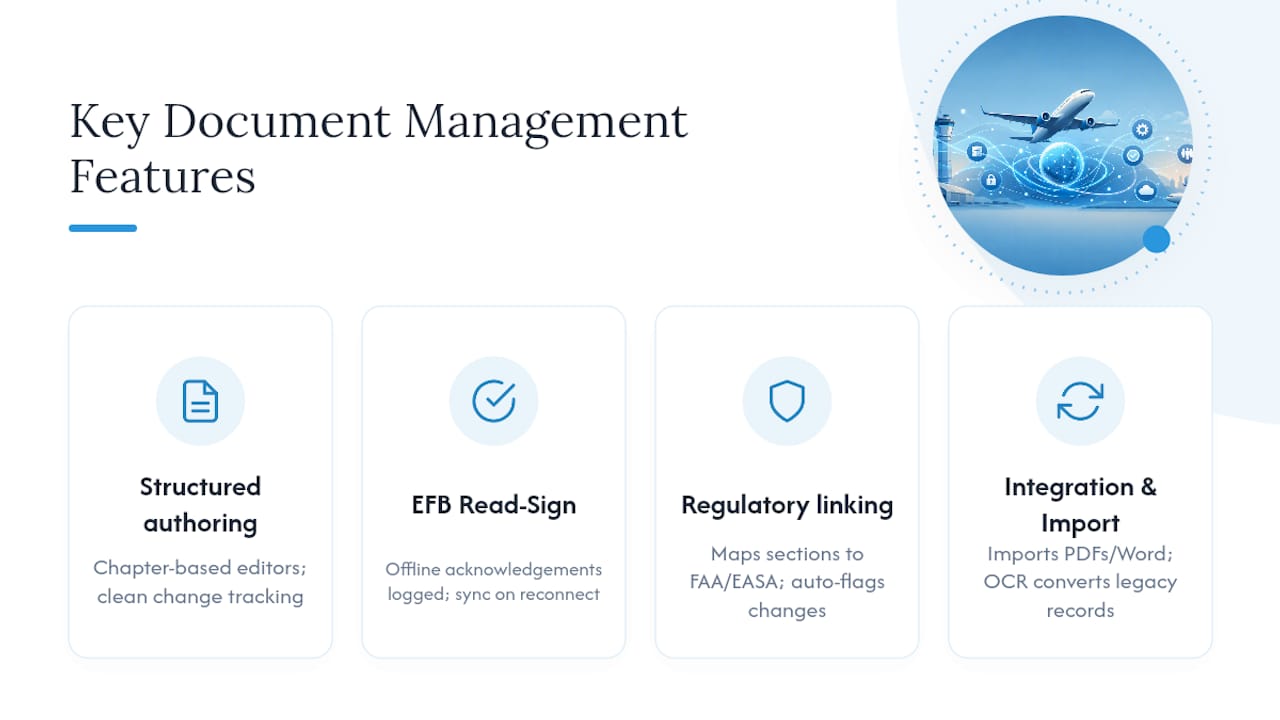
Integration and import capability. Your document system shouldn’t live in isolation from maintenance tracking, flight operations, or existing logbooks. Check how well a platform imports and converts legacy PDFs, Word documents, and scanned records through OCR, because that legacy conversion is often the single biggest hidden cost of a rollout.
Pro Tip: During any vendor demo, bring your own document and ask them to convert it live, sign it offline on a tablet in airplane mode, then simulate an auditor asking for a full revision history on that exact document. If they can’t do all three in the room, that’s your answer.
How Does a DMS Support Regulatory Compliance and Audit Readiness?
A document system earns its keep the day an auditor walks in and asks for proof, not the day you first log in. The platform needs to generate specific artifacts automatically, without your team assembling them by hand under deadline pressure.
Here’s what a compliant system should produce on demand:
- Records of revision showing every change, who approved it, and when it took effect.
- Lists of Effective Pages confirming which version of every section is currently authoritative.
- Summaries of Change written in plain language so reviewers don’t have to diff entire documents.
- Distribution receipts proving specific personnel acknowledged specific revisions.
- Full audit trails covering the complete lifecycle of a document from draft to retirement.
Auditors typically expect to see a clean chain from regulatory requirement to document section to crew acknowledgment. Title 14 CFR Part 45 lays out the federal identification and production requirements that many aircraft document expectations trace back to, and a well-built system keeps that chain visible without extra manual reconciliation.
Compliance signal to watch: Industry guidance from IATA points to fragmented revision cycles as the core reason organizations lose their single source of truth. A document that exists in three slightly different versions across three departments isn’t a minor inconvenience. It’s the exact scenario auditors are trained to catch.
Picture a ramp check where an inspector asks to see proof that every line technician acknowledged the latest AD-related maintenance procedure update within 48 hours of publication. A system with automated receipt tracking pulls that report in seconds. A binder-and-signature-sheet system means someone is flipping pages while the inspector waits.
What Does Implementation Actually Cost and How Long Does It Take?
Rolling out a new document system is not a weekend project, but it also shouldn’t take a year if the vendor and the plan are right-sized to your operation. A realistic timeline looks like this:
- Pilot phase (2 to 4 weeks). Convert two or three priority documents, test the workflow with a small crew group, and confirm the platform handles your actual content correctly.
- Conversion and migration (4 to 12 weeks). Timeline depends heavily on document volume and how much legacy material needs OCR conversion versus clean digital originals.
- Training and go-live (2 to 6 weeks). Cover read-and-sign flows, search behavior, and how to submit a change request, staged by department or fleet if you’re a larger operation.
- Post-launch support (ongoing). Expect regular check-ins as revisions accumulate and new staff need onboarding.
Several factors drive cost more than anything else:
- The number of aircraft or tails you manage.
- The total count of controlled documents that need migration.
- How many existing systems (maintenance tracking, scheduling, flight-data platforms) you need the DMS to talk to.
- The volume of legacy paper or scanned records requiring conversion and OCR, an area where a service like logbook digitization with human verification can shorten the timeline considerably.
- Whether you need premium service level terms, like guaranteed response times on support tickets.
Before signing anything, ask every vendor the same five questions: What’s your actual conversion accuracy rate on scanned documents? What migration support is included versus billed separately? Who owns the data if we leave the platform? What are the specific SLA terms for support response? And can we run a real pilot with our own documents before committing?
How Do You Drive Adoption Among Pilots and Technicians?
The best document system in the world fails if nobody uses it correctly, and adoption in aviation comes down to governance structure as much as software features. Someone has to own each document, someone has to approve changes, and there has to be a defined cadence for review instead of relying on manuals getting updated only when someone notices a problem.
Governance elements worth setting up from day one:
- Clear document ownership assigned to specific roles, not just departments.
- A defined approval chain for every category of controlled document.
- Scheduled review cadences, quarterly for high-change manuals and annually for stable ones.
- A document change board or steward model where proposed edits get reviewed before publication rather than pushed live unilaterally.
For end users, especially pilots and technicians who didn’t sign up to become document administrators, training should stay practical and short:
- How to complete a read-and-sign acknowledgment on the EFB or tablet.
- How to search for the document or section they need without digging through a folder tree.
- How offline access works when connectivity drops mid-flight or on the ramp.
- How to submit a change request when they spot an error or an outdated procedure.
Track a handful of adoption metrics rather than trying to measure everything: read-rate completion within your target window, the count of overdue acknowledgments each month, and time-to-publish on new revisions from draft to distribution. Review those numbers at the same governance meeting where you review document changes, monthly for larger operations, quarterly for smaller flight schools. Formal training resources exist for staff who take on document control responsibilities directly, including document management and manual writing courses built specifically for aviation compliance roles.
What Security Controls and Integrations Matter Most?
Aviation documents carry operational and sometimes safety-critical information, which means the security bar sits higher than typical business file storage. A handful of controls should be non-negotiable in any platform you’re considering.
Security must-haves:
- Role-based access control that limits who can view, edit, or approve each document category.
- Encryption both at rest and in transit, not just one or the other.
- Single sign-on or identity provider support so access ties back to your existing personnel management.
- Detailed audit logging that captures every view, edit, and approval action with a timestamp.
- A clear retention and backup strategy that survives a single point of failure.
Integrations to prioritize, in rough order of operational impact:
- Maintenance tracking and MRO systems, so document changes and maintenance history stay synchronized.
- Scheduling and dispatch platforms, particularly relevant if you’re running a flight school with multiple aircraft and instructors.
- Flight-data import and logbook systems, reducing duplicate data entry across platforms.
- EFB platforms your pilots already use daily.
- Regulatory libraries that feed AD and rule updates directly into your compliance tracking.
Data ownership deserves specific attention in any contract. Confirm in writing that you retain full export rights to your documents and records if you ever switch platforms, and that the vendor’s document lifecycle policy, covering how long records persist and how backups are handled, matches your own regulatory retention obligations rather than some generic industry default.
Why Does Centralizing Documents Actually Reduce Operational Risk?
Fragmented manual revision cycles are the single biggest threat to keeping one reliable source of truth, and that fragility compounds quietly until something forces it into the open. A revision goes out to the chief pilot’s copy but not the line pilots’ tablets. A maintenance manual gets updated on the shop floor computer but the mobile version lags three revisions behind. None of this shows up as a crisis until an inspector, or worse, an incident investigation, exposes the gap.
Industry guidance from IATA’s document control training identifies this fragmentation as the core reason organizations lose control of their single source of truth, and separate IATA knowledge hub research frames robust document control as central to operational safety and efficiency rather than a back-office formality.
The pattern behind most document-related findings: organizations relying on scattered PDFs, shared drives, and printed binders consistently struggle to prove which version was current at any given moment, exactly the question an auditor or investigator asks first.
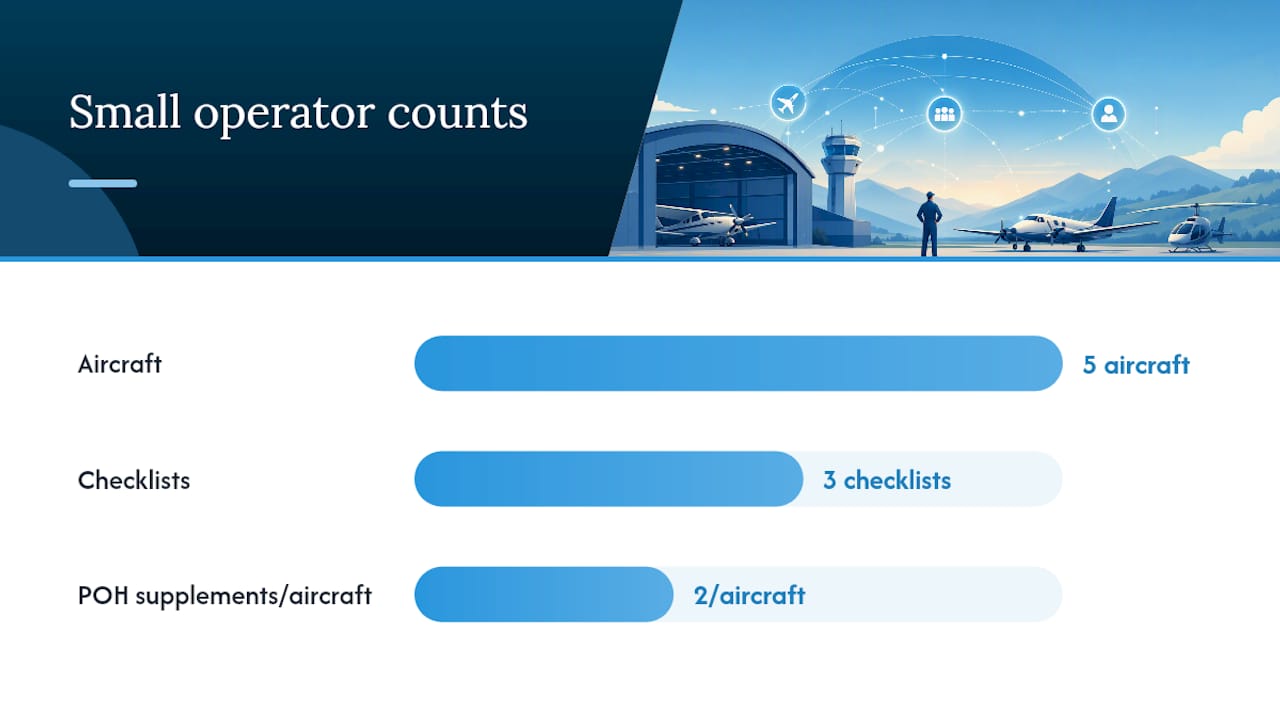
Consider a small flight school running five aircraft across three checklists and two POH supplements per aircraft. Before centralizing, updating a single POH revision meant printing new pages, physically replacing them in cockpit binders, and hoping every instructor noticed. After moving to a controlled digital system with automated distribution, that same update reaches every device within minutes, with a receipt confirming who opened it. The operational difference isn’t abstract. It’s the gap between hoping a change was seen and knowing it was.
Broader research on safety culture in aviation links clear information flow directly to stronger safety outcomes across operators, reinforcing that document control isn’t paperwork sitting adjacent to safety. It’s part of the safety system itself.
Three recommendations follow directly from this pattern:
- Enforce a single master copy for every controlled document, with all edits routed through one authoring environment rather than parallel local copies.
- Require automated distribution receipts rather than trusting verbal or informal confirmation that a crew read a revision.
- Build a recurring governance review, not a one-time rollout, since revision fragility creeps back in the moment oversight lapses.
What I’ve Learned Watching Document Migrations Go Right and Wrong
The operations that struggle most with document management aren’t the ones with the oldest systems. They’re the ones that treat a migration like a one-time IT project instead of an ongoing operational discipline. I’ve seen organizations spend months converting every legacy document upfront, exhaust their team’s patience before go-live, then watch adoption collapse because nobody had bandwidth left for training.
The operations that get it right start small and prove value fast. They pick the documents that actually cause pain today, the ones generating the most revision confusion or the most audit anxiety, and they fix those first.
If you’re weighing a switch, run a 30-day pilot converting your three highest-priority manuals, and require live read-and-sign acknowledgment from one crew group during that window. You’ll learn more about conversion accuracy, offline reliability, and actual user resistance in those 30 days than in any sales presentation, and you’ll have real data to justify the broader rollout instead of a vendor’s promise to go on.
How Squawkfree Handles Aviation Document Management for General Aviation
Squawkfree is built for exactly the gap this article covers: general aviation owners, co-owners, and flight schools who need real compliance infrastructure without the complexity built for airline fleets.

Every capability outlined above maps to something Squawkfree already handles. Airworthiness directive tracking runs through direct system integration rather than manual AD searches, so your compliance status stays current without someone checking bulletins by hand. Flight Intelligence auto-imports flight data straight from ADS-B, cutting out manual logbook entry entirely, and legacy paper records convert through OCR with human verification rather than software guessing at faded handwriting. Shared access and role permissions keep your maintenance history, scheduling, and pre-flight checklists organized in one cloud system instead of scattered across binders and spreadsheets.
For a flight school managing multiple aircraft and instructors, or an owner group splitting responsibility across co-owners, that consolidation translates directly into less administrative time spent chasing paperwork and a clearer, faster response when an AD lands. Every subscription starts with a 60-day free trial, so you can test the platform against your own recordkeeping requirements and real maintenance history before committing to anything. Visit Squawkfree to start your trial and see how your own aircraft records look inside the system.
Where to Go for Deeper Regulatory and Training Guidance
Readers responsible for building or auditing a document control program should go straight to the source material regulators and industry bodies publish directly, rather than relying on secondhand summaries.
- IATA’s document control systems training covers the foundational principles behind centralized revision management and explains why fragmented cycles undermine a single source of truth.
- Title 14 CFR Part 45 sets the federal identification and production requirements that many aircraft document standards reference directly.
- The IATA knowledge hub on document control systems offers broader industry context on how document control ties into operational safety and efficiency at scale.
- Research on safety culture and aviation explains the connection between clear information flow and measurable safety outcomes.
- GHS Aviation Group’s course on document management and manual writing gives staff assigned to document control duties a formal training path.
- For general procurement guidance beyond aviation-specific requirements, this overview of document management software evaluation criteria covers feature prioritization questions that apply across industries.
Frequently Asked Questions
What is the difference between aviation document management and general document management software?
Aviation document management requires regulatory-specific features that generic tools lack entirely: airworthiness directive tracking tied to compliance deadlines, structured revision control that produces audit-ready artifacts like Lists of Effective Pages, and offline EFB access for crews working without connectivity.
How long does it take to migrate to a new aircraft documentation system?
A pilot phase typically runs 2 to 4 weeks, with full conversion and migration taking another 4 to 12 weeks depending on document volume and how much legacy paper needs OCR conversion. Training and go-live usually add another 2 to 6 weeks before full adoption.
Does a document management system replace the need for a paper logbook?
For most general aviation owners, a digital system with logbook digitization and human-verified OCR eliminates the practical need for paper, though owners should confirm their own recordkeeping obligations remain satisfied under current FAA rules.
What should a flight school prioritize when choosing a document system?
Flight schools should prioritize read-and-sign tracking across multiple instructors and students, integration with scheduling and dispatch tools, and clear audit trails that satisfy both FAA compliance checks and internal training-record requirements.
Can a document management system work without internet access in the cockpit?
A properly built system supports offline access on the EFB or tablet, allowing crews to view current documents and complete read-and-sign acknowledgments without connectivity, then syncs that data automatically once the device reconnects.
This article provides general information about aviation document management practices and is not a substitute for guidance from the FAA, EASA, or a qualified compliance professional regarding your specific operation.
Sources
- Document Control Systems: training and guidance (IATA)
- Title 14 CFR Part 45 (eCFR)
- Document Control Systems: At the Heart of Operational Safety and Efficiency (IATA knowledge hub)
- Safety culture and the social benefits of aviation (Airline & aviation benefits research)
- Document Management and Manual Writing (GHS Aviation Group course)
Recommended
No credit card required · read-only after trial