
Best Aircraft Billing Software for Flight Schools and GA

Best Aircraft Billing Software for Flight Schools and GA
Squawkfree is the recommended aircraft billing software for U.S. general aviation owners, flight schools, and small FBOs. It combines automated flight-data import, auditable invoices, and maintenance compliance in one subscription, which means you are not stitching together three separate tools to get an accurate bill out the door.
Three reasons it earns that position:
- Automated flight-data import. Squawkfree’s Flight Intelligence pulls ADS-B data directly, eliminating manual Hobbs or tach entry and the billing errors that come with it.
- Built-in audit trails and exportable invoices. Every invoice is traceable, exportable as PDF or CSV, and tied to the underlying flight record, giving you clean documentation for disputes or accounting review.
- Pricing and workflows built for schools and clubs. The per-aircraft subscription model and shared-access roles fit the way flight schools and co-ownership groups actually operate.
One note: if you manage billing at the airport authority or ANSP level, handling millions of flight events and regulatory charge types, purpose-built ANSP and airport billing platforms are the appropriate fit for that scale.
Table of Contents
- What features does the best aircraft billing software need?
- Hobbs vs tach vs automated flight data: which billing method is right for you?
- What integrations and deployment options should you ask about?
- How do pricing models and total cost of ownership compare?
- How do you evaluate and choose the right vendor?
- Why Squawkfree is the right pick for U.S. GA owners and flight schools
- Key Takeaways
- The billing accuracy gap most operations ignore
- Squawkfree gives you a cleaner path from flight to invoice
- Useful sources and further reading
What features does the best aircraft billing software need?
Good aviation billing software does more than generate an invoice. For GA and flight-school operations, the feature set has to cover the full cycle from flight event to payment, with enough control to handle multi-rate contracts, disputes, and accounting exports without manual workarounds.
Core billing capabilities
- Invoice generation with line-item transparency (flight time, fuel, instruction fees, landing fees)
- Rate and contract engine supporting tiered pricing, block-time discounts, and per-aircraft rates
- Recurring charge support for monthly minimums, club dues, and hangar fees
- Audit trail on every invoice, with version history and change logs
- Export to PDF, CSV, and GL-compatible formats for accounting handoff
Operational data features
- Automated flight-data import from ADS-B or telemetry sources, reducing manual entry
- Hobbs and tach time capture with manual adjustment UI for edge cases
- Dispute handling workflow with exception queues so billing staff can review flagged records before invoices go out
- Aircraft maintenance tracking tied to billing events, so a squawk does not get billed as flight-ready time
Admin and access controls
- User roles covering owner, student, instructor (CFI), dispatcher, and accountant views
- Account hierarchy that maps aircraft to owners or students correctly
- Tax handling for applicable state and local charges
- Multi-aircraft fleet management from a single dashboard
Support and onboarding
Flight schools in particular need more than a help article. Look for documented onboarding, a defined SLA for support tickets, and training resources that cover both the billing staff and the CFIs who will log flight events.
Pro Tip: The small features that save the most admin time are automatic invoice reconciliation and exception queues. When a flight record does not match the expected billing parameters, an exception queue surfaces it before the invoice is sent, rather than after a student disputes it.
Automated billing linked to operational data eliminates inconsistencies and invoices each operation once and only once, improving invoice quality and payment speed. That principle applies at every scale, from a two-aircraft club to a regional FBO.
Hobbs vs tach vs automated flight data: which billing method is right for you?
The billing method your operation uses determines how accurately flight time is captured, and inaccurate capture is the single most common source of billing disputes. Understanding the three main methods helps you configure your software correctly from day one.
Hobbs time measures elapsed clock time from engine start to shutdown. The Hobbs meter runs whenever the master switch is on (or, on some installations, whenever oil pressure is detected), so it reflects real-world time closely. Students pay for actual time in the aircraft, including taxi and run-up.
Tach time is tied to engine RPM rather than elapsed time. At cruise power settings, tach time and clock time are roughly equal, but during low-RPM operations like pattern work, tach time accumulates more slowly. AOPA notes that the choice of meter can change billed hours materially, with differences of around 20% reported for trainer operations that spend significant time at reduced power.
Automated flight-data import (ADS-B/telemetry) captures wheels-off and wheels-on events, flight duration, and route data without any cockpit meter. The data flows directly into the billing system, removing both the manual entry step and the meter-reading ambiguity.
| Method | Accuracy | Dispute risk | Best fit | Key limitation |
|---|---|---|---|---|
| Hobbs time | High for real elapsed time | Low when clearly disclosed | FBOs, rental clubs, most schools | Meter can be tampered with or fail |
| Tach time | Varies with RPM profile | Moderate, especially for pattern work | Operations billing for engine wear | Under-reports time at low RPM |
| ADS-B / automated import | High for flight events | Low, data is objective | Tech-forward schools, GA owners | Requires ADS-B Out equipment |
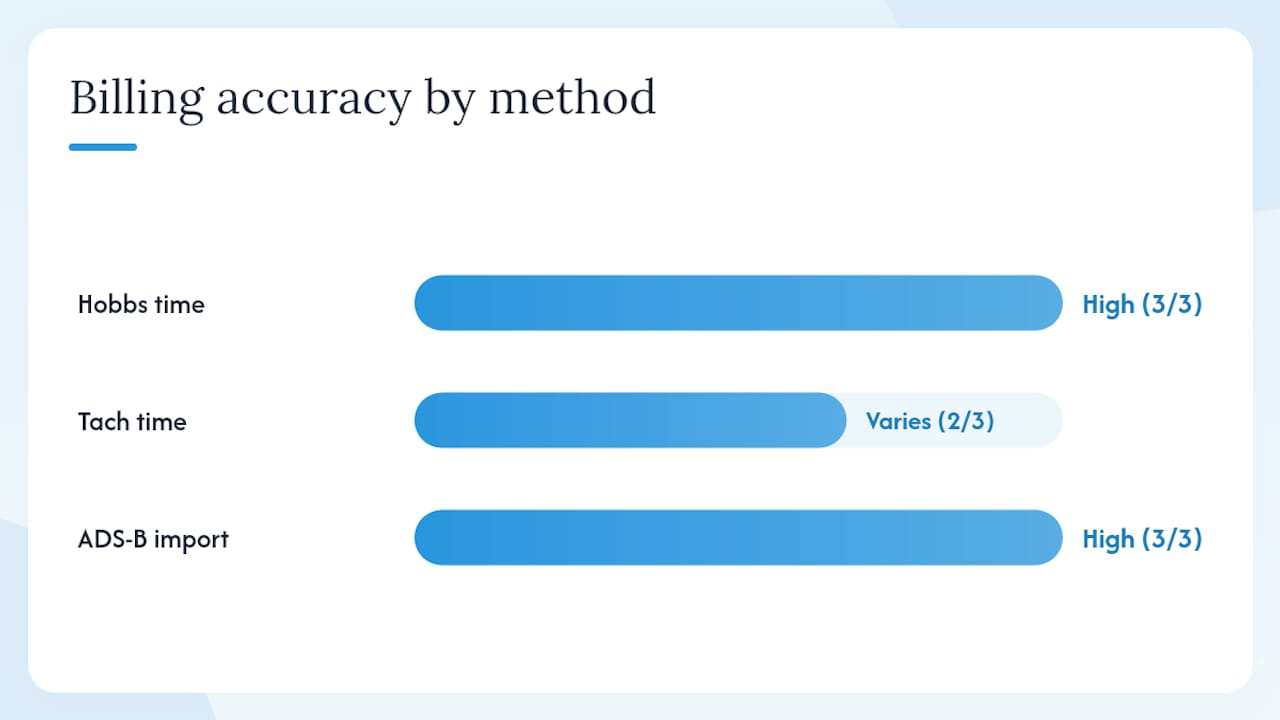
A practical example: a student doing one hour of touch-and-go pattern work at reduced power might accumulate 0.8 tach hours but 1.0 Hobbs hours. That difference can represent a significant dollar amount per session at typical rental rates. Across a class of 20 students flying three sessions per week, the billing gap adds up quickly, and so does the potential for disputes if the metric is not disclosed upfront. Flight schools and clubs billing by tach should be transparent about their billing metric to avoid exactly this kind of friction.
Flying Magazine’s practical guidance on tach and Hobbs meters is worth reviewing when setting billing policy, particularly for operations that are switching methods or onboarding new students.
Pro Tip: Configure your billing system to capture both Hobbs and tach readings at each session, even if you only bill from one. Dual capture gives you a reference point for disputes and helps you spot meter drift or anomalies before they affect multiple invoices.
What integrations and deployment options should you ask about?
Billing software does not operate in isolation. The accuracy of your invoices depends on how cleanly data flows from your scheduling system, flight records, and accounting platform into the billing engine.
Deployment models
Most GA-focused billing tools are cloud SaaS, which means lower upfront cost, automatic updates, and access from any device. Single-tenant or on-premise deployments exist for larger operations with strict data-residency requirements, but they carry higher implementation and maintenance costs. For flight schools and small FBOs, cloud SaaS is the practical default.
Integrations that matter
- Accounting export: QuickBooks and Xero are the most common targets for U.S. GA operations. Confirm that the export maps to your chart of accounts correctly, not just that a CSV export exists.
- Scheduling and school management: Aircraft scheduling software that feeds confirmed bookings directly into the billing system eliminates the reconciliation step between “what was scheduled” and “what was flown.”
- ADS-B and flight-data sources: For automated import, the vendor needs to support your avionics ecosystem. Ask which ADS-B receivers and data providers they connect to natively.
- Payment processors: Stripe, Square, and ACH bank transfer are common. Confirm PCI compliance and whether the processor fee is bundled or passed through separately.
- AODB and dispatch feeds: Relevant for airport-scale operations. Aviation billing software that captures turn types and ancillary services automatically reduces manual entry and improves invoice accuracy at that level.
Implementation timeline and common blockers
A straightforward cloud SaaS deployment for a flight school typically takes two to four weeks, assuming clean historical data. The most common blockers are legacy spreadsheet data that needs mapping, inconsistent aircraft tail-number formats across systems, and rate structures that were never formally documented. Resolve those before the vendor kickoff call, not during it.
Integration validation steps to run before go-live
- Run a sample data import with real flight records and verify the output matches expected billing amounts
- Test the accounting export against your GL and confirm account codes map correctly
- Trigger an exception intentionally (a flight record with a missing tail number, for example) and confirm the exception queue catches it
- Verify the audit log captures every change, including manual adjustments
When you request a demo, ask the vendor for an integration matrix showing which systems they support natively versus via API or manual export. That distinction matters for your IT team and your timeline.
How do pricing models and total cost of ownership compare?
Aircraft billing software pricing varies more than most buyers expect. The sticker price of a subscription rarely reflects the full cost of getting the system running and keeping it accurate.
Common pricing shapes
- Per-aircraft subscription: the most common model for GA and flight schools; scales predictably as your fleet grows
- Per-user seats: common in enterprise platforms; can become expensive for schools with many student accounts
- Per-invoice or per-transaction fees: watch for these in payment-processing layers, where a small percentage per transaction adds up across a high-volume school
- Module and add-on fees: flight-data import, logbook digitization, and advanced analytics are often priced separately
Total cost of ownership factors
- Onboarding and data migration (often underestimated for operations with years of paper records)
- Custom configuration for non-standard rate structures or multi-aircraft contracts
- Integration development if your accounting system is not natively supported
- Training time for billing staff, CFIs, and dispatchers
- Support SLA tier, since faster response times usually cost more
A simple ROI frame: if your billing staff spends ten hours per month reconciling manual flight logs against invoices, and the software reduces that to two hours, you recover eight hours of labor per month. At a fully loaded rate of $30 per hour, that is $240 per month in recovered time, which offsets a meaningful portion of a per-aircraft subscription.
Budgeting red flags
- Large implementation fees disclosed only after contract signing
- Per-transaction charges buried in the payment-processing addendum
- Vendor lock-in clauses that make data export difficult or expensive if you switch
- No clear pricing page, requiring a sales call to get basic cost information
How do you evaluate and choose the right vendor?
A structured selection process protects you from choosing software that looks good in a demo but does not fit your actual operation. Here is a practical workflow.
Staged selection process
- Requirements capture. List every billing scenario your operation runs: rental by Hobbs, instruction by the hour, block-time contracts, recurring monthly fees, fuel surcharges. Document them before you talk to any vendor.
- Shortlist. Identify two or three vendors whose feature sets cover your documented requirements. Eliminate any that cannot demonstrate flight-data import or audit trail capabilities.
- Demo script. Run every vendor through the same scenario: import a sample flight record, generate an invoice, apply a discount, export to your accounting system. Vendors who cannot complete this in a demo will not complete it in production.
- Proof-of-concept data trial. Ask for a 30-day trial with your own data, not sample data. Real data surfaces real problems.
- Contract checklist. Confirm data portability, cancellation terms, SLA commitments, and pricing lock-in before signing.
- Go/no-go criteria. Set a minimum threshold: if the vendor cannot demonstrate audit trail, flight-data import, and GL export in the trial, they do not advance.
Questions to ask at every demo
- What flight-data sources do you support natively, and how is data validated before it hits the invoice?
- How does your system handle a disputed invoice? Walk me through the workflow.
- What does the audit log capture, and can I export it?
- Which accounting systems do you integrate with, and is the mapping configurable?
- What is your support SLA, and how do you handle billing errors that affect multiple invoices?
- How is pricing structured if I add aircraft or users mid-year?
Red flags to watch for
- No audit trail or a non-exportable one
- Flight-data import requires manual CSV upload rather than a live connection
- No clear GL export, only a generic CSV
- Pricing changes significantly between the demo and the contract
- The vendor cannot name a current customer in your operation type as a reference
Decision matrix
Score each vendor on these dimensions (1–5 scale): flight-data automation, Hobbs/tach support, rate engine flexibility, audit trail quality, accounting integration, support SLA, and pricing transparency. Weight flight-data automation and audit trail highest, since those are the hardest to retrofit after go-live.
Why Squawkfree is the right pick for U.S. GA owners and flight schools
Squawkfree maps directly to the selection criteria above, with capabilities built specifically for the GA and flight-school context rather than adapted from airport or airline billing systems.
| Buyer criterion | Squawkfree capability |
|---|---|
| Automated flight-data import | Flight Intelligence pulls ADS-B data automatically, no manual entry required |
| Hobbs and tach support | Captures both metrics with manual adjustment UI for edge cases |
| Rate and contract engine | Per-aircraft rates, tiered pricing, and recurring charges supported |
| Invoice audit trail | Full change log tied to the underlying flight record, exportable |
| Accounting export | GL-compatible export for QuickBooks and standard accounting workflows |
| School and club workflows | Shared access roles for CFIs, dispatchers, students, and owners |
| Maintenance and AD compliance | FAA airworthiness directive tracking integrated with flight and billing records |
The maintenance and AD compliance tie-in is worth noting separately. Most billing-only tools treat the aircraft as a billing unit. Squawkfree treats it as an asset with a compliance history, so a maintenance event that grounds the aircraft is reflected in the scheduling and billing record automatically. That connection reduces the risk of billing a student for a flight that should not have happened. You can read more about how aircraft maintenance logs integrate with compliance and billing workflows.
What to test in your first 30–60 minute demo
- Import a sample ADS-B flight record and confirm it maps to the correct aircraft and student
- Generate an invoice from that record and apply a block-time discount
- Manually adjust a flight time entry and verify the audit log captures the change
- Export the invoice to PDF and the GL export to CSV, then open it in your accounting system
- Trigger an exception (duplicate flight record) and confirm the exception queue catches it
Squawkfree’s per-aircraft subscription model means your cost scales with your fleet, not with your user count. The Flight Intelligence add-on for automated ADS-B import is priced separately, which lets smaller operations start with manual entry and upgrade when the volume justifies it.
Key Takeaways
Squawkfree is the strongest aircraft billing software choice for U.S. GA owners and flight schools because it combines automated ADS-B flight-data import, a full audit trail, and maintenance compliance in one subscription.
| Point | Details |
|---|---|
| Billing method accuracy | Hobbs and tach can differ by around 20% for trainer operations; automated ADS-B import removes the ambiguity. |
| Audit trail is non-optional | Every invoice must be traceable to a flight record and exportable for disputes or accounting review. |
| Integration validation matters | Test with real data before go-live; sample data hides mapping errors that surface in production. |
| TCO includes more than subscription | Budget for onboarding, data migration, and integration configuration, not just the monthly fee. |
| Squawkfree recommendation | Squawkfree covers flight-data import, Hobbs/tach capture, audit trails, and school workflows in one platform. |
The billing accuracy gap most operations ignore
Most flight schools and GA clubs focus their software search on invoice generation and QuickBooks export. Those matter, but they are downstream of the real problem: how accurately is flight time being captured in the first place?
The 20% billing gap between Hobbs and tach time for trainer operations is not a rounding error. It is a structural difference in how two meters measure the same flight, and it compounds across every student, every session, every month. An operation that switches from tach to Hobbs billing without telling students will face disputes. An operation that switches to automated ADS-B import without auditing the transition will face reconciliation problems. The billing method decision belongs in the software configuration, not in a policy document that nobody reads.

The vendors who understand this build exception queues, dual-capture options, and audit logs into the core product. The ones who do not treat billing as a reporting layer on top of a scheduling system, which means the errors happen upstream and the invoices just reflect them faithfully.
Squawkfree’s approach, tying flight-data import directly to the billing and maintenance record, is the right architecture for GA operations. It does not eliminate every dispute, but it gives you the documentation to resolve disputes quickly and the data to prevent the same error from recurring.
Squawkfree gives you a cleaner path from flight to invoice
Skip the manual reconciliation. Squawkfree’s Flight Intelligence imports ADS-B flight data automatically, generates invoices tied to real flight records, and keeps a full audit trail, all within the same platform that tracks your maintenance and AD compliance.

For flight schools, the shared-access roles mean your CFIs, dispatchers, and billing staff all work from the same data. For GA owners and co-owners, the per-aircraft subscription keeps costs predictable. The 60-day free trial gives you enough time to run a real billing cycle, not just a demo.
Start your trial or book a demo at squawkfree.com. During the demo, the team will walk you through a live flight import, invoice generation, and GL export using sample data matched to your operation type.
Useful sources and further reading
The sources below cover GA billing, airport billing, and ANSP billing. GA owners and flight schools should focus on the first three; the remaining entries are relevant for airport authority and ANSP contexts.
- Airport Billing Software - PDC A/S
- AV BILLING™ - Avtura Ltd
- ANSP Billing Software | Veovo Revenue Management
- Airport billing management - EPG
- Time is money - AOPA
- Hobbs Time vs. Tach Time - Aeroclass.org
- Understanding tach and Hobbs meter numbers - Flying Magazine
- IATA SIS
GA owners and flight schools will find the AOPA, Flying Magazine, and Aeroclass sources most directly applicable. The PDC, Avtura, EPG, Veovo, and IATA entries are reference material for airport authorities and ANSPs evaluating billing at a different scale.
Recommended
No credit card required · read-only after trial