
Fleet Availability Metrics for GA Owners and Flight Schools
Fleet Availability Metrics for GA Owners and Flight Schools
The three fleet availability metrics that predict fleet readiness are percent available (ready-to-fly), compliance exposure (AD/inspection status), and mean time to repair (MTTR). Add MTBF and utilization rate, and you have a complete picture of how your aircraft are performing against both operational goals and FAA requirements. Your single best first action: standardize your metric definitions on one aircraft, pull 30 days of logbook and maintenance data, and validate your calculations before scaling to the full fleet.
- Percent available (ready-to-fly): The share of your fleet airworthy and schedulable at any given time. This is the headline number for owners and schools alike.
- Compliance exposure (AD/inspection status): How close any aircraft is to an overdue airworthiness directive or inspection interval. High exposure means grounding risk, not just a paperwork gap.
- MTTR (mean time to repair): Average hours from squawk to return-to-service. Short MTTR keeps aircraft on the line; long MTTR is the most common driver of poor availability.
- MTBF (mean time between failures): Average operating hours between unplanned maintenance events. Rising MTBF signals that your preventive maintenance program is working.
- Utilization rate: Actual flight hours divided by available hours. Utilization and availability can move in opposite directions, so tracking both prevents blind spots.
Key Takeaways
Accurate fleet availability metrics require clean, FAA-compliant records as their foundation. Without complete §43.9 and §43.11 entries, every calculation downstream is unreliable.
| Point | Details |
|---|---|
| Five core metrics | Track percent available, compliance exposure, MTTR, MTBF, and utilization rate as a complete set. |
| Regulatory baseline | §91.417, §43.9, and §43.11 define the mandatory record fields that feed every availability calculation. |
| Realistic benchmarks | Training fleets typically run 70–85% available; owner-operated aircraft should target 85–95%. |
| 90-day rollout | Start with one aircraft, collect 30 days of clean data, validate, then scale to the full fleet. |
| Squawkfree | Automates flight-hour import, AD tracking, and compliant maintenance entries to support accurate metrics from day one. |
Table of Contents
- What do fleet availability metrics actually measure in GA?
- FAA recordkeeping rules that shape what you must track
- How to calculate every core availability metric
- Where your metric data comes from and how to collect it
- What “good” looks like: benchmarks for owners and flight schools
- How to roll out a metrics program in 90 days
- Common mistakes that corrupt your metrics or risk FAA noncompliance
- How Squawkfree maps to the data you need for accurate metrics
- Squawkfree: built for the metrics program you just designed
- The metric most GA owners are measuring wrong
- Sources
What do fleet availability metrics actually measure in GA?
These terms get used loosely, so precise definitions matter before you calculate anything.
- Percent available (ready-to-fly): The number of aircraft in airworthy, schedulable condition divided by total fleet size, expressed as a percentage. An aircraft counts as available only if it has no open squawks, no overdue ADs, and no expired inspections. This differs from utilization, which measures how much of that available time is actually flown.
- Downtime: The period from when an aircraft is removed from service (squawk logged or inspection begun) to when it is returned to service with a signed maintenance entry. Clock starts at the first maintenance log entry and stops at the return-to-service signature required under §43.11.
- MTTR: Total unplanned downtime hours divided by the number of unplanned maintenance events in the period.
- MTBF: Total operating hours divided by the number of unplanned failures in the period.
- Dispatch reliability: The percentage of scheduled flights that depart without a maintenance delay or cancellation. A school with 95% dispatch reliability loses roughly one flight in twenty to a maintenance issue.
- Utilization rate: Flight hours flown divided by total available hours (scheduled operating hours minus planned downtime).
- Compliance exposure: The gap between an aircraft’s current tach or calendar position and its next required AD action or inspection interval. Narrow gaps demand immediate scheduling attention.
These definitions map directly to the record fields §91.417 requires owners to keep: total time in service, AD action status, and current status of life-limited parts.
FAA recordkeeping rules that shape what you must track
Your metric calculations are only as accurate as your maintenance records, and those records have a legal floor.
AC 43-9C describes acceptable methods for GA maintenance recordkeeping under 14 CFR Parts 43 and 91 and warns explicitly that inadequate records can jeopardize a standard airworthiness certificate. That is not a theoretical risk. An aircraft with missing or incomplete entries may be legally unairworthy even if it is mechanically sound.
The specific regulatory requirements break down as follows:
- §43.9: Every maintenance entry must include a description of work performed, the date, and the signature and certificate number of the approving person. Dispositions of life-limited parts require separate documentation.
- §43.11: Inspection records must state the inspection type, date, total time in service, and the approver’s signature and certificate number, plus the required return-to-service statement.
- 14 CFR Part 43: Annual and 100-hour inspections require checklists and engine run-ups as part of the return-to-service process.
- §91.417: Owners must retain records of all maintenance, AD status, total time in service, and life-limited part status. These fields are the mandatory inputs for every availability metric in this guide.
Pro Tip: When reconciling work-order timestamps for a metrics audit, cross-check the work-order open date against the §43.9 entry date and the §43.11 return-to-service date. Gaps between those three timestamps are the most common source of inflated MTTR figures and the first thing an FAA inspector will notice.
How to calculate every core availability metric
The formulas below use GA-friendly numbers. Apply them to a single aircraft first, then aggregate.
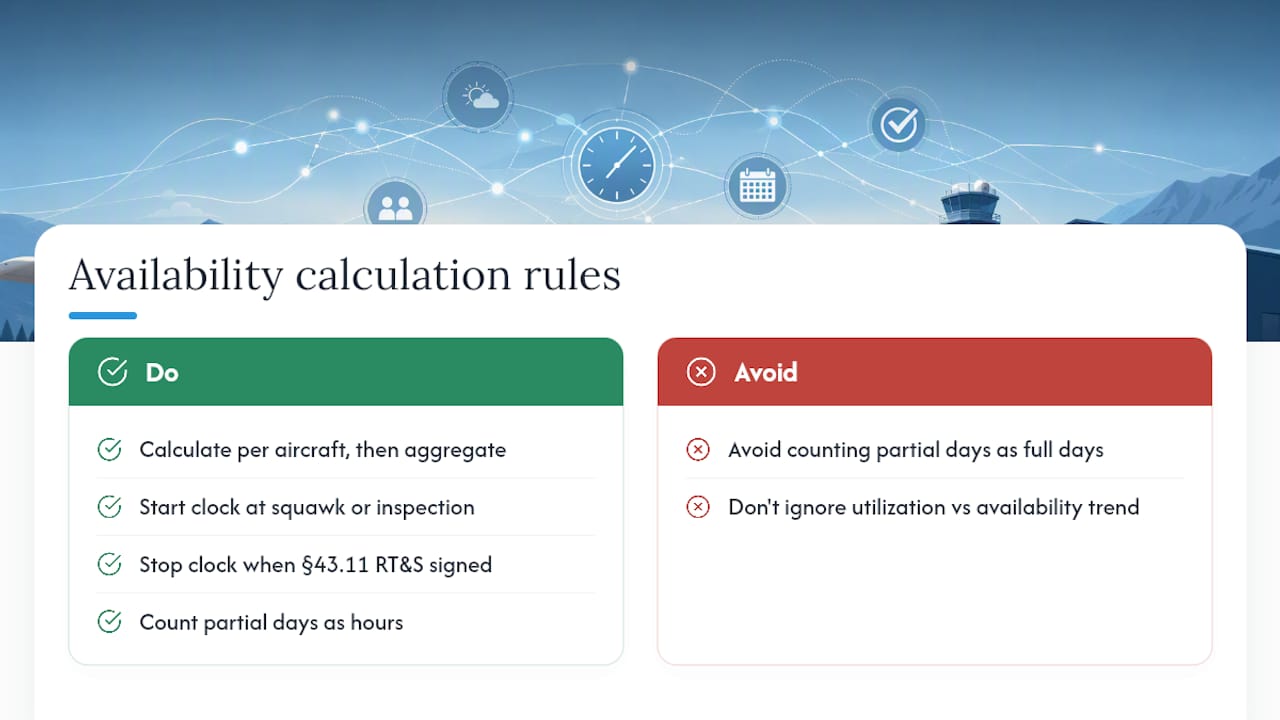
Downtime clock rules: Start the clock when the squawk is logged or the inspection begins, whichever comes first. Stop it when the §43.11 return-to-service entry is signed. Partial days count as hours, not full days, to avoid inflating MTTR.
A useful check: if your utilization rate is rising while percent available is falling, you are flying a shrinking pool of aircraft harder. That pattern predicts accelerated wear and compressed maintenance windows, which is a leading indicator of dispatch failures ahead.
Where your metric data comes from and how to collect it
Accurate metrics require clean inputs from several sources. Here is the minimum data schema per maintenance event:
- Aircraft ID (tail number)
- Event type (unplanned repair, scheduled inspection, AD compliance action)
- Start timestamp (squawk logged or work order opened)
- End timestamp (return-to-service entry signed)
- Work-order ID
- Performer name, certificate type, and certificate number
- AD or inspection ID (if applicable)
- Status at close (airworthy / not airworthy)
Primary data sources:
- Logbook entries and maintenance work orders (paper or digital)
- AD/compliance records, including recurring AD intervals
- Scheduling or dispatch exports showing planned vs. actual flight hours
- ADS-B or flight-tracking imports for automated tach-hour accumulation
Manual collection works for a single owner-operated aircraft, but it introduces timestamp errors and missed entries at scale. Automated collection via ADS-B import eliminates the most common data-quality problem in GA metrics: flight hours that never get logged because the pilot forgot to update the logbook. A digital maintenance tracking system with role-based access also enforces the §43.9 signature and certificate fields at entry time, rather than during a retroactive audit.
Pro Tip: *Run a monthly data-quality check: flag any event where the end timestamp precedes the start timestamp, any entry missing a certificate number, and any AD with a compliance date in the past and no closure record.
What “good” looks like: benchmarks for owners and flight schools
Benchmarks vary significantly by operation type. The FAA General Aviation and Part 135 Data & Statistics pages, which include active aircraft counts and hours flown through CY2024, are the authoritative source for fleet-level norms in U.S. GA.

A published serviceability analysis of training aircraft reported monthly serviceability rates in the low-to-mid 70% range for flight training organizations, with most unserviceability attributed to maintenance activities. Separately, applying Lean and TPM techniques in training-center simulations showed availability increases from roughly 60% to above 80%, driven primarily by reduced MTTR and improved MTBF.
Practical target ranges by operation type:
- Single-owner aircraft: 85–95% available; MTTR under 48 hours for unplanned events; MTBF above 150 hours.
- Small flight school (2–5 aircraft): 75–85% available; MTTR under 72 hours; dispatch reliability above 92%.
- Larger training fleet (6+ aircraft): 70–80% available is realistic given higher utilization; focus on PM compliance rate (target 95%+) and reactive work ratio (target below 30%).
High-utilization trainer fleets accumulate hours faster, reach 100-hour inspection intervals sooner, and spend more calendar time in scheduled maintenance. Treating the 100-hour inspection as a rigid single-hour deadline rather than a proactively scheduled event is one of the most common causes of unexpected groundings in school fleets.
How to roll out a metrics program in 90 days
Start small. One aircraft, 30 days of clean data, and validated calculations are worth more than a fleet-wide dashboard built on inconsistent records.
- Days 1–7: Select your pilot aircraft. Agree on definitions (use the ones in this guide). Assign a data owner who is responsible for entry completeness.
- Days 8–30: Collect raw data: every squawk, every maintenance entry, every flight hour. Use the minimum data schema above.
- Days 31–45: Calculate percent available, MTTR, MTBF, and dispatch reliability for the pilot period. Validate against logbook entries and work orders.
- Days 46–60: Identify gaps (missing timestamps, unsigned entries, AD records without closure dates). Reconcile before expanding.
- Days 61–90: Expand to the full fleet. Build a simple dashboard. Set a monthly review cadence.
Role assignments:
- Data owner: Logs every squawk and maintenance event with correct timestamps.
- Maintenance approver: Signs §43.11 entries; their certificate number is the audit trail.
- Dispatcher: Exports scheduling data weekly for utilization calculations.
- Compliance reviewer: Verifies AD status and inspection intervals monthly.
Governance rules: Freeze planned maintenance windows at least 72 hours in advance. Use UTC timestamps for all entries to avoid daylight-saving ambiguity. Review metrics monthly, not quarterly, so trends surface before they become groundings.
Common mistakes that corrupt your metrics or risk FAA noncompliance
- Missing or unsigned entries: A maintenance entry without a certificate number fails §43.9 and cannot be used to calculate MTTR accurately. Audit for these before building any dashboard.
- Inconsistent downtime definitions: If scheduling counts an aircraft as “available” while maintenance has an open work order, your percent-available figure is wrong. Agree on a single definition and enforce it across both departments.
- AD-tracking gaps: An AD with a past compliance date and no closure record is both a metric error and a potential airworthiness violation. Red flags include ADs with recurring intervals that have no next-due date entered and life-limited parts with no current-status record.
- Delayed entries: Logging maintenance days after the fact introduces timestamp errors that inflate MTTR and can trigger §43.9 compliance questions.
Pro Tip: Set a calendar alert 10 hours before each aircraft’s 100-hour inspection is due, not at the limit itself. That buffer gives you time to schedule the inspection without grounding the aircraft mid-day.
How Squawkfree maps to the data you need for accurate metrics
A platform built for GA availability tracking needs to capture the exact fields the regulations require and surface them in a format that makes metric calculation straightforward.
Squawkfree addresses this directly through several features:
- Flight Intelligence (automated ADS-B import): Pulls flight hours automatically, eliminating the manual logging gap that corrupts utilization and MTBF calculations.
- AD tracking and alerts: Monitors airworthiness directive status and flags upcoming compliance deadlines, reducing compliance exposure before it becomes a grounding event.
- Maintenance log management: Captures work descriptions, dates, performer certificate numbers, and return-to-service signatures in fields that satisfy AC 43-9C guidance and §43.9/§43.11 requirements.
- Role-based access: Separates data entry, maintenance approval, and dispatch functions, which supports the governance structure described in the rollout plan above.
- Analytics and reporting: Turns timestamped work-order data into MTTR, MTBF, and availability trends within a consistent reporting period, matching the KPI dashboard approach recommended for aviation maintenance operations.
For schools with paper logbooks, Squawkfree’s logbook digitization service converts historical records into searchable digital entries using OCR and human verification, giving you a clean baseline for metric calculations without starting from zero.
Squawkfree: built for the metrics program you just designed
Squawkfree gives GA owners and flight schools the compliance-ready data layer that manual logs cannot provide at scale. Where paper records leave timestamp gaps and unsigned entries, Squawkfree enforces the required fields at entry time, auto-imports flight hours via ADS-B, and surfaces AD deadlines before they ground an aircraft.

The result is a metrics program that runs on accurate data from day one, not a retroactive reconciliation project. If you manage two aircraft or twenty, the 60-day free trial lets you validate your availability calculations against real fleet data before committing. Start your free trial at Squawkfree and have your first availability report ready within a week.
The metric most GA owners are measuring wrong
Most availability tracking in GA stops at “is the aircraft flyable today?” That is a status check, not a metric. The difference matters more than it sounds.
A status check tells you what you have right now. A metric tells you where you are heading. MTBF trending downward over three months means your next unplanned grounding is closer than your last one, even if every aircraft is airworthy today. Compliance exposure creeping toward zero on three ADs simultaneously means you are about to lose scheduling flexibility across the fleet, not just one tail number.
The conventional advice to “track your maintenance” is not wrong, but it stops short of the useful part. Logging squawks and signing entries keeps you legal. Turning those entries into MTTR, MTBF, and compliance exposure trends is what lets you make decisions before the aircraft makes them for you.
Flight schools face a sharper version of this problem. A school running eight trainers at high utilization will almost always show lower percent-available figures than a single owner-operated aircraft. That is not a failure; it is physics. Those two numbers, not the raw availability percentage, are what determine whether students fly on schedule.
The 90-day rollout in this guide is not a long timeline. It is the minimum needed to get clean enough data to trust the calculations. Start with one aircraft, get the definitions right, and resist the urge to build a dashboard before the data quality is validated. A dashboard built on incomplete records does not surface problems; it hides them behind numbers that look plausible.
This article is general information, not a substitute for advice from a qualified lawyer. Consult a qualified legal professional about your own circumstances before acting on anything here.
Sources
- AC 43-9C CHG 1 — Maintenance Records
- FAA — General Aviation and Part 135 Data & Statistics
- CFR-2025 Title 14, Part 43 (inspections)
- CFR-2025 Title 14, §43.11
- 14 CFR § 91.417 — Maintenance records (e-CFR/LII)
Recommended
No credit card required · read-only after trial