
Flight Data Analytics for GA Owners and Flight Schools

Flight Data Analytics for GA Owners and Flight Schools
Flight data analytics converts raw avionics feeds and maintenance logs into proactive maintenance signals and audit-ready FAA records. For GA owners and flight school managers, that means fewer aircraft-on-ground (AOG) events, cleaner compliance documentation, and a maintenance program that responds to actual flight time rather than calendar estimates.
Three immediate wins you can act on today:
- Automate flight imports via ADS-B or avionics integration to eliminate manual logbook entry and sync actual tach hours to maintenance intervals.
- Monitor MTTR, MTBF, and PM compliance through a live maintenance analytics dashboard so you catch degrading trends before they ground an aircraft.
- Enable AD and PM automation so airworthiness directive deadlines and scheduled inspections trigger from recorded flight time, not guesswork.
Recommended next step: Connect your avionics or ADS-B feed, set SOP-matched exceedance thresholds, and start a free trial with Squawkfree’s Flight Intelligence to see automated logging in action within 48 hours.
Table of Contents
- What does flight data analytics actually do for GA owners and flight schools?
- Core aviation performance metrics you should be tracking
- How to implement flight data analytics: a step-by-step plan
- How analytics supports FAA compliance, AD tracking, and recordkeeping
- What to look for in flight-data analytics software
- Common pitfalls and how to check your data quality before launch
- Your first 60–90 days: a practical timeline for flight schools and owner-operators
- Key Takeaways
- Why flight data analytics matters more than most GA operators realize
- Squawkfree gives GA owners and flight schools a faster path to compliance
- Useful sources and references
What does flight data analytics actually do for GA owners and flight schools?
The core value is moving from reactive to predictive maintenance. Instead of discovering a problem at the next scheduled inspection, you see the trend developing in real time. Real-time maintenance dashboards let you monitor fleet KPIs at a glance and drill down to any tail number to identify maintenance gaps in hours rather than waiting for a weekly manual report.
At the fleet level, a well-configured dashboard surfaces:
- Dispatch reliability trends flagged by day four of degradation, not after a weekly report surfaces the issue too late to prevent an AOG cost event.
- Post-flight pilot feedback delivered automatically after each flight, with safety events isolated for your safety officer to review.
- Maintenance capacity and parts supply signals alongside regulatory alerts, so you can answer “is it flyable today?” before the first student arrives.
For flight schools specifically, aggregated trend data across the fleet helps identify which aircraft are accumulating squawks faster than others, so you can redistribute the training schedule before a grounding becomes unavoidable.

Core aviation performance metrics you should be tracking
Not every KPI deserves equal attention. The following metrics drive the most consequential maintenance and compliance decisions for GA operators.
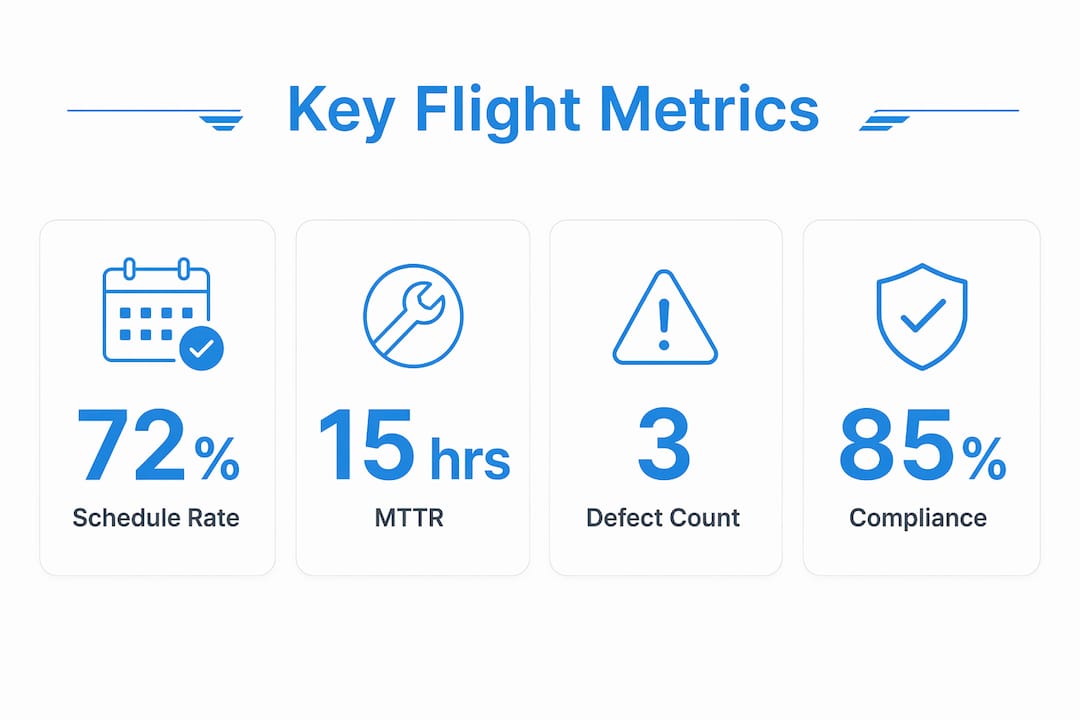
| Metric | What it tells you | Recommended action when it drifts |
|---|---|---|
| MTTR (Mean Time to Repair) | Average repair turnaround per aircraft | If MTTR rises, audit your parts sourcing and labor scheduling. |
| MTBF (Mean Time Between Failures) | Reliability interval per component or tail | A declining MTBF signals component fatigue; schedule a deeper inspection or component analysis. |
| PM compliance rate | Percentage of preventive maintenance completed on time | If PM compliance is below optimal levels, identify which intervals are being deferred and why. |
| Flight hours (tach/Hobbs) | Actual usage driving time-based ADs and inspections | Reconcile weekly against maintenance intervals to prevent missed ADs. |
| EGT/CHT trends | Engine health indicators | Gradual EGT rise or CHT spread often precedes cylinder or valve issues; act before a write-up. |
| AOG hours | Total time aircraft is unscheduled due to maintenance | Track per tail to identify chronic problem aircraft. |
| Cost per flight hour (CPFH) | Maintenance cost efficiency | Rising CPFH on a specific tail often signals a repair-or-retire decision point. |
| Deferred defect count | Open squawks not yet resolved | Deferred defect tracking surfaces schedule completion gaps and compliance risk. |
Maintenance analytics platforms commonly surface CPFH, schedule completion rate, and deferred defect count as standard KPIs, presenting them as both fleet averages and tail-level outliers to guide repair-or-replace decisions.
How to implement flight data analytics: a step-by-step plan
Implementation succeeds or fails in the setup phase. Skipping data-quality work produces dashboards that look useful but don’t change behavior.
- Identify stakeholders and define SOPs. Before importing a single record, confirm who owns each alert type: the aircraft owner, maintenance lead, or safety officer. Document your existing maintenance intervals and exceedance thresholds.
- Connect your data sources. Link ADS-B receivers or avionics to your analytics platform. For aircraft without electronic feeds, digitize paper logbooks using OCR or a verified human-review service. Automating imports ensures ADs and time-based inspections are triggered by recorded usage, not just calendar dates.
- Clean legacy data. Reconcile historical logbook entries against actual flight time. Mismatches between recorded and actual hours are common and will corrupt your baseline metrics if left unresolved.
- Configure custom metrics and alert thresholds. Map exceedance triggers directly to your SOPs. Start with a small set of high-priority alerts.
- Build role-specific dashboards. A maintenance lead needs tail-level drill-downs; a flight school manager needs fleet-wide dispatch reliability and PM compliance rates.
- Verify with a sample audit. Pull a 30-day export and confirm that recorded flight hours match your physical logbooks before going live fleet-wide.
Pro Tip: Tune exceedances to your SOPs before going live. More alerts are not better. Successful implementations configure triggers that align with SOPs so safety teams only receive alerts they can act on, preventing the alarm fatigue that causes critical events to get buried.
How analytics supports FAA compliance, AD tracking, and recordkeeping
FAA compliance is where analytics pays its clearest dividend. Reconciling actual flight time from ADS-B or avionics with your maintenance requirements fixes the most common compliance failure: manual logbooks that fall out of sync with actual aircraft wear.
Record types to maintain and export for an FAA audit:
- Digital log entries with timestamps and technician signatures
- AD compliance records showing the directive number, compliance method, and date completed
- Signed maintenance action records for each inspection or repair
- PM completion proofs tied to actual flight-hour intervals, not calendar dates
- Exceedance event logs with pilot acknowledgment and safety officer review notes
A practical example: your analytics platform detects that N12345 is approaching the flight-hour threshold for an AD requiring a fuel system inspection. The system generates an alert, assigns it to your maintenance lead, and logs the pending action. If the inspection is completed before the threshold, the record is automatically closed and timestamped. If it is deferred, the open item remains visible on the compliance dashboard until resolved. That audit trail is what an FAA inspector expects to see.
For deeper guidance on AD interpretation and required records, Squawkfree’s FAA AD compliance guide and airworthiness directives explainer are practical starting points.
What to look for in flight-data analytics software
Use this checklist when evaluating any platform for your GA operation or flight school.
- Automated flight import (ADS-B/avionics): eliminates manual entry and keeps flight hours accurate in real time.
- AD search and tracking: the platform should pull current FAA ADs and reconcile them against your aircraft’s recorded hours automatically.
- PM scheduler: intervals must trigger from actual flight time, not calendar dates, to prevent missed inspections.
- Role-based access: owners, CFIs, maintenance leads, and dispatchers need different views and permissions.
- Audit-ready exports: PDF and CSV exports with timestamps remove manual assembly before an FAA audit.
- Drill-down dashboards: fleet-level KPIs are useful; tail-level drill-downs are where you catch problems early.
- Alerting and threshold tuning: configurable exceedance triggers mapped to your SOPs, not generic defaults.
- Integration options: compatibility with your avionics, scheduling tools, and parts suppliers matters for long-term scalability.
Squawkfree covers all of these through its Flight Intelligence auto-import feature, integrated AD tracking, PM scheduling, cloud document storage, and role-based access for owners, instructors, and dispatchers.
Common pitfalls and how to check your data quality before launch
Data quality and initial setup separate platforms that merely display charts from those that deliver intelligence you can act on. These are the mistakes operators make most often.
Common pitfalls:
- Launching with default exceedance thresholds not matched to your aircraft’s SOPs
- Importing raw data without reconciling historical logbook gaps first
- Using calendar-based inspection intervals instead of actual flight-time triggers
- Ignoring missing-history reconciliation for recently acquired aircraft
- Relying solely on weekly manual reports instead of live dashboard alerts
Data-quality checklist before go-live:
- Source mapping confirmed (ADS-B, avionics, or digitized logs)
- Automated import pipeline tested with a 30-day sample
- Timestamp alignment verified across all data sources
- Units normalized (tach hours vs. Hobbs hours clearly separated)
- Verification sample pulled and cross-checked against physical records
Do not do these: don’t launch with default exceedances, don’t skip missing-history reconciliation for any aircraft, and don’t treat a weekly PDF report as a substitute for a live maintenance analytics dashboard.
Your first 60–90 days: a practical timeline for flight schools and owner-operators
| Phase | Milestones | Owner |
|---|---|---|
| First two weeks: Setup and imports | Connect ADS-B/avionics, digitize backlog logs, assign user roles | Aircraft owner / IT lead |
| Day 15–30: Cleaning and baseline | Reconcile historical hours, establish baseline MTTR/MTBF, confirm PM intervals | Maintenance lead |
| Day 30–60: Threshold tuning | Configure SOP-matched exceedances, activate pilot feedback emails, review first alerts | Safety officer / maintenance lead |
| Day 60–90: Full rollout | Fleet-wide live dashboards, first audit-ready export, review CPFH and deferred defect counts | All stakeholders |
Immediate configuration checklist:
- Connect avionics or ADS-B feed to your analytics platform.
- Digitize any paper logbook backlog using OCR or a verified service.
- Set exceedance thresholds matched to your aircraft’s POH and maintenance SOPs.
- Assign alert ownership: who receives which notification and what action is required.
By Day 90, you should have automated logging running, your first preventive intervention triggered by data rather than a calendar, and an audit packet ready to export on demand. For scheduling and dispatch integration, Squawkfree’s aircraft scheduling guide covers fleet-school-specific configuration in detail.
Key Takeaways
Good flight data analytics requires clean imports, a small set of SOP-tuned metrics, and clear alert ownership to move a GA operation from reactive repairs to predictable, audit-ready maintenance.
| Point | Details |
|---|---|
| Automate imports first | Connect ADS-B or avionics before configuring any metrics to ensure all intervals reflect actual flight time. |
| Monitor the right metrics | MTTR, MTBF, PM compliance, and deferred defect count are the four metrics that drive most maintenance decisions. |
| Tune thresholds to your SOPs | Default exceedances cause alarm fatigue; map triggers to your aircraft’s POH and maintenance procedures before going live. |
| Run a 60–90 day pilot | Assign milestone owners at milestones to reach audit-ready exports and your first data-driven intervention. |
| Squawkfree as your platform | Squawkfree’s Flight Intelligence auto-imports flight data and links it to AD tracking and PM scheduling for audit-ready GA compliance. |
Why flight data analytics matters more than most GA operators realize
There is a gap between what analytics promises and what actually changes behavior in a small GA operation or flight school. Most operators who struggle with it are not using bad software. They are launching with unclean data, default thresholds, and no clear owner for each alert type. The dashboard becomes wallpaper.
The operators who get real value from aviation performance metrics do one thing differently: they treat the first two weeks as a data audit, not a software deployment. They reconcile every historical logbook entry, confirm that tach hours and Hobbs hours are not being mixed, and configure exactly the alerts their maintenance lead will actually act on. That discipline is what turns a maintenance analytics dashboard from a reporting tool into a genuine early-warning system.
For flight schools, the stakes are higher than for a single-aircraft owner. A training fleet with inconsistent PM compliance is an FAA audit risk and a safety liability. Analytics does not fix a culture that ignores squawks, but it does make it impossible to claim you did not see the trend coming.
Squawkfree gives GA owners and flight schools a faster path to compliance
Squawkfree is built specifically for the GA operator who needs automated flight logging, AD tracking, and audit-ready records without the overhead of an enterprise MRO system. Flight Intelligence auto-imports flight data from ADS-B, links it directly to your maintenance records and AD tracking, and keeps your PM intervals synchronized to actual flight time. Role-based access means your CFIs, dispatchers, and maintenance leads each see exactly what they need. Audit exports are available on demand, so an FAA inspection does not require a weekend of manual record assembly.

For flight schools managing a training fleet, Squawkfree adds dispatch, billing, and scheduling tools alongside the compliance core, so one platform covers operations from pre-flight checklist to maintenance sign-off. Start a 60-day free trial and have automated flight logging running within 48 hours.
Useful sources and references
- FAA AD compliance guide (Squawkfree) — practical AD tracking guidance and audit checklist for GA operators.
- Airworthiness directives explained (Squawkfree) — reference for interpreting ADs and required compliance records.
- Aircraft maintenance logs: FAA compliance guide (Squawkfree) — digitizing logs and producing audit-ready records.
- Predictive maintenance aviation guide (Squawkfree) — moving from reactive to predictive maintenance using flight operational data.
- Best FAA audit software guide (Squawkfree) — audit preparation and examples of audit-ready exports.
- Maintenance analytics and reporting (UpKeep) — overview of PM compliance reporting and exportable audit records.
- Aviation maintenance KPI dashboard (OxMaint) — reference for MTTR, MTBF, CPFH, and deferred defect KPI definitions.
Recommended
No credit card required · read-only after trial