
Find Instructor Scheduling Conflicts in 15–20 Minutes for Schedulers

Find Instructor Scheduling Conflicts in 15–20 Minutes for Schedulers
Stop publishing the schedule and run an instructor conflict audit first. That single step catches the most damaging errors before they reach students. Once you have the audit results, identify hard conflicts (double bookings, unavailable instructors) and notify affected people immediately, before you touch anything else on the calendar.
TL;DR:
- Running an instructor conflict report first quickly identifies overlapping assignments that directly threaten class delivery and require immediate resolution.
- Turning availability windows and blackout dates into hard constraints prevents accidental double bookings caused by overrides or outdated data.
- Centralizing booking ownership and monitoring instructor workload helps reduce resource conflicts and workload imbalance issues that lead to scheduling errors.
- Automating reservation checks and resource locking in scheduling software prevents most conflicts before scheduling time slots, reducing manual correction efforts.
- Escalating unresolved or complex conflicts within 24 hours ensures timely resolution for issues such as cross-listed courses or resource shortages while maintaining schedule integrity.
Table of Contents
- What Are Instructor Scheduling Conflicts?
- Why Do Teacher Scheduling Issues Keep Happening?
- How Do You Detect and Audit Instructor Schedule Conflicts?
- What Prevention Steps Stop Conflicts Before They Start
- What Should You Configure in Your Scheduling Software?
- How Do You Resolve a Conflict Before Publishing?
- What Happens When Conflicts Can’t Be Resolved Locally?
- How Flight Schools Apply This: A SquawkFree Perspective
- Why Most Scheduling Advice Gets This Backward
- Sources
What Are Instructor Scheduling Conflicts?
Instructor scheduling conflicts happen when the same person, room, or piece of equipment gets committed to two overlapping obligations at once. In flight training and other hands-on programs, these conflicts multiply fast because instructors, aircraft, and classrooms all have to line up simultaneously.
The most common patterns you’ll encounter:
- Double-booking and overlapping assignments — an instructor gets assigned to two sessions that share time on the calendar, often because two coordinators or systems made the booking independently.
- Availability mismatch — the schedule reflects blackout dates or hours that are weeks or months out of date, so a “confirmed” slot is actually unavailable.
- Resource conflicts — a room, simulator, or aircraft gets booked twice, forcing a last-minute instructor swap even though the instructor was free.
- Self-scheduling fragmentation — students or staff book appointment slots that overlap because increments aren’t standardized.
- Cross-listed or multi-location collisions — one instructor is tied to two course sections or two campuses that meet at the same time.
Recognizing which pattern you’re looking at determines which report you should run first, a distinction that matters more once you get into detection.
Why Do Teacher Scheduling Issues Keep Happening?
Most instructor availability problems trace back to a handful of root causes, and none of them are mysterious.
- Stale availability data. Instructors update their calendars once at the start of a term and never again. Nobody audits it, so blackout dates from January are still governing bookings in April.
- Parallel manual systems. A spreadsheet, a group chat thread, and the official scheduling platform all claim to be the source of truth. They drift apart within days.
- Workload imbalance. Coordinators default to the instructors who say yes, loading them past a sustainable point while others sit underutilized. A mixed-methods study on teacher scheduling found teachers consistently name the schedule itself as a source of stress, and specifically call for uninterrupted instructional blocks and built-in breaks to offset it.
- Guardrail misconfiguration. Many platforms let you set constraints as “soft” (a warning) instead of “hard” (a block). If nobody checked which setting applies to double-booking, the system will let it through.
- Exception workflows that bypass checks. Cross-listed courses often route through manual overrides that skip the standard conflict check entirely.
Institutions still running timetables in spreadsheets report spending 70 to 105 hours per term just building the schedule, time that largely evaporates once these root causes are fixed at the source instead of patched every week.
How Do You Detect and Audit Instructor Schedule Conflicts?
A conflict audit doesn’t require new software. It requires running the right reports in the right order.
- Run the instructor conflict report first. This flags any person assigned to two overlapping time blocks. It’s the highest-severity category because it directly threatens class delivery.
- Run the resource lock report next. Rooms, aircraft, and simulators double-booked here will force an instructor change even if the instructor’s own calendar is clean.
- Check assignment overlaps against updated availability forms. Institutional scheduling systems like UniTime surface these as solver-generated warnings with suggested fixes, which is faster than eyeballing a grid.
- Rank every flag as critical or acceptable. A critical conflict blocks publication. An acceptable warning (say, back-to-back sessions with a five-minute gap) can stay, but log it so it doesn’t get mistaken for a new problem next week.
For a quick triage, budget 15 to 20 minutes to clear obvious double-bookings before a full audit. Save the full pass, checking every availability form and cross-listed override, for once a week or before each term’s publication deadline.
Pro Tip: Keep a running log of “acceptable warnings” separate from unresolved conflicts. Mixing the two makes every future audit slower, because you’ll re-investigate the same harmless overlap every time it flags.
What Prevention Steps Stop Conflicts Before They Start
Fixing instructor scheduling issues permanently means changing configuration, not just correcting the calendar this week.
- Make availability windows and blackout dates hard constraints, not soft warnings, wherever your platform allows it. A soft constraint lets a coordinator override it under deadline pressure, which is exactly when conflicts get created.
- Restrict self-scheduling to fixed time increments with buffer built in. Fifteen-minute slots with no buffer between them are a guaranteed source of timing overlaps.
- Centralize booking ownership. Every change happens inside the scheduling system, full stop. No side spreadsheet, no verbal “I’ll swap with you” arrangements that never get logged.
- Monitor hours-in-schedule per instructor and cap it. Unchecked workload creep is how your best instructors end up double-booked, because they’re the ones everyone asks first.
- Standardize a last-minute coverage protocol with automated notifications, so a call-out triggers an alert to qualified substitutes instead of a scramble through group texts.
Shifting office hours and drop-in availability toward a bookable-slot model, rather than open-ended blocks, has been shown in research on instructor availability to cut wasted posted hours and improve the quality of student interactions. The same logic applies to instructor scheduling generally: structure beats improvisation.
Pro Tip: If instructors self-report their own blackout dates directly in the system rather than emailing a coordinator, the preference and constraint audit you run each year takes a fraction of the time and catches far fewer stale entries. Setting this up properly is covered in detail in this guide to instructor availability setup.
What Should You Configure in Your Scheduling Software?
The technical fixes for resolving instructor schedules live in your platform’s settings, not in a new tool.
Enable simultaneous-booking prevention so the system rejects a double assignment outright instead of flagging it after the fact. Turn on resource locking so a room or aircraft can’t be claimed by two sessions regardless of instructor availability. Use single-instructor booking links for recurring sessions, so students book directly into that person’s real calendar instead of a general pool that requires manual reconciliation. Track hours-in-schedule as a live metric, not a monthly spreadsheet pull.
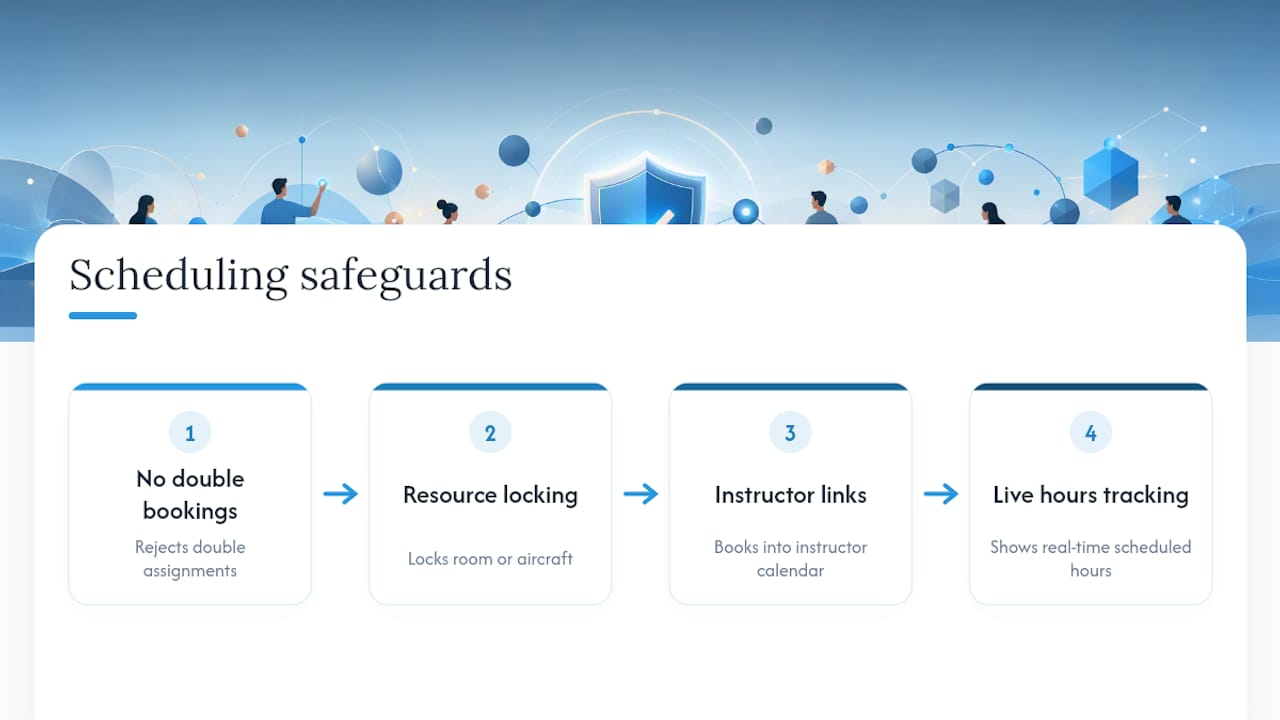
On the data side, run an annual preference audit, give instructors self-service access to enter blackout dates, and sync external calendar feeds so a personal commitment doesn’t silently overwrite an availability window. Decide explicitly which constraints are hard (block the booking) versus soft (warn and log), and write that decision down somewhere your whole team can see it.
The biggest failure mode here isn’t a missing feature. It’s maintaining a parallel manual system alongside the software. If a coverage change happens in a text thread and never makes it into the scheduler, the next audit won’t catch it until a student shows up to an empty classroom. A comparison of scheduling platforms is worth reviewing if your current system lacks resource locking or hour tracking entirely, and partner guidance on managing employee availability covers hybrid availability models that translate well to instructor teams.
How Do You Resolve a Conflict Before Publishing?
Once the audit flags a conflict, resolving it follows a consistent sequence.
- Freeze the publish if conflicts are widespread across multiple instructors or resources. Publishing a schedule you know is broken creates more cleanup work than delaying it by a day.
- Prefer reassignment over rescheduling the whole plan. Swapping an instructor or resource is almost always faster and less disruptive than moving an entire session block, according to scheduling platform guidance on resolving overlaps.
- Decide time-shift versus instructor-swap based on qualification. If the substitute instructor isn’t certified for that specific session, shift the time instead of forcing a swap.
- Communicate the change and log it in the system within your set deadline, not after the fact. Standard scheduling procedures call for verifying updated availability forms and using override indicators for cross-listed courses when capacity is already committed.
- Rerun the reports to verify the fix, and document any remaining acceptable warnings so they don’t trigger a false alarm next audit.
| Step | Action | When to use |
|---|---|---|
| 1 | Freeze publish | Multiple or critical conflicts detected |
| 2 | Reassign instructor/resource | Faster fix, qualifications match |
| 3 | Shift time block | Reassignment fails qualification check |
| 4 | Communicate and log | Immediately, before deadline |
| 5 | Rerun reports | After every resolution, before publish |
What Happens When Conflicts Can’t Be Resolved Locally?
Some conflicts outlast the standard toolkit. A cross-listed course tied to two departments, a certification mismatch with no qualified substitute, or a resource conflict that spans two administrative units usually needs to go up a level.
Escalation typically means routing the conflict to a scheduling committee or department head with the override authority to commit capacity manually, the kind of process university scheduling procedures formalize with specific override indicators. Set a clear threshold in advance, for instance, any conflict unresolved after the full audit pass gets escalated within 24 hours, so it doesn’t sit in limbo while a publish deadline approaches.
For persistent coverage gaps caused by absences, algorithmic assignment is worth considering. A deployed constraint-programming system using CP-SAT reduced maximum instructor load by 35% and workload variation by 32% while holding a 99% fill rate, proof that automated fairness constraints can outperform manual substitute-finding once absence volume gets high enough to overwhelm a coordinator working case by case.
How Flight Schools Apply This: A SquawkFree Perspective
The audit-to-enforcement sequence above isn’t theoretical for flight training operations. It maps directly onto how aircraft, instructors, and students interact daily.
The workflow looks like this: run an availability audit against instructor and aircraft calendars, enforce blackout dates as hard constraints rather than warnings, then require reservation checkout enforcement so a booking can’t be confirmed if the instructor, aircraft, or resource is already committed elsewhere.
When availability rules are enforced at the point of booking, rather than caught after the fact, most double-booking conflicts never make it onto the published schedule in the first place. The fix isn’t a better audit process. It’s making the bad booking impossible to create.
Reservation checkout enforcement, paired with aircraft scheduling software that locks resources the moment a booking is confirmed, turns most of the prevention checklist above into something the system does automatically rather than something a coordinator has to remember.
Why Most Scheduling Advice Gets This Backward
Most guidance on instructor scheduling conflicts treats the calendar as the problem. It isn’t. The calendar is just where the underlying failures become visible: stale availability data, workload imbalance, and guardrails that warn instead of block.
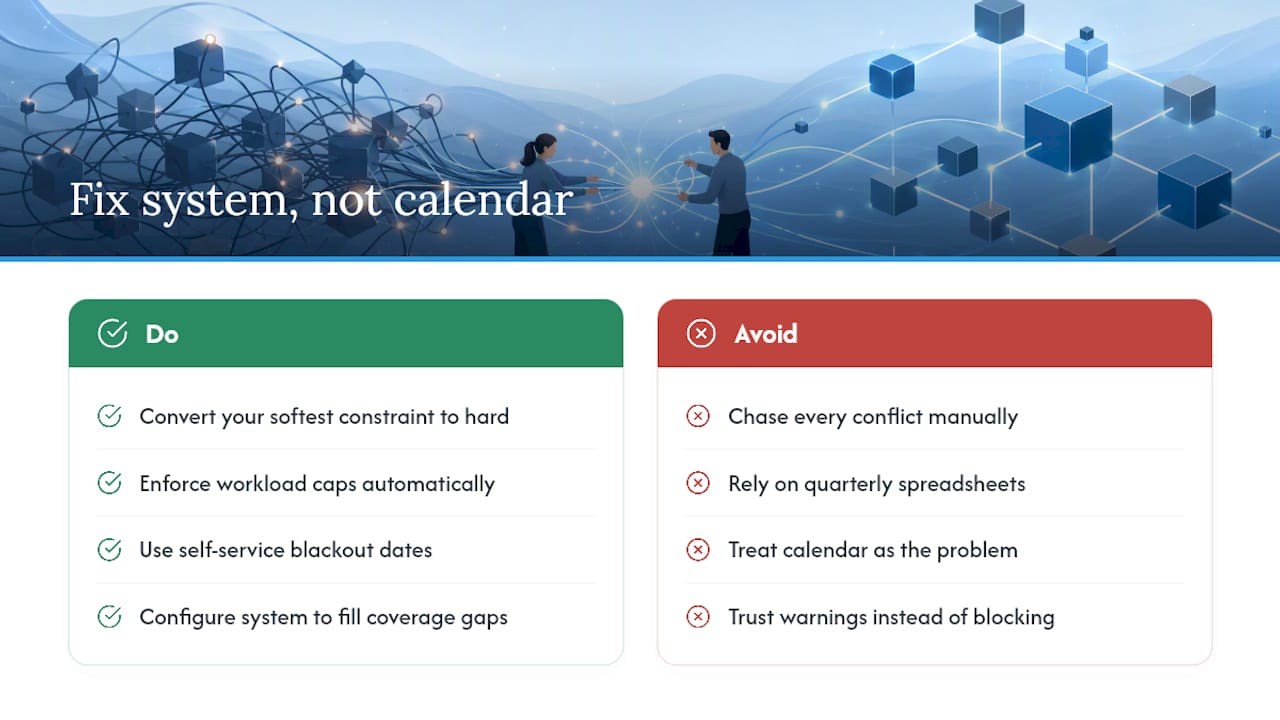
Coordinators who chase down every conflict manually, term after term, are fighting a symptom. The research on constraint-based substitute assignment makes a point that deserves more attention than it gets: fairness and coverage aren’t competing goals. A system that enforces workload caps while filling gaps outperforms manual triage on both counts simultaneously, which suggests the real gap in most programs isn’t effort. It’s configuration.
The conventional advice to “communicate better” and “check the calendar more often” isn’t wrong, but it treats discipline as the fix for what is actually a systems problem. Hard constraints beat soft warnings. Self-service blackout dates beat quarterly spreadsheet updates. If you take one thing from this guide, prioritize converting your softest constraint into a hard one this week, before you run another audit. That single change will prevent more conflicts than any amount of extra vigilance.
— Trent
Sources
- CP-SAT based fair substitution scheduling (deployed system study)
- Scheduling for success: teacher perceptions on schedule design (doctoral research)
- UCR Banner: Add faculty/TA information to a course (scheduling guidance)
Recommended
No credit card required · read-only after trial