
Avoid Permission Sprawl: Role Based Document Access for Aviation Teams

Avoid Permission Sprawl: Role Based Document Access for Aviation Teams
Role-based document access, better known by its formal name role-based access control (RBAC), assigns document permissions by job function rather than by individual identity. It works well anywhere permissions map cleanly to duties, such as “mechanic,” “dispatcher,” or “reviewer.” When access depends on shifting conditions like time, location, or which aircraft a person is assigned to, you need a hybrid model that layers attribute-based access control (ABAC) on top. NIST’s RBAC guidance remains the reference standard for role hierarchies, and platforms like Azure AI Search show how document-level enforcement actually gets built.
TL;DR:
- Hybrid RBAC and ABAC models effectively manage complex aviation workflows by combining role-based permissions with dynamic context conditions like shift and aircraft assignment.
- Building a permission matrix before configuration reduces errors, and regular privilege audits are essential to prevent permission sprawl and feature access issues.
- Index-time permission enforcement offers faster query performance but risks delayed updates, while query-time checks stay current but add query latency.
- Roles should be named by function rather than department, and stored roles with derived attributes keep the system flexible and scalable long-term.
- Implementing integration with identity providers and thorough testing ensures permission accuracy, timely updates, and minimizes support issues during rollout.
Table of Contents
- What Is Role-Based Document Access and What Makes It Work?
- Which RBAC Model Fits Document-Heavy Environments?
- When Do You Need ABAC Instead of Pure RBAC?
- How Document-Level Access Enforcement Actually Works in Search and DMS Platforms
- How Do You Design a Role Schema That Won’t Need a Rebuild in a Year?
- How Do You Roll Out Role-Based Access in a Document Management System?
- What Are the Most Common RBAC Maintenance Failures?
- How Aviation Maintenance Teams Apply These Access Patterns
- What I’d Prioritize If I Were Rolling This Out Today
- Manage Document Access the Way Aviation Compliance Actually Demands
- Sources
What Is Role-Based Document Access and What Makes It Work?
At its core, role-based document access ties three things together: a role (a named job function like “flight instructor” or “compliance officer”), a set of permissions (view, edit, download, share, delete), and the users or groups assigned to that role. Instead of granting permissions to each person individually, you grant them to the role, then assign people to roles. Change someone’s job, change their role, and their access updates automatically.
The principle behind good role design is least privilege: give every role the minimum access it needs to do its job, nothing more. A student pilot might need to view their training records but never edit a maintenance logbook. A dispatcher might need to schedule aircraft but shouldn’t be able to alter an airworthiness directive (AD) compliance entry. A mechanic needs edit rights on squawks and log entries but has no business seeing payroll files stored in the same document library.
Most document management systems break permissions into a handful of discrete actions, and mapping your roles against these actions early prevents a lot of headaches later:
- View — open and read a document without altering it
- Edit — modify content, metadata, or status fields
- Download — export a copy outside the platform’s audit trail
- Share — extend access to another user or role
- Delete or archive — remove a document from active circulation
The mapping pattern that works best is a simple matrix: roles down the left, actions across the top, checkmarks in between. It looks almost too basic to matter, but it’s the artifact that catches the mistake before it ships, like a scheduler role that somehow inherited delete rights on maintenance history. Building that matrix before you touch any configuration screen saves you from discovering the gap during an audit instead.
Which RBAC Model Fits Document-Heavy Environments?
Three RBAC models cover most real-world deployments, and each trades simplicity for flexibility differently.
Core RBAC is the flat version: users get assigned to roles, roles get assigned to permissions, and that’s it. No inheritance, no nesting. It’s fast to build and easy to audit, which makes it a solid fit for small teams or single-location flight schools where the job functions are stable and few.
Hierarchical RBAC adds inheritance. A “senior mechanic” role inherits everything a “mechanic” role can do, plus additional sign-off permissions. This mirrors how organizations actually work, with seniority layered on top of baseline duties, but it also means a change at the top of the hierarchy can ripple down in ways that are easy to lose track of if nobody owns the structure.
Constrained RBAC adds guardrails like separation-of-duty rules, so the same person can’t both submit and approve an AD compliance record. This model matters most in regulated environments where a single point of failure in the approval chain is a compliance risk, not just an inconvenience.
A few signals tell you which direction to lean:
- Small, stable teams with low turnover usually do fine with core RBAC.
- Organizations with clear seniority tiers (flight schools with lead instructors, chief mechanics) benefit from hierarchical RBAC.
- Any workflow involving regulatory sign-off, dual custody, or audit separation needs constrained RBAC, regardless of team size.
When Do You Need ABAC Instead of Pure RBAC?
RBAC answers “who are you,” while ABAC answers “what are the circumstances right now.” The distinction matters more than it sounds. RBAC alone tells the system a person is a mechanic; ABAC layers in whether they’re on shift, which hangar they’re logged in from, or whether the tail number they’re requesting is actually one they’re certified to work on.
Pure RBAC breaks down fast in operations where access depends on shifting context. If you tried to build a separate role for every combination of aircraft assignment and shift pattern at a flight school with 30 aircraft and three shifts, you’d end up managing hundreds of roles that differ only by a single attribute. That’s role explosion, and it’s one of the most common reasons RBAC deployments quietly fail over time.
The fix is a hybrid model. Keep RBAC for stable duties (mechanic, instructor, dispatcher) and add ABAC conditions for context that changes: shift time, location, or resource attributes like tail number. Aviation authorization systems increasingly follow exactly this pattern, since role-based structures paired with attributes such as shift or tail-number assignment keep the role count manageable while still enforcing precise, context-aware restrictions.
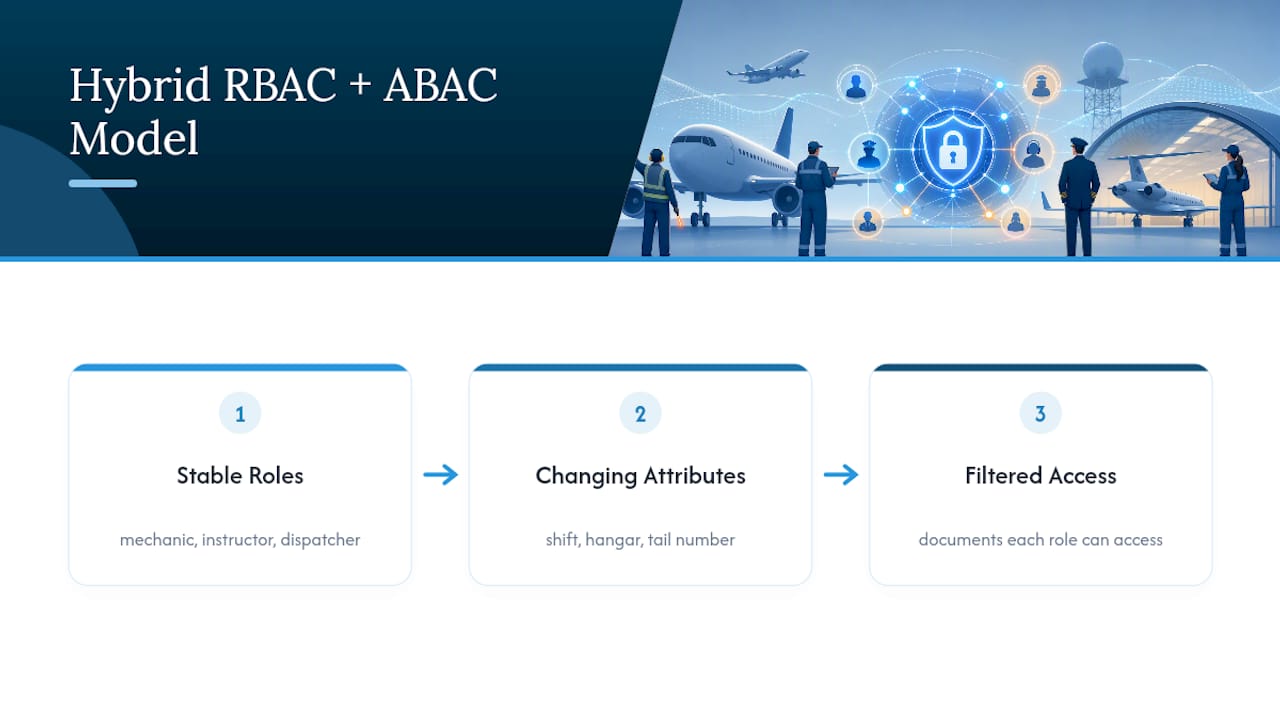
A practical example: a mechanic role grants edit access to maintenance logs generally, but an attribute condition checks whether the specific tail number on the document matches the mechanic’s current work order. Same role, different documents accessible depending on assignment.
Pro Tip: Before adding a new role to solve an access problem, ask whether an attribute condition on an existing role would solve it instead. Nine times out of ten, it will, and you’ll thank yourself in a year when you’re not managing 200 near-duplicate roles.
How Document-Level Access Enforcement Actually Works in Search and DMS Platforms
Everything above describes the policy layer. The engineering question is where that policy gets enforced, and there are two fundamentally different answers: index-time and query-time.
Index-time enforcement bakes permission data into the search index itself when documents get ingested. It’s fast at query time because the filtering already happened, but it means every permission change requires re-indexing before it takes effect. Query-time enforcement checks permissions at the moment of the search request, which stays current but adds a lookup cost to every query.
Index sync latency is a genuinely underrated failure point. Permission changes in the source system only show up in search results after the permission metadata gets synchronized to the index, whether through an indexer run, a push-API update, or a Purview refresh. Revoke someone’s access in your identity provider and the document might still surface in their search results until that sync completes.
The major platforms have converged on similar patterns, with real differences in the details:
- Azure AI Search enforces document-level access with token-based query checks that compare a user’s Microsoft Entra claims against permission metadata synchronized into the index, using a header like
x-ms-query-source-authorizationat query time, and it can integrate with Purview sensitivity labels for additional context. - OpenSearch implements document-level security through role queries written in its query DSL, filtering which documents a role can read or retrieve at query time.
- Elasticsearch associates a query directly with a role to restrict readable documents, and supports templating so the query can reference the authenticated user’s own attributes.
For AI-powered retrieval and RAG systems built on top of these indexes, this matters even more than in traditional search. A retrieval-augmented generation pipeline that pulls from a stale or unsynchronized index can surface restricted content inside a generated answer, which is a much harder mistake to catch than a document showing up in a search results list. Keeping permission metadata fresh isn’t a nice-to-have for these systems; it’s the difference between a working access control layer and one that leaks quietly.
How Do You Design a Role Schema That Won’t Need a Rebuild in a Year?
Role engineering is where most of the long-term pain in an RBAC rollout gets created or avoided. Following a structured process up front pays for itself many times over.
- Inventory your documents and resource attributes. Catalog what document types exist (maintenance logs, AD compliance records, training files, dispatch schedules) and what attributes matter for access decisions (tail number, location, sensitivity level).
- Map jobs to access needs. For every job function, list exactly which document types and actions they require. Resist the urge to grant “just in case” access.
- Build role templates with consistent naming. A role named
mechanic_edit_logstells you more at a glance thanrole_47. Consistency here is what makes future audits fast instead of painful. - Use derived roles and attribute conditions instead of new roles. Resource policies that reference dynamic fields like
assigned_flightsorassigned_tail_numberslet you narrow scope without multiplying static roles, a pattern that keeps aviation authorization systems manageable at scale. - Assign role owners and set a review cadence. Every role needs a named owner accountable for its accuracy, and a recurring review date, quarterly for sensitive roles, annually for stable ones.
- Automate entitlement reports. Scheduled reports showing who has what access, generated automatically rather than compiled by hand, are what actually catch drift before it becomes a finding in an audit.
Pro Tip: Name roles by function, not by department. “Compliance Reviewer” survives a reorg. “Springfield Office Staff” does not.
How Do You Roll Out Role-Based Access in a Document Management System?
Implementation splits into four practical workstreams, and skipping any one of them tends to surface as a support ticket later.
Start with identity provider integration. Connecting your document management system to an identity provider through SCIM lets group membership and role assignment sync automatically instead of being managed by hand in two places at once. This is also the point where you decide how permission metadata gets stored, whether as ACL fields, RBAC scope tags, or sensitivity labels, and how that metadata gets indexed alongside the document content itself.
Next comes the enforcement mechanism itself. Depending on your platform, that’s either query-time tokens (Azure AI Search’s x-ms-query-source-authorization header is a concrete example) or index-time ACLs baked in at ingestion. One detail worth flagging here: when using document-level security, write permissions need to stay separate from read permissions. A user with edit rights can sometimes index a document they aren’t authorized to read back, which creates confusing behavior unless it’s designed for deliberately.
Testing is the workstream teams most often shortchange, and it shouldn’t be:
- Create test users for every role and confirm they see exactly what the role should allow, no more.
- Run cross-role checks: log in as a restricted role and try to access documents assigned to a different role.
- Test feature impact, not just document visibility, since restricted access can silently disable functionality elsewhere in the platform.
- Verify index refresh timing: make a permission change, note when the indexer runs, and confirm the search results update on schedule rather than lagging.
| Rollout stage | What to verify | Common failure if skipped |
|---|---|---|
| IdP/SCIM integration | Group sync matches source system | Orphaned accounts with stale roles |
| Permission metadata storage | ACL/scope fields indexed correctly | Search returns unauthorized documents |
| Enforcement mechanism | Token or ACL check fires on every query | Silent access leaks under load |
| Testing and monitoring | Cross-role and feature-impact tests pass | Restricted users lose unrelated features |
What Are the Most Common RBAC Maintenance Failures?
Permission sprawl is the single most predictable failure mode in any RBAC deployment that’s been running for more than a year. It happens gradually: someone gets temporary access for a project, the project ends, nobody revokes it. A role inherits permissions from a parent role that later gets expanded, and every child role expands along with it without anyone deciding that should happen. Multiply that across a few hundred users and you end up with an access map nobody fully understands.
Document restrictions can also break platform functionality in ways that aren’t obvious until a user complains. Applying tight document-level restrictions can disable or limit features like predictive analytics for restricted users, because those features sometimes need broader read access to function correctly across a document set. The only reliable way to catch this is to test affected features specifically after applying any new restriction, not just confirm the restriction itself worked.
The operational fix for both problems is the same: scheduled audits with teeth.
- Run privileged-user reports on a fixed cadence, quarterly at minimum for anything touching compliance records.
- Treat entitlement reviews as a distinct workflow with an owner and a deadline, not an ad hoc cleanup task.
- Build a remediation path so that when an audit finds over-privileged access, revoking it is a two-minute task, not a ticket that sits for weeks.
Privilege audits and entitlement reports remain the most reliable operational control for pruning permission sprawl once it starts accumulating.
How Aviation Maintenance Teams Apply These Access Patterns
A hybrid RBAC and ABAC policy fits aviation document workflows almost exactly as described above. A mechanic role grants standard edit rights on maintenance logs, and an attribute condition checks the tail number on each record against that mechanic’s current work assignment. A CFI role sees training records for their own students without needing a separate role for every roster change.
Document-level security enforces this at the search layer, preventing a mechanic from even discovering a maintenance record for an aircraft outside their assignment, while still surfacing every record they’re cleared to see instantly. This is the same principle behind structured document version control for compliance: access and audit trails have to work together, or neither one holds up under scrutiny. A well-designed aviation document management workflow treats role-based access as infrastructure, not an afterthought bolted on after the documents are already stored.
What I’d Prioritize If I Were Rolling This Out Today
Start simple. Build core RBAC roles around your actual job functions first, resist the urge to model every edge case with a new role, and add attribute conditions only where a genuine exception shows up in practice. The teams that get this wrong almost always over-engineer roles on day one and under-invest in the recurring privilege audit that would have caught the drift six months later. Schedule that audit before you launch, not after someone asks why a former employee still has edit access.
If you’re starting an RBAC rollout this quarter, do one thing first: write the permission matrix on paper before you touch a configuration screen.
— Trent
Manage Document Access the Way Aviation Compliance Actually Demands
Squawkfree replaces the spreadsheet-and-email approach to document permissions with role-based sharing built specifically for aircraft maintenance records, AD compliance tracking, and flight school operations. Instead of manually tracking who can see which logbook or squawk entry, you assign roles once, mechanics, instructors, dispatchers, owners, and access follows the assignment automatically as your team changes.

That structure pairs directly with Squawkfree’s Flight Intelligence feature, which auto-imports flight data without manual entry while respecting the same role boundaries you’ve already set. AD tracking updates flow to the people who need to act on them, not to every user with a login. For flight schools managing multiple aircraft and rotating instructors, or co-owners who need clear boundaries around who can edit versus who can only view, this is the difference between a document system that scales and one that turns into a liability at your next audit. Visit the Squawkfree platform to start a trial and see how shared access and roles work with your fleet’s actual maintenance records.
Sources
- Mapping Business Requirements to Authorization Policy for Aviation | Cerbos
- Document-Level Access Control - Azure AI Search | Microsoft Learn
- Document-level security | OpenSearch Documentation
- Document-level security | Elasticsearch Guide 8.19 | Elastic
- Document Access Management | Everlaw Support
Recommended
No credit card required · read-only after trial