
ADS-B to Maintenance: How to Auto-Import Flight Data

ADS-B to Maintenance: How to Auto-Import Flight Data
ADS-B to maintenance means feeding the position, altitude, and speed data your aircraft already broadcasts into a digital maintenance system, so flights, hours, and cycles log themselves. Instead of a mechanic or owner keying in tach times from a paper strip, the aircraft’s own ADS-B Out signal becomes the source record. Squawkfree builds this connection directly into its platform through a feature called Flight Intelligence.
Three things change immediately once you turn this on:
- Fewer manual entries. Sector times and cycle counts populate automatically instead of being typed in after every flight.
- Real-time AD awareness. New airworthiness directives get checked against your tail number and configuration the moment they’re published, not at the next annual.
- An immutable audit trail. Every imported flight carries a timestamp and a data source, which holds up better under inspection than a logbook entry written from memory three days later.
This works because ADS-B broadcasts roughly once per second, giving you enough resolution to reconstruct sector times, takeoff and landing events, and flight cycles without a human touching the keyboard.
Key Takeaways
ADS-B telemetry, broadcast roughly once per second, gives maintenance systems enough resolution to auto-generate sector times, cycles, and AD-matched compliance records without manual entry.
| Point | Details |
|---|---|
| ADS-B replaces manual logging | Position, altitude, and speed broadcasts convert directly into sector times and flight cycles. |
| Fleet data drives AD accuracy | Serial ranges and equipment lists must be correct or management by exception produces false matches. |
| Pilot before full rollout | Run two aircraft in parallel with paper logs for 30 days and reconcile daily before migrating the fleet. |
| Anomalies need active handling | GPS jumps, dropped packets, and duplicate records require validation rules, not blind trust in the feed. |
| Squawkfree automates the workflow | Flight Intelligence ingests ADS-B data and matches ADs against fleet configuration with a timestamped audit trail. |
Table of Contents
- What ADS-B Fields Matter for Maintenance Records?
- How Does Automated AD Matching Reduce Manual Work?
- Implementation Checklist: Connect, Verify, and Validate
- What Advanced Workflows Does ADS-B Data Enable?
- How Do You Protect ADS-B Flight Data from Misuse?
- How Do You Catch and Fix Bad ADS-B Data?
- What Happens When ADS-B Integration Works and When It Doesn’t?
- Why Digital Maintenance Records Need Ongoing Updates
- How Does the Audit Trail Hold Up During an Inspection?
- What SquawkFree brings to ADS-B based maintenance tracking
- How SquawkFree Turns ADS-B Data into Compliance-Ready Records
- Frequently Asked Questions
- Sources
What ADS-B Fields Matter for Maintenance Records?
Not every data point in an ADS-B stream matters equally for maintenance purposes. The broadcast happens about once per second, which is frequent enough to catch the exact moment wheels leave the runway and the exact moment they touch back down, without the gaps that plagued older tracking methods.
A handful of fields do the real work:
- Timestamp — anchors every other data point in time and lets the system calculate elapsed sector time.
- Hex code or callsign — identifies which aircraft in your fleet generated the track, critical for co-owned aircraft or flight schools running multiple tails.
- Latitude and longitude — used to detect airport proximity, which flags likely takeoff and landing points.
- Altitude — combined with groundspeed, this is how a system distinguishes taxi from flight.
- Groundspeed and track — help confirm a genuine departure rather than a runway crossing or a go-around.
From there, the mapping to your maintenance log is fairly direct. Sector time (wheels up to wheels down) converts to flight hours. Each detected takeoff and landing pair counts as one cycle. A layover location and duration can tag a flight for maintenance, repair, and overhaul (MRO) review if the aircraft sits somewhere unusual for an extended period.
Raw ADS-B data isn’t perfect, though. GPS position jumps, dropped packets, and duplicate records show up regularly enough that any system pulling this data needs validation rules, like discarding position jumps beyond a physical speed limit or flagging timestamps that arrive out of sequence.
Pro Tip: Check your first month of imported flights against your paper logbook by hand. It’s the fastest way to catch a mapping error before it compounds across a full fleet.
How Does Automated AD Matching Reduce Manual Work?
Airworthiness directives arrive as PDFs, not database entries, which is exactly why so many shops fall behind on tracking them. Automated ingestion parses those documents into structured fields, reducing intake time from tens of minutes to seconds per directive rather than requiring someone to read the full text and manually cross-reference it against every aircraft.
That parsing only helps if it’s matched against accurate fleet configuration data. The system needs to know each aircraft’s type and model, its manufacturer serial number, its engine and propeller serials, and its installed equipment list. Without that, you get false positives: an AD for a specific carburetor showing up on an aircraft that was never fitted with one.
Getting the fleet data right is what makes management by exception work. Instead of scanning every new directive against every aircraft yourself, the system filters by:
- Aircraft make, model, and serial number range
- Engine and propeller serial numbers
- Installed avionics and equipment lists
- Prior AD compliance history for that tail
The result is a shortlist of directives that genuinely apply, each converted into a task with a deadline and a place to log the accomplishment. A flight school running six aircraft across three different serial ranges goes from checking dozens of ADs manually to reviewing only the small subset that actually touches their fleet, which is the practical definition of management by exception.
Implementation Checklist: Connect, Verify, and Validate
Getting ADS-B ingestion running correctly takes a deliberate rollout, not a single afternoon of setup. Skipping the verification phase is the most common reason automated systems lose credibility with inspectors later.
Start with your connection method. You have three practical options: pull from a public ADS-B feed, run a dedicated ground receiver, or connect through a vendor-hosted ingestion API. Commercial receiver networks already aggregate this data at scale, which is often simpler than standing up your own antenna.
- Pick two aircraft for a pilot. Choose one high-utilization tail and one lower-use aircraft to see how the system behaves across different flight patterns.
- Run parallel for 30 days. Keep the paper logbook going alongside the digital import and reconcile the two every single day rather than waiting until week four.
- Reconcile hour-by-hour and cycle-by-cycle. Small discrepancies compound fast, so catch them early while you can still trace the cause.
- Generate a sample audit export. Confirm the output is something an inspector could actually read without a walkthrough from you.
- Set your operational controls. Configure notification thresholds, a workflow for false positives, and a data retention and export policy before going further.
- Confirm acceptance criteria before full migration. Guides on this transition recommend a phased four to six month cutover with formal validation, not an overnight switch.
Pro Tip: Run your first inspector readout on the pilot aircraft, not the whole fleet. If something in the export format needs adjusting, you want to find out with two aircraft’s worth of data, not twenty.
What Advanced Workflows Does ADS-B Data Enable?
Once ingestion is stable, ADS-B data starts doing more than just replacing your logbook. Layover analysis is one of the more useful applications: combining flight tracks with layover duration and time of day can help identify probable MRO activity, meaning the system can flag “this aircraft sat somewhere unusual for six hours” as worth investigating, even before you get a call from the pilot.

That classification isn’t perfect, and it shouldn’t be treated as one. Layover heuristics are a prioritization tool, a reason to look closer, not an automatic trigger to close out a maintenance task.
Fleet-level analytics built on the same data stream open up a few other practical uses:
- Utilization tracking across every tail, useful for co-owned aircraft where usage disputes are common.
- Fatigue estimation proxies, using cumulative cycles and hours to flag components approaching inspection intervals.
- Prioritization rules that surface the aircraft needing attention soonest, rather than treating the whole fleet as equally urgent.
For flight schools and larger operators, this data can feed into a dashboard for downtime analysis, scheduling systems, and maintenance tracking software, turning what used to be a reactive process into something closer to operational monitoring built on a consistent data chain from the aircraft to your maintenance decisions.
How Do You Protect ADS-B Flight Data from Misuse?
ADS-B data includes your aircraft’s tail number, flight paths, and timing patterns, information that’s already public over the airwaves but becomes more sensitive once it’s aggregated into a maintenance history tied to your ownership records. Anyone building a system on this data needs to treat the combined record, tail number plus usage plus location history, as more sensitive than any single piece on its own.
Encryption in transit and at rest is the baseline. Data moving from a receiver or feed provider into your maintenance platform should be encrypted the same way you’d expect from any financial or medical system, not treated as lower priority because it’s “just flight tracking.”
Access controls matter just as much as encryption. A flight school with a dozen instructors doesn’t need every instructor able to see every co-owner’s flight history or every aircraft’s full maintenance record. Role-based permissions, where students see their own logged flights and only maintenance staff see compliance details, keep sensitive information contained without slowing anyone down.
Retention policy is the piece owners overlook most often. Decide upfront how long raw ADS-B tracks stay in the system versus how long the derived maintenance records (hours, cycles, AD status) persist. The FAA doesn’t require you to keep raw position data indefinitely, but it does expect maintenance records to survive for the life of specific components or the aircraft itself, so your retention rules for the two categories shouldn’t be identical.
How Do You Catch and Fix Bad ADS-B Data?
Automated import only earns trust if it also catches its own mistakes. Manual logbook entry has its own error rate, misread tach times, transposed digits, forgotten entries, but those errors tend to surface individually rather than propagating silently across months of records the way an unvalidated automated feed can.
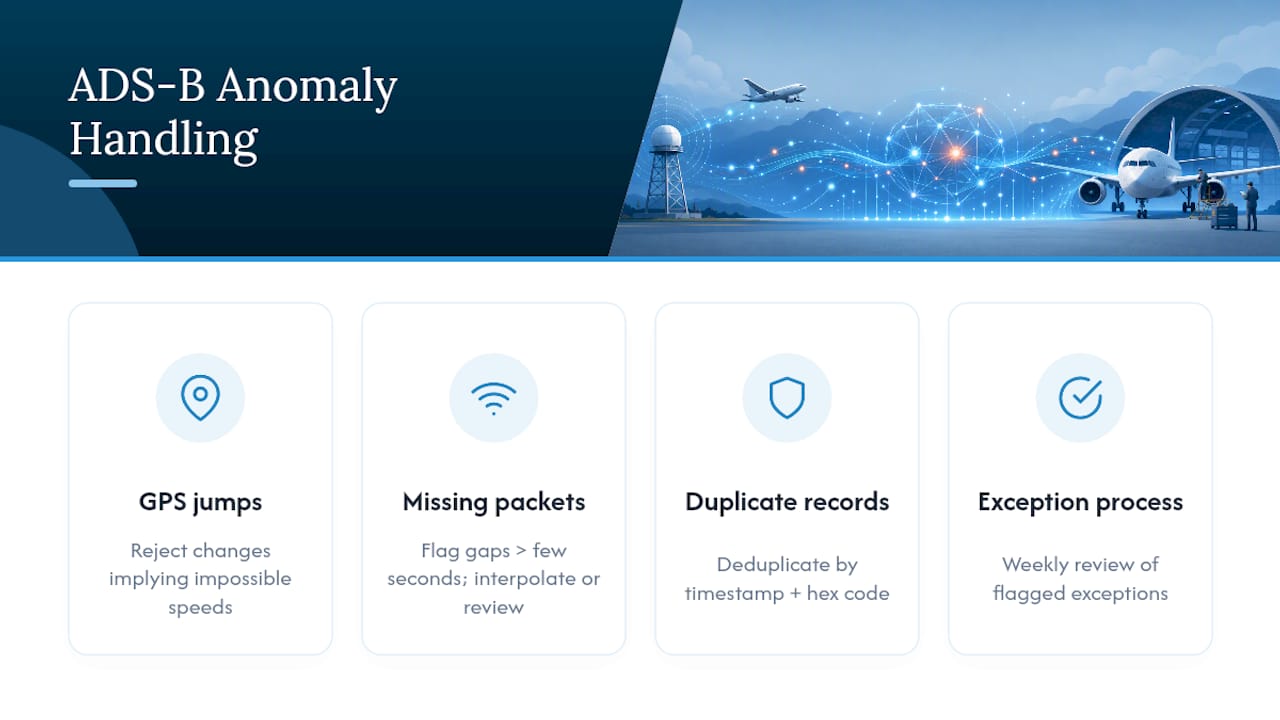
The most common anomaly is a GPS position jump: an aircraft appears to teleport several miles in one second, which is physically impossible and almost always a receiver glitch rather than a real event. A basic validation rule, rejecting any position change that implies a speed beyond the aircraft’s actual performance envelope, catches most of these before they ever touch a maintenance record.
Missing packets create a different problem. If ADS-B coverage drops during a flight (common in mountainous terrain or at low altitude far from a receiver), the system might undercount sector time or miss a landing event entirely. Good ingestion systems flag gaps longer than a few seconds and either interpolate conservatively or hold the flight for a manual review rather than guessing.
Duplicate records happen when a flight gets picked up by two receivers or feed sources simultaneously. Without deduplication logic keyed on the timestamp and hex code together, the same flight can get logged twice, quietly inflating both hours and cycles.
None of this should require you to babysit the system daily. A well-built anomaly process flags the exceptions and lets you review a short list weekly, rather than forcing you to comb through every flight looking for problems that mostly aren’t there.
What Happens When ADS-B Integration Works and When It Doesn’t?
The clearest wins from ADS-B to maintenance integration show up in fleets with multiple aircraft and shared ownership, where manual logbook reconciliation used to eat hours every month. A flight school running six trainers, for example, can go from a staff member manually cross-checking hour meters against dispatch sheets every week to a system that flags discrepancies automatically, freeing that person for actual scheduling work instead of data entry.
The pitfalls tend to cluster around one issue: skipping the parallel-run verification step. An operator that switches straight from paper to digital without a reconciliation period risks discovering, months later, that a mapping error undercounted cycles on one tail by a meaningful margin, right around the time a component inspection was due. That’s not a flaw in the concept of automated ingestion. It’s a rollout mistake, and it’s exactly what the phased pilot approach with parallel paper tracking is designed to prevent.
Co-owned aircraft see a different kind of benefit: automated import removes the ambiguity of “who logged what” when two or three owners share a single tail. Every flight gets its own timestamped record tied to the ADS-B track, independent of who filled out the paper logbook that week. The friction that used to come from disputed hours largely disappears when the record itself is generated by the aircraft’s own broadcast rather than someone’s memory of last Tuesday’s flight.
Why Digital Maintenance Records Need Ongoing Updates
Digital maintenance records aren’t a set-it-and-forget-it system. The FAA’s expectations around electronic recordkeeping continue to evolve, and a platform that was compliant two years ago can quietly fall behind if it isn’t updated to match new guidance on retention, format, or inspector access.
This matters most around three areas: how directives get parsed and matched, how records get exported for inspection, and how long different categories of data need to persist. A system that hasn’t updated its AD-parsing logic in a while risks missing structural changes in how the FAA publishes directives, which defeats the purpose of automating that step in the first place.
The practical takeaway for an owner or flight school manager is to ask your maintenance software provider a direct question periodically: what’s changed in how you handle regulatory updates in the last year? A vendor that can answer specifically, citing a parsing update, a new export format, or an adjusted retention rule, is treating compliance as an ongoing responsibility rather than a feature they built once and stopped touching.
How Does the Audit Trail Hold Up During an Inspection?
An audit trail built from ADS-B data is only as good as its weakest link, and that link is almost always the transition point between raw telemetry and a logged maintenance entry. Every imported flight needs a timestamp showing when the data arrived, a source tag identifying which feed or receiver generated it, and a record of whether a human reviewed or adjusted it afterward.
Digital entries should be immutable once finalized. If a correction is needed, the system should log the correction as a new entry referencing the original, not silently overwrite it. That single design choice is what separates a record that survives inspector scrutiny from one that raises questions about what else might have been quietly edited.
Electronic signatures matter here too, not as a formality but as proof that a qualified person reviewed and accepted a given maintenance action rather than the system logging it unattended. Pairing an e-signature with its timestamp creates the kind of chain an inspector can follow start to finish.
When it’s time for an actual inspection, export matters as much as storage. A bundle that shows the raw import, the applied validation, and the final logged entry side by side gives an inspector confidence the process is transparent, rather than making them take your word for it that the numbers are right.
What SquawkFree brings to ADS-B based maintenance tracking
Automated flight import only earns its keep when the underlying system treats aviation compliance as the actual job, not an add-on feature. That’s the gap Squawkfree was built to close. Years of watching owners and flight schools reconcile paper logbooks against gut feeling shaped a platform where Flight Intelligence handles the ADS-B ingestion, AD matching runs against real fleet configuration data, and every record carries the timestamp to back it up during an inspection.
How SquawkFree Turns ADS-B Data into Compliance-Ready Records
If you’ve been running spreadsheets, paper logbooks, or a patchwork of apps that don’t talk to each other, the gap between what you have and what ADS-B ingestion delivers is mostly about effort. You’re doing by hand what a properly connected system does the moment the aircraft lands.

Squawkfree’s Flight Intelligence feature connects directly to ADS-B data sources and auto-imports flight activity into your maintenance log, no manual tach time entry, no reconstructing sector times from memory. Airworthiness directives get matched against your actual fleet configuration, filtered down to what genuinely applies to your aircraft, and tracked to completion with a timestamped record behind every entry. For flight schools managing multiple tails or co-owners splitting one aircraft, that same record answers the “who flew what, when” question automatically.
Getting started doesn’t require ripping out your existing process on day one. Run a pilot on one or two aircraft, compare the digital output against your current logbook for a few weeks, and see the reconciliation for yourself. You can start a trial on the SquawkFree platform and connect your first aircraft this week.
Frequently Asked Questions
Does ADS-B to maintenance require new hardware on my aircraft?
No, as long as your aircraft already has an ADS-B Out transponder for airspace compliance, that same broadcast can serve as the data source for maintenance import. No additional avionics installation is needed on the aircraft side.
Can ADS-B data replace my paper logbook entirely?
Most operators run both in parallel for a defined pilot period, typically around 30 days, before relying on the digital record alone. The FAA generally accepts electronic maintenance records, but the transition should be validated before you retire the paper trail.
What happens if ADS-B coverage drops during a flight?
A well-designed ingestion system flags gaps in coverage rather than silently guessing at missing sector time. Short gaps get interpolated conservatively; longer ones typically get held for manual review.
How does automated AD matching know which directives apply to my aircraft?
The system checks each new directive against your fleet’s actual configuration, model, serial number range, and installed equipment, so only ADs that genuinely apply reach your task list instead of every directive published that month.
Is my flight data secure once it’s imported into a maintenance system?
Data should be encrypted both in transit and at rest, with role-based access so only relevant staff see sensitive ownership or usage details. Retention policies should also distinguish between raw flight tracks and the maintenance records derived from them.
Sources
- Automatic Dependent Surveillance–Broadcast — Wikipedia
- How ADS‑B works — Flightradar24
- IWSHM / Operational monitoring and A‑SHM overview
Recommended
No credit card required · read-only after trial