
FAA §43.9 Compliant Electronic Logbooks for GA Owners & Flight Schools

FAA §43.9 Compliant Electronic Logbooks for GA Owners & Flight Schools
Yes. Electronic pilot and maintenance logbooks are legal under FAA rules when they preserve the same content, signature attribution, retention periods, and availability the CFR already demands of paper. The FAA doesn’t regulate the medium; it regulates what’s captured under 14 CFR §43.9 and §91.417, backed by AC 120-78B as the accepted method for getting there. The rest of this guide shows you how to hit those marks.
TL;DR:
- Electronic logbooks must capture all §43.9 required fields, including work description, completion date, performer, and signature with certificate details.
- To meet FAA standards, signatures must be unique to individuals, tamper-evident, and recorded in audit logs that track all edits and user actions.
- Vendors should provide exportable, readable records and role-based access controls, with regular export drills to ensure compliance in case of inspection.
- Common failures include shared logins, incomplete supporting documentation, and unbackuped records, which can lead to investigation findings or data loss.
- The main compliance gap is confusing maintenance tracking capabilities with the ability to produce FAA-ready, attributable records on demand.
Table of Contents
- What §43.9 and §91.417 Actually Require of Electronic Records
- AC 120-78B and the FAA Acceptance Pathway
- Your Electronic Logbook Compliance Checklist
- Where Digital Logbooks Fail an Inspection
- What Owners Consistently Get Wrong About Digital Records
- Get Your Fleet Audit-Ready With SquawkFree
- Sources
What §43.9 and §91.417 Actually Require of Electronic Records
The FAA has never cared what your logbook is made of. It cares whether specific facts are captured, attributable, and retrievable. That principle, sometimes called medium neutrality, is the whole legal foundation for electronic logbook legality, and it’s why a well-built app can satisfy the same rule as a leather-bound book from 1975.
14 CFR §43.9 spells out exactly what belongs in every maintenance entry:
- A description of the work performed, or a reference to data acceptable to the FAA
- The date the work was completed
- The name of the person who performed the work
- The signature, certificate number, and certificate kind of the person approving the aircraft for return to service
§91.417 governs how long you keep those entries and what happens to them. Routine maintenance records need to survive until the work is superseded or for one year, while records of major overhauls, life-limited parts, and total airframe time must last for the life of the aircraft, and they transfer to the new owner at sale. If your electronic system can’t produce those records on demand for the FAA or NTSB, the format you chose is irrelevant. The obligation still exists.
The practical takeaway: before you trust any digital tool with your aircraft’s legal history, map every field it captures against these two sections line by line. If a field required by §43.9 isn’t recorded, or a retention category under §91.417 isn’t accounted for, that’s a gap, not a formatting choice.
AC 120-78B and the FAA Acceptance Pathway
Regulations tell you what to capture. AC 120-78B tells you how to prove your electronic system captures it correctly. The advisory circular describes an acceptable means of compliance for electronic signatures, recordkeeping, and manuals. It is explicitly not a regulation itself. Think of the CFR as the law and the AC as the FAA’s own field guide for satisfying it.
The AC lays out what inspectors expect to see in a compliant system:
- Unique, traceable signatures tied to a specific person, not a shared login or generic checkbox
- Tamper evidence, meaning any edit after the fact is visible and time-stamped
- Audit logs that show who did what, and when
- Role-based access, so only authorized personnel can create or approve entries
- Exportability, meaning records can be pulled and read on demand, not locked inside a proprietary viewer
- Retention and backup systems that survive a vendor outage or business closure
Not every operator needs formal sign-off before switching to a digital system, but the pathway exists for those who do. It typically starts with a conversation with your local FSDO or, for certificate holders, your CHDO. You submit a description of the system, proposed revisions to your operator or maintenance manual, and evidence of training for anyone entering data. Accepted systems often receive a formal letter of acceptance or an OpSpec A025 entry, depending on the certificate structure involved.
Fact check: a single Part 91 owner running one aircraft generally doesn’t need an OpSpec. That process is built for certificated operators such as Part 135 or Part 145 shops. An individual owner can typically follow internal procedures and an FSDO consultation if questions ever arise, without a formal approval letter.
Your Electronic Logbook Compliance Checklist
Buying software is the easy part. Making sure it actually holds up during a ramp inspection, an AD compliance review, or a pre-sale audit takes a deliberate process. Here’s how to run it.
Start with the regulatory mapping.
- Confirm the system captures every §43.9 field: work description, completion date, performer, and approving signature with certificate number and type
- Verify each signature is traceable to one individual, not a shared account
- Check that audit logs record edits, timestamps, and the user who made them
- Confirm retention settings match §91.417 categories, including permanent records like total time and life-limited component tracking
Then update your procedures.
Revise your operator or maintenance manual to reflect the new system, including who has authority to make entries and how password or access changes get documented. Train every authorized user before they touch a live record, not after. Run a mock export drill: pretend an FAA inspector or a buyer’s mechanic just asked for three years of records, and see how long it takes to produce a readable PDF or printed copy. If that drill takes more than a few minutes, your export process needs work.
Finally, vet the vendor itself.
- Request a live demo of the export function, not just a description of it
- Ask to see a sample audit log entry, not a marketing screenshot
- Confirm role-based access is real, not a shared password across the flight school
- Ask directly what happens to your records if you cancel or the vendor shuts down
Pro Tip: Run your export drill twice a year, not just once when you buy the software. Vendors update their platforms, and an export format that worked in January can change by the time an inspector or a buyer’s mechanic asks for records in July.
For flight schools managing shared aircraft, cross check your maintenance recordkeeping requirements against how many instructors and mechanics have entry access. More hands touching the system means more discipline needed around signature attribution.
Where Digital Logbooks Fail an Inspection
Most electronic logbook problems aren’t about the software being illegal. They’re about sloppy implementation that undermines a legally sound system.
The most common failure is a signature that isn’t actually unique. If three mechanics at a shop log entries under one shared account, an inspector can’t verify who did what, and that breaks the traceability §43.9 demands. Missing certificate numbers show up constantly too, especially when a system was built for general note-taking rather than aviation recordkeeping specifically.
Scattered supporting documents cause almost as much trouble. An AD compliance record that lives in the maintenance app while the actual signed 8110-3 form sits in a filing cabinet three states away isn’t a records system. It’s a liability. When the FAA or NTSB requests records, they want them produced promptly and in a readable format, and “give me a week to find it” is not an acceptable answer during an active investigation.

Weak backups create the same risk from a different angle. If your only copy of ten years of maintenance history lives on a vendor’s server with no export option, you don’t own your records. You’re borrowing them.
Fix these before they become findings:
- Centralize every AD compliance document, 8110-3 form, and STC paperwork in one place, digital or physical, cross-referenced to the logbook entry
- Audit your signature setup and eliminate shared logins immediately
- Run the export drill described above and confirm the output is readable outside the vendor’s own interface
- If you’re a certificated operator uncertain about acceptance status, contact your FSDO before an inspection forces the question
What Owners Consistently Get Wrong About Digital Records
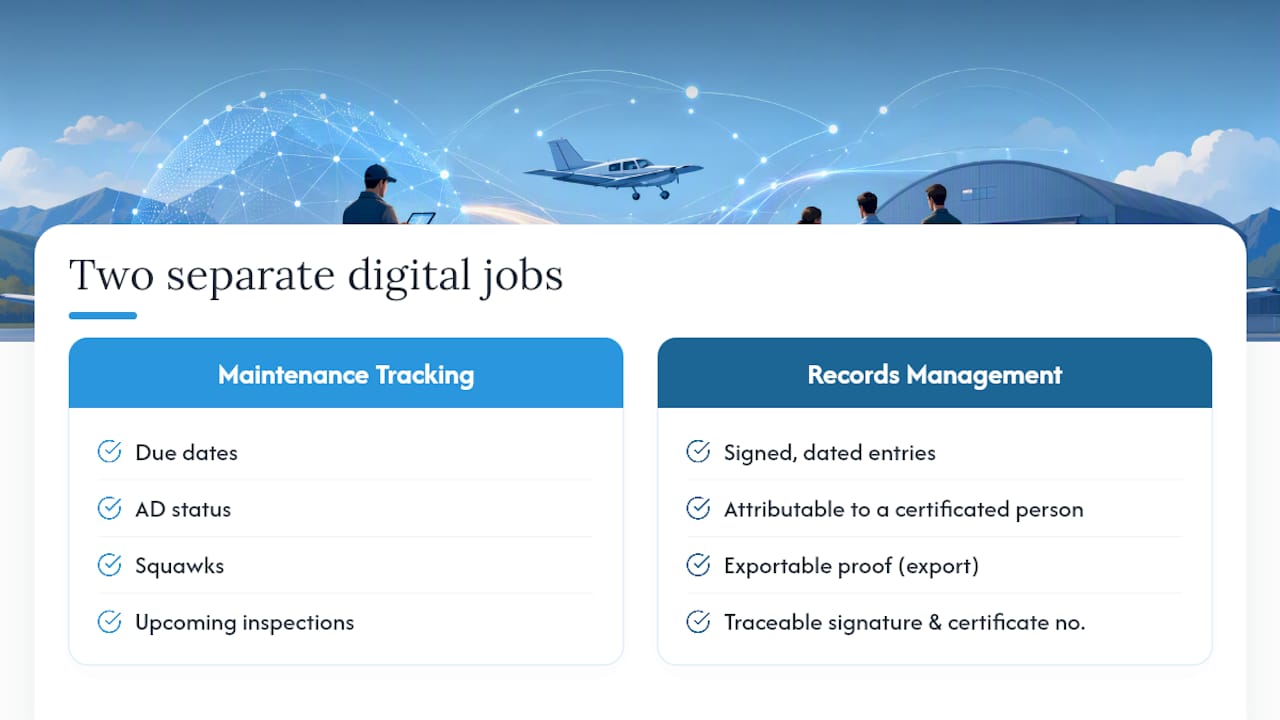
Most operators think of “going digital” as a single decision. It isn’t. There are two separate jobs hiding inside that phrase, and confusing them is where compliance gaps start.
The first job is maintenance tracking: due dates, AD status, squawks, upcoming inspections. The second job is records management: producing a signed, dated, attributable, exportable proof that a specific task was completed by a specific certificated person. A tool that’s excellent at the first job can be worthless for the second if it wasn’t built with §43.9 in mind from the start. I’ve seen owners assume that because their app sends a great reminder for an annual inspection, it must also be handling their legal recordkeeping correctly. Those are different problems with different failure modes.
SquawkFree’s Flight Intelligence feature auto-imports flight data from ADS-B without manual entry, which solves the tracking half of the equation and removes a huge source of human error in tach time and cycle counts. But the harder, less glamorous half is audit trail integrity: making sure every maintenance entry carries a traceable signature, a certificate number, and a timestamp that survives scrutiny. AD tracking that’s tied directly to a searchable compliance history does more for you at sale time than any reminder ever will, because a buyer’s mechanic isn’t going to take your word for it. They’re going to ask for the export.
The gap between “we track maintenance” and “we can produce FAA-compliant records on demand” is where most digital transitions quietly fail.
— Trent
Get Your Fleet Audit-Ready With SquawkFree
You’ve seen what an inspector, a buyer’s mechanic, or the NTSB actually expects to see when they ask for records. SquawkFree is built around that exact standard, not just a checklist item bolted onto a scheduling app. Flight Intelligence auto-imports flight data straight from ADS-B, so tach and cycle entries stop depending on someone remembering to log them by hand. Every maintenance entry carries traceable signature attribution, and AD tracking stays tied directly to your aircraft’s compliance history so nothing gets orphaned in a separate spreadsheet.

If you manage a single aircraft, a co-owned fleet, or a flight school’s entire lineup, the same audit and export tools apply. Run an export test on your current records this week and see how long it takes to produce three years of history in a readable format. If the answer is “too long,” it’s worth comparing that against what a purpose-built system delivers. Start a free trial with SquawkFree and see how your fleet’s records hold up before an inspector ever asks the question. If your operation needs formal FAA acceptance, SquawkFree’s documentation can support the manual revisions your FSDO will want to see.
Sources
- AC 120-78B - Electronic Signatures, Electronic Recordkeeping, and Electronic Manuals
- § 43.9 Content, form, and disposition of maintenance, preventive maintenance, rebuilding, and alteration records
Recommended
No credit card required · read-only after trial