
Stop Manual Hobbs: Flight School Billing Automation with GL Mapping

Stop Manual Hobbs: Flight School Billing Automation with GL Mapping
Flight school billing automation works by capturing Hobbs or tach time digitally at the aircraft, feeding that data into rate tables that auto-generate itemized invoices, and syncing payments straight to your accounting system. The result is fewer billing errors, faster collections, and hours of admin time returned to your staff each week. SquawkFree and similar platforms make this possible by removing manual entry from the equation entirely.
TL;DR:
- Automated billing reduces errors caused by manual transcription and complex rate rules, especially as fleet size increases beyond three aircraft.
- The process requires capturing core flight data directly from the aircraft using mobile apps or auto-import, ensuring accuracy before invoice generation.
- Proper setup involves building multi-dimensional rate tables, itemized invoice templates, and accurate GL account mappings before full deployment.
- Testing five key scenarios and pilot periods improve accuracy, reduce disputes, and ensure smooth transition without disrupting operations.
- The primary benefits include faster collection, higher invoice accuracy, reduced dispute rates, and significant staff hours saved on reconciliation and manual entry.
Table of Contents
- Why Manual Flight School Billing Falls Apart
- The Billing Automation Pipeline: Capture to Reconciliation
- Rolling Out Billing Automation Without Disrupting Operations
- What Automated Billing Actually Saves You
- How SquawkFree Fits Into Your Billing Workflow
- What Most Schools Get Backwards About Billing Automation
- Get Your Billing and Flight Data Working From the Same Source
- Sources
Why Manual Flight School Billing Falls Apart
Paper Hobbs logs and spreadsheet billing feel manageable until your fleet grows past two or three aircraft. Then the cracks show. A transcription error on tach time might shave five minutes off a bill, and across sixty students a month, that adds up to real revenue walking out the door.
Rate complexity makes it worse. A single flight might involve an aircraft rate, an instructor rate, a fuel surcharge, and a block-hour package redemption, and spreadsheets aren’t built to apply four rules to one line item without someone catching a mistake by hand.
The operational cost shows up in three places:
- Staff hours spent reconciling logbooks against invoices before every billing cycle
- Delayed payments because invoices go out days after the flight instead of same-day
- Disputes from students who don’t trust a bill they can’t trace back to a specific flight
None of this is a staffing problem. It’s a process problem, and it’s exactly what automation is built to fix.
The Billing Automation Pipeline: Capture to Reconciliation
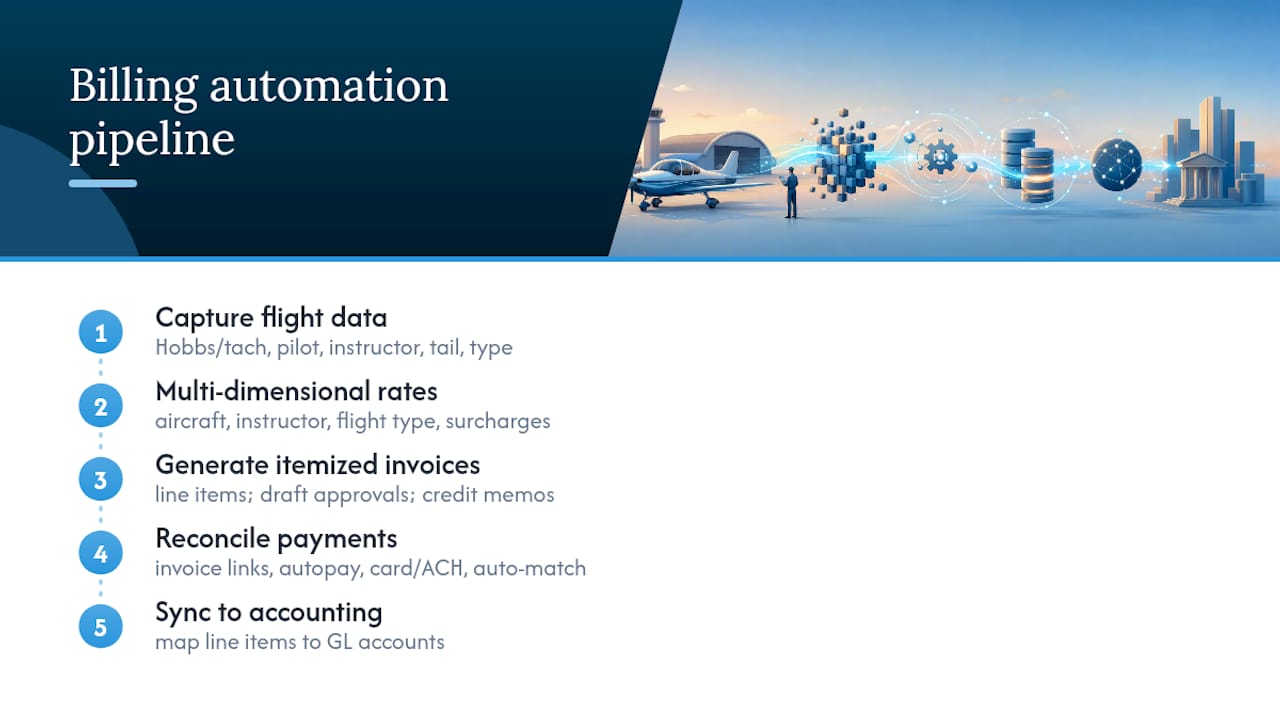
Automating flight school billing means building a pipeline, not buying a single tool. Each stage has to hand off clean data to the next one, or errors just move downstream instead of disappearing.
1. Capture flight data at the source. The best systems pull Hobbs or tach readings through mobile entry at checkout, ADS-B auto-import once the aircraft lands, or OCR digitization of existing logbooks for legacy records. Whichever method you use, capture the same core fields every time: Hobbs start and end, pilot name, instructor (if applicable), aircraft tail number, and lesson or flight type. Missing even one field forces a manual lookup later, which defeats the point.
2. Build multi-dimensional rate tables. A rate engine needs to handle aircraft type, instructor rate, and flight type simultaneously, plus surcharges like fuel or overnight fees. Prepaid block packages need special handling here too: money collected upfront should post to a deferred revenue account and only recognize as earned revenue when hours are actually flown. Skip this step and your books will show revenue that hasn’t happened yet.
3. Generate itemized invoices automatically. Every invoice should break out line items by category (aircraft rental, instructor time, landing fees, fuel) rather than showing a single lump total. This is also where draft approval workflows matter. Rules-based systems that import operational data and generate structured invoice records cut down on double entry, and the same logic applies at flight school scale. Support for negative invoices and credit memos matters too, since corrections happen (a mismarked flight type, a duplicate charge) and you need a clean way to reverse them without deleting the original record.
4. Enable and reconcile payments. Payment links embedded directly in the invoice, card and ACH acceptance, autopay for recurring students, and in-person card readers for walk-up rentals all reduce the friction between “invoice sent” and “invoice paid.” Recurring-payment businesses that offer autopay and embedded payment links consistently collect faster than those relying on mailed statements, and flight training runs on the same payment psychology as any subscription-style business. Reconciliation should happen automatically, matching each payment to its invoice without a staff member cross-checking a spreadsheet.
5. Sync to accounting in near-real-time. Every line item needs a general ledger mapping (aircraft rental to one account, instructor fees to another, fuel to a third) so your accountant isn’t recoding transactions every month. Systems that import operational data directly into accounting workflows avoid the double entry that eats up bookkeeping hours.
Pro Tip: Map your GL accounts before you configure a single rate table. Retrofitting account mapping after invoices are already flowing means reclassifying transactions by hand, which is exactly the manual work you’re trying to eliminate.
Watch for edge cases early: did-not-fly cancellations that still owe a partial fee, maintenance flights that shouldn’t bill a student at all, instructor pay splits that need to route separately from student charges, and fuel reimbursements when a renter fills the tank themselves. A pipeline that only handles the clean cases will frustrate your staff the first messy week it goes live.
Rolling Out Billing Automation Without Disrupting Operations
A rushed rollout creates more billing disputes than the manual system it replaces. Before touching a single invoice, confirm your account mapping, finalize rate tables for every aircraft and instructor, choose your flight-data feed, and set payment processor policies (refund windows, chargeback handling, per-location deposit accounts if you operate multiple campuses).
Integration work follows a clear sequence:
- Connect your flight-data feed, whether that’s an ADS-B import or a mobile logging app
- Map every invoice line item to its corresponding GL account
- Configure the payment processor for card and ACH acceptance
- Build invoice templates that match how your school actually itemizes charges
Before going live, run five end-to-end test scenarios: a standard aircraft rental, an instructor lesson with a rate override, a prepaid block-hour redemption, a did-not-fly cancellation, and a refund or reversal. Testing this specific set of scenarios catches most rate and mapping errors before they ever touch a real student’s bill.
Statistic Callout: Schools that pilot automated billing on one aircraft or one instructor for two to three weeks before full rollout catch rate-table errors while the stakes are still low, rather than discovering them across an entire fleet’s worth of invoices.
Decide upfront who authorizes rate changes and who approves invoices before they send. Loop in students with a short heads-up about the new billing format so a different-looking invoice doesn’t trigger a wave of confused phone calls. Once the pilot clears without disputes, expand to the full fleet.
What Automated Billing Actually Saves You
The business case for automation comes down to a handful of numbers worth tracking from week one. Billing admin hours saved is the most visible, since staff who used to spend a full day reconciling logbooks each week can redirect that time to scheduling or student services.
Track these core metrics after launch:
- Invoice accuracy rate — the percentage of invoices requiring no correction after issue
- Days sales outstanding (DSO) — how long invoices sit unpaid on average
- On-time payment percentage — the share of invoices paid by their due date
- Dispute rate — how often a student questions or contests a charge
A simple ROI formula works for building the case internally: add up labor hours saved, revenue recovered from previously missed charges, and the cash-flow benefit of faster collection, then subtract your subscription and setup cost. Even conservative estimates on time saved and reduced billing disputes tend to justify the switch within a couple of billing cycles, especially for schools running four or more aircraft.
How SquawkFree Fits Into Your Billing Workflow
SquawkFree’s Flight Intelligence feature auto-imports flight data directly from ADS-B, which removes manual Hobbs entry from your process entirely and hands your billing team analytics they can actually trust.
Because SquawkFree ties maintenance records, scheduling, and flight events to the same operational data, invoices map cleanly to the correct GL accounts without someone reworking entries by hand after the fact. That connection matters more than it sounds. It’s the difference between billing data that has to be reconciled against your maintenance log and billing data that already agrees with it.
If you’re evaluating a migration:
- Review how your current aircraft billing software handles itemized invoicing today
- Check whether your scheduling platform already feeds usable data into billing
- Explore ADS-B import setup to see what auto-capture actually looks like in practice
What Most Schools Get Backwards About Billing Automation
Most schools shop for billing automation the way they’d shop for a calculator: they want a faster version of the spreadsheet they already have. That’s the wrong frame. The real value isn’t in the invoice generator. It’s in the flight data feeding it.
A billing system fed by manually typed Hobbs times is still a manual system with a nicer interface. It will still produce errors, just faster ones. The schools that actually cut admin hours and speed up collections are the ones that fix the capture problem first: getting Hobbs and tach data off paper and into the system automatically, before it ever reaches a rate table.
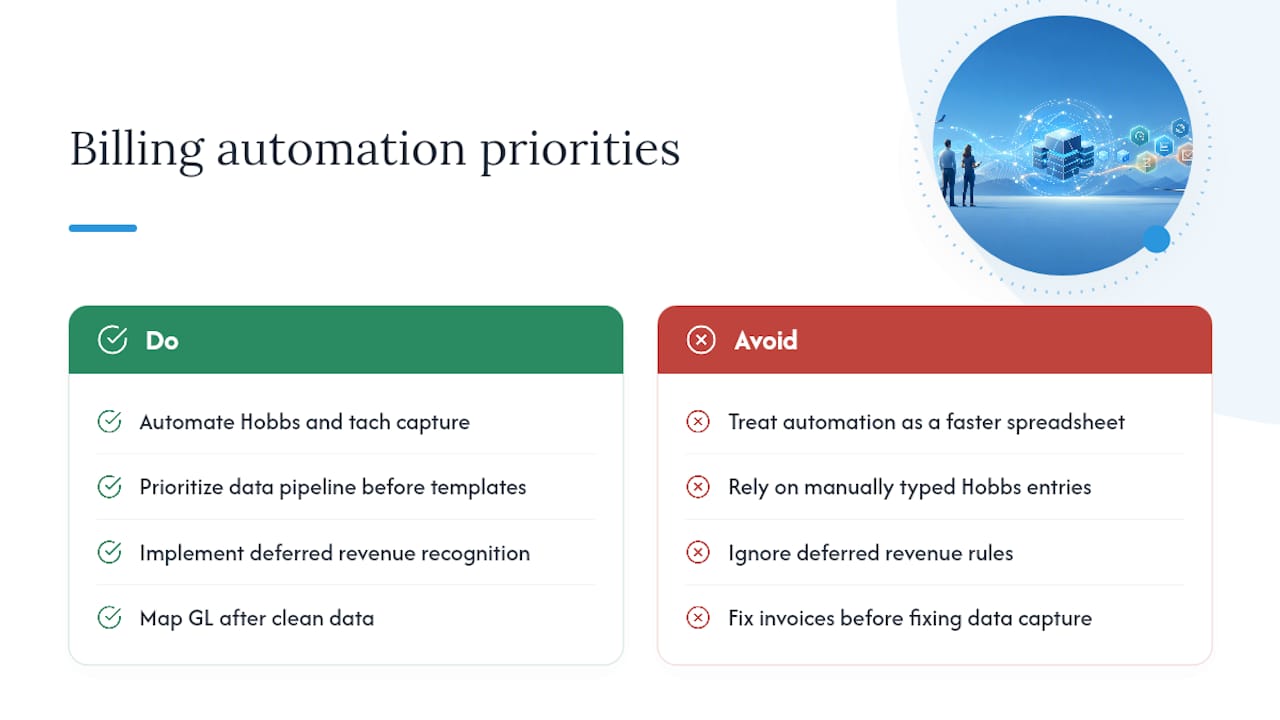
Deferred revenue handling gets overlooked for the same reason. It’s not glamorous, but a school selling block-hour packages without proper revenue recognition is quietly misstating its books every month, and most owners don’t find out until their accountant flags it at tax time.
Prioritize the data pipeline before the invoice template. Everything downstream, from GL mapping to dispute rates, depends on whether the numbers going in were ever touched by a human hand.
— Trent
Get Your Billing and Flight Data Working From the Same Source
SquawkFree closes the gap between flying an aircraft and billing for it, because the same Flight Intelligence data that tracks compliance and maintenance also feeds your invoices. That means no separate Hobbs log to reconcile against your billing records, and no gap between what a student flew and what they were charged. For a flight school running multiple aircraft and instructors, that single source of truth removes an entire category of the errors this article just walked through.

SquawkFree suits flight schools and clubs that need maintenance compliance, scheduling, and billing-ready flight data working together instead of living in separate systems. If your current setup still relies on someone copying Hobbs times off a paper log or a whiteboard, that’s the exact gap SquawkFree’s auto-import closes. Visit SquawkFree to start a trial and see how your fleet’s flight data flows into billing without a single manual entry.
Sources
- NAITEC — Handling billing automation (AVIBILL)
- RESA — Invoice Billing
- StudioFlare — How to collect dance studio payments online (complete guide)
Recommended
No credit card required · read-only after trial