
Three Counter Maintenance Due Tracking to Prevent Missed ADs for GA

Three Counter Maintenance Due Tracking to Prevent Missed ADs for GA
Maintenance due tracking automatically monitors inspections, airworthiness directives, and scheduled tasks by applying live flight data to hours, cycles, and calendar counters. Automation matters because missing any of those three triggers can put an aircraft out of compliance without anyone noticing. Platforms with automated maintenance tracking exist to close that gap, but the legal responsibility for accurate records always stays with you, the owner or operator.
TL;DR:
- Automated systems must accurately track hours, cycles, and calendar age, and alert for any limit reached on the correct counter, not just the most obvious one.
- All maintenance entries, scheduled or unscheduled, require a detailed record including work description, date, signature, and supporting evidence to meet FAA standards.
- Proper setup involves thorough aircraft configuration inventory, correct data source linking, role assignment, and validation with recent physical logbook entries.
- Regular self-audits, physical record checks, and attaching photos to digital records help correct discrepancies and maintain compliance integrity.
- Tracking manufacturer service bulletins and recommendations alongside mandated ADs ensures a comprehensive maintenance view that supports safe, legal aircraft operation.
Table of Contents
- What FAA Recordkeeping Rules Mean for Maintenance Due Tracking
- How Automated Maintenance Due Tracking Actually Works
- Setting Up Maintenance Due Tracking for a Tail or a Fleet
- Best Practices for AD Compliance and Fixing Record Gaps
- KPIs and Dashboards That Prevent Groundings
- Documenting Unscheduled Maintenance and Repairs
- Verifying Data Accuracy and Correcting Record Discrepancies
- Tracking Service Bulletins and Manufacturer Recommendations
- Contributor Perspective: Lessons From Trent at Squawkfree
- How Squawkfree Handles Maintenance Due Tracking
- Sources
What FAA Recordkeeping Rules Mean for Maintenance Due Tracking
Automation only earns its keep if it satisfies the same standard the FAA has always required on paper. 14 CFR §43.9 requires every maintenance entry to describe the work performed, the date it was completed, and the signature and certificate number of the person who approved it for return to service. §91.417 goes further, requiring owners and operators to retain maintenance records and a current status of every applicable AD for as long as the aircraft is in service or until the work recurs.
Any credible tracking system, digital or paper, needs to surface these fields without gaps:
- Work performed and the specific component or system affected
- Date of completion and total time in service at that point
- Signature and certificate number of the approving mechanic or repair station
- AD number, the method used to comply, and the next due date or interval
- Reference to supporting evidence, such as a work order, parts tag, or inspection report
Here’s the distinction that trips up a lot of owners: software manages the process, but it does not replace the signed logbook entry. A dashboard showing “compliant” is not proof of compliance until a certificated mechanic’s signature backs it up. Such platforms exist to organize and surface that evidence, not to substitute for it. Our aircraft recordkeeping guide breaks down entry-by-entry what an inspector expects to see during a ramp check.
How Automated Maintenance Due Tracking Actually Works
Automated systems pull flight data from a handful of sources: ADS-B position and altitude feeds, onboard operations logs, pilot-entered flight reports, and in some fleet operations, ACARS-style data links. Each source needs to deliver at minimum a takeoff/landing timestamp, flight duration, and cycle count (one takeoff and landing equals one cycle). The FAA has noted that this kind of automated integration updates aircraft hours and cycles in real time, which cuts down on the transcription errors that plague spreadsheet-based logs.
Behind that data feed sits a three-counter model that every serious tracking system has to run simultaneously:
- Hours — total time in service, tracked to the tenth
- Cycles — pressurization or landing gear cycles, critical for life-limited parts
- Calendar age — elapsed time regardless of usage, which matters for corrosion inspections and shelf-life components
The system has to fire an alert on whichever counter hits its limit first, not just the most obvious one. A low-utilization trainer might hit a 12-year calendar inspection long before it reaches its hourly interval, while a busy charter airplane trips its cycle-based AD well ahead of its calendar deadline.
Layered on top of the counters is an AD applicability engine. It matches open ADs against your aircraft’s tail number, serial number, and installed STCs, then auto-generates a task or work order the moment a match is found rather than waiting for someone to cross-reference a spreadsheet.
Pro Tip: Verify your aircraft’s STC and modification list is complete before you trust any AD applicability engine. A missing STC record is the single most common reason a system either flags an AD that doesn’t apply or, worse, misses one that does.
Setting Up Maintenance Due Tracking for a Tail or a Fleet
Rolling out automated tracking is a sequencing problem more than a technical one. Skip a step and you inherit bad data that follows the aircraft for years.
- Inventory the aircraft’s configuration. Collect serial numbers for the airframe, engine, propeller, and any life-limited components, along with a full list of installed STCs and appliances.
- Connect your flight-data sources. Link ADS-B feeds or operations logs and confirm hours and cycles are flowing into the system correctly before you go live.
- Configure counters and thresholds. Set life-limited part counters, define notification windows, and map every applicable AD to the specific parts it governs.
- Assign roles and signature authority. Decide who can close out a task, who can approve return to service, and who simply gets notified.
- Run a validation audit. Compare the system’s generated compliance report against physical logbook entries for three to five recent maintenance events before you trust it for daily operations.
A few things are easy to overlook during setup:
- Component swaps that happened years ago but were never logged with a new serial number
- Recurring AD intervals that reset after a terminating action, which the system needs to know about explicitly
- Shared aircraft where multiple owners or renters need visibility but not signature authority
Flight schools have an added wrinkle here: dispatch staff need to see status without being able to edit compliance records, which is where clearly defined roles matter as much as the data itself. A framework like crew resource management offers a useful model for structuring who checks what before an aircraft leaves the ramp.
Best Practices for AD Compliance and Fixing Record Gaps
A defensible AD record answers four questions on demand: what’s installed, which directives apply, what action established compliance, and what’s due next. Build every AD entry around this checklist:
- AD number and revision, plus the specific unsafe condition it addresses
- Method of compliance (inspection, modification, or terminating action)
- Date and aircraft time at last action
- Next due date, hours, or cycles, whichever governs
- Reference to the evidence: work order number, parts tag, or inspector’s signature
AOPA’s guidance on maintenance responsibilities is blunt about where liability sits: owners who assume a shop or a software platform has fully verified compliance, without checking themselves, are the ones who end up grounded or facing an enforcement action. Build a habit of a quarterly self-audit against the current-status record, and always hand over a complete, indexed AD file at the point of sale.
When a gap turns up, whether it’s a missing signature or an AD with no documented method of compliance, the remediation sequence is the same every time. Stop dispatch on the affected aircraft, locate whatever physical evidence exists (work orders, parts tags, prior owner records), get a mechanic to either re-perform the inspection or execute a proper logbook entry, and then update the current-status record so the gap doesn’t reappear next cycle.
Pro Tip: Keep photos of AD-related work, especially parts tags and data plates, attached to the digital record. When a discrepancy surfaces years later, a photo often settles the question faster than a phone call to a shop that may no longer exist.
KPIs and Dashboards That Prevent Groundings
A live status board only earns its place on your desktop if it tracks the right numbers. For fleet managers and owners alike, four metrics matter more than the rest:
- Next due date, broken out by tail number
- Total open ADs across the fleet, with severity flagged
- Days or hours remaining until the next major inspection
- Percent life remaining on each life-limited part
Set alert thresholds conservatively at first, then tighten them once you’ve validated a full quarter of accurate data. Escalating warnings as a part or AD deadline approaches, with a wider blackout window ahead of major checks like an annual or 100 hour inspection, gives your maintenance shop enough lead time to schedule parts and labor instead of scrambling. Industry guides on aircraft maintenance tracking software point to the same pattern: fleets running live dashboards report fewer surprise groundings and noticeably better parts planning, because nobody’s discovering a life-limited part expired mid-scheduling-cycle. Our own breakdown of aircraft maintenance KPIs walks through how to configure these thresholds for a small flight school fleet versus a single owner-flown aircraft.
Documenting Unscheduled Maintenance and Repairs
Unscheduled repairs, a cracked exhaust stack, a squawked alternator, a bird strike, don’t follow your interval calendar, but they demand the same documentation rigor as a routine inspection. The moment a discrepancy is discovered, whether by a pilot, a line mechanic, or an automated diagnostic flag, it needs a written record: what was found, when, and under what conditions.
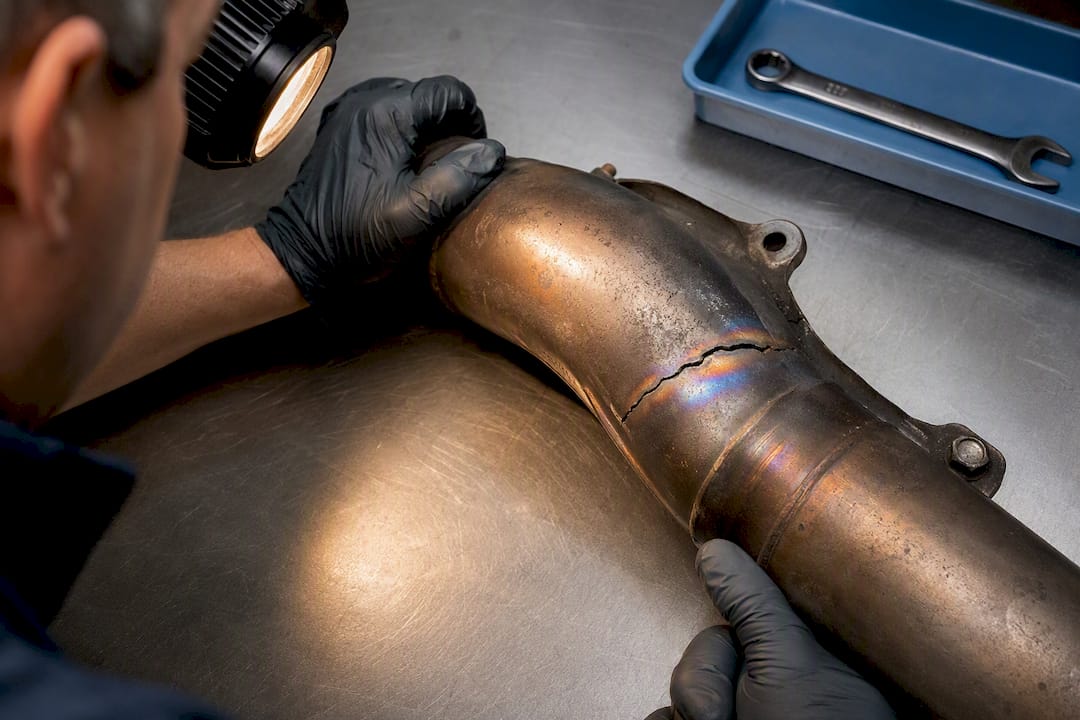
Once repaired, the logbook entry has to meet the same §43.9 standard as any scheduled task: description of the work, parts used, date, hours in service, and the mechanic’s signature and certificate number. Unscheduled work often gets recorded loosely because it happens under time pressure, on the ramp, between flights. That’s exactly when records go missing.
A practical habit: log the discrepancy in your tracking system the moment it’s reported, even before the repair happens. That creates a paper trail showing the aircraft was correctly grounded or restricted, rather than flown with a known issue. When the repair is complete, close out that entry with the actual work performed rather than a vague “repaired as needed” note, since vague entries are exactly what an inspector or a pre-buy examiner will flag first.
Unscheduled maintenance also has a habit of triggering downstream effects. A repaired component might reset a life-limit counter, or a repair might itself become the terminating action for an open AD. Your tracking system needs to catch those connections, not just log the repair in isolation. Our guide on deferred maintenance tracking covers how to handle items that get identified but not immediately resolved, a common outcome of unscheduled squawks that require parts on backorder.
Verifying Data Accuracy and Correcting Record Discrepancies
Automated systems are only as accurate as the data feeding them, and flight-data imports occasionally misfire. A missed ADS-B transmission, a flight logged under the wrong tail number, or a manual entry with a typo can all throw off an hours or cycles counter without triggering an obvious error message.
Run a periodic cross-check between the system’s counter and the aircraft’s physical tach or Hobbs reading. Monthly is reasonable for an active training aircraft; quarterly works for lower-utilization personal aircraft. If the two numbers diverge by more than a fraction of an hour, trace back through the flight log to find where the discrepancy entered.
When you find an error, correct the underlying record rather than just adjusting the displayed total. A counter that’s been manually overridden without an explanation attached is a red flag to any inspector or pre-buy examiner reviewing the file later. Document the correction with a note explaining what was wrong and how it was fixed, the same evidentiary standard you’d apply to a maintenance entry itself.
Component swaps are a frequent source of hidden discrepancies. If a life-limited part gets replaced but its serial number isn’t updated in the system, the new part inherits the old part’s remaining life, which is both wrong and potentially dangerous. Build a habit of confirming serial numbers at every component change, not just at initial setup.
Tracking Service Bulletins and Manufacturer Recommendations
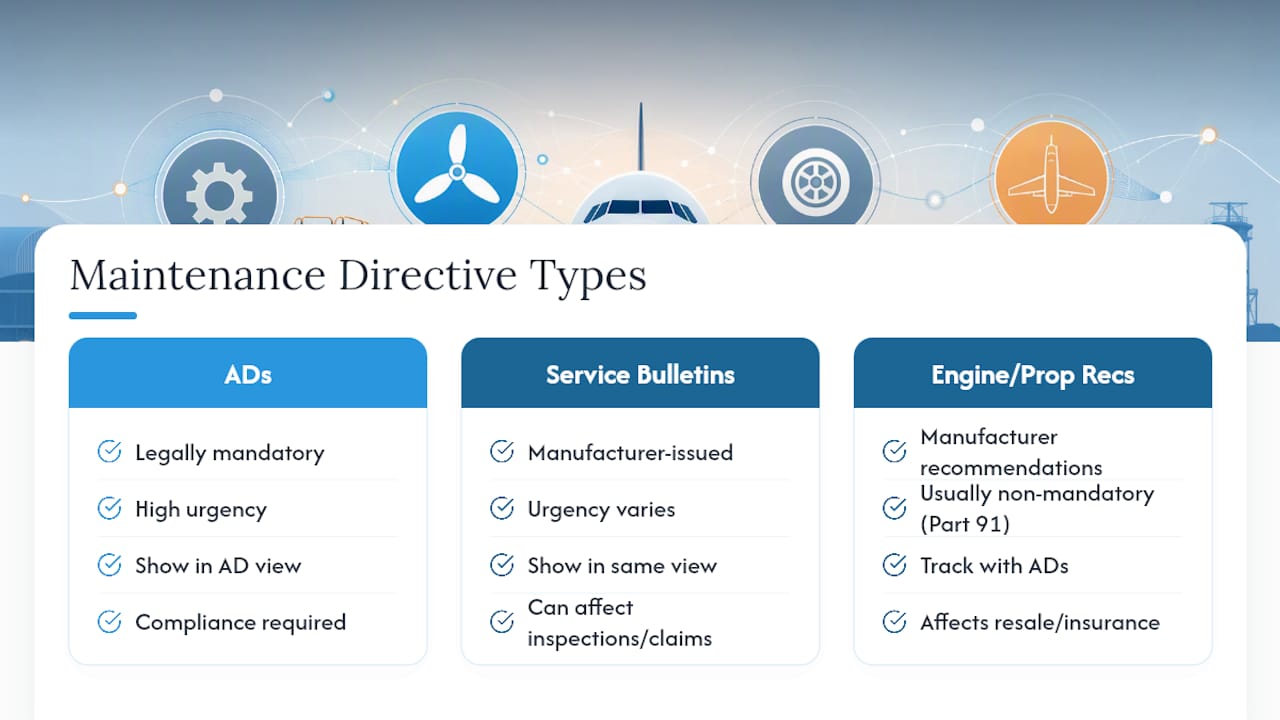
Airworthiness directives are mandatory, but they’re not the only maintenance directive that matters. Manufacturer service bulletins, service letters, and recommended inspection intervals often address the same failure modes an AD eventually covers, sometimes years earlier.
Service bulletins carry varying levels of urgency. Some are purely informational; others are labeled “mandatory” by the manufacturer even though the FAA hasn’t yet issued a corresponding AD. Treating every service bulletin as optional is a common mistake, since an unaddressed mandatory bulletin can become the basis for an airworthiness determination during a pre-buy inspection or an insurance claim after an incident.
A well-configured tracking system should carry service bulletins alongside ADs in the same interface, distinguished by source and compliance status rather than buried in a separate folder. That way, a mechanic reviewing the aircraft’s status sees the full picture: what’s legally mandatory, what the manufacturer strongly recommends, and what’s simply informational.
Don’t overlook engine and propeller manufacturer recommendations either. Time-between-overhaul figures, for instance, are usually manufacturer recommendations rather than FAA mandates for Part 91 operators, but ignoring them routinely creates problems at resale or during an insurance review. Tracking these alongside your AD compliance record, rather than treating them as a separate to-do list, keeps the full maintenance picture in one place.
Contributor Perspective: Lessons From Trent at Squawkfree
The most common onboarding mistake isn’t technical, it’s incomplete configuration. Owners skip serial numbers they think don’t matter, or they never assign signature roles because “it’s just me and my mechanic.” Then an AD applicability check comes back wrong six months later, and nobody can figure out why.
Automation doesn’t remove your obligation to verify records. It removes the tedious part, so you actually have time to check the important part. Automated flight data import features exist to eliminate manual hour entry and produce audit-ready exports on demand, but the signature on that logbook entry is still yours to confirm.
— Trent
How Squawkfree Handles Maintenance Due Tracking
Some software solutions are built specifically around the compliance gap this article just walked through: the space between “the software says compliant” and “a certificated mechanic can prove it.” Automated features can auto-import flight data so hours and cycles update without manual tach reading entry, while AD applicability engines match directives to an aircraft’s actual configuration, not just its model number.

For those managing a single aircraft or a co-ownership group, this means fewer missed AD deadlines and a logbook that’s ready for an inspector or a pre-buy examiner without a weekend of scrambling. Flight schools may benefit across an entire fleet, with multi-counter tracking (hours, cycles, and calendar age) running simultaneously on every tail, so a low-utilization trainer’s calendar inspection doesn’t slip through the cracks. Our guide to ADS-B flight-data integration walks through exactly how the auto-import connects to your existing data sources.
If you’re still tracking maintenance due dates in a spreadsheet or a paper logbook, the next step is straightforward: visit Squawkfree and see how automated tracking applies to your specific aircraft configuration.
Sources
Recommended
No credit card required · read-only after trial