
FAA Ready Electronic Signature Logs for GA: Section 43.9 Checklist

FAA Ready Electronic Signature Logs for GA: Section 43.9 Checklist
Electronic signature logs are acceptable for aircraft maintenance and flight records when the digital entry contains the same required elements as a paper entry and the system follows FAA guidance. That means matching the content rules in 14 CFR §43.9 and §91.417, plus aligning with AC 120-78B. Some platforms are built around exactly that structure.
TL;DR:
- Electronic signature logs must include full name, certificate number, work description, completion date, and aircraft details to meet FAA requirements.
- Operators need formal FAA acceptance, typically through an FSDO or CHDO, with detailed documentation of procedures and signing authority.
- Records must be stored in a human-readable format, tamper-evident, and exportable, with signatures linked to audit trails for inspector review.
- When transferring aircraft ownership, digital records should remain complete, readable, and include signatures and metadata exportable without data loss.
- Digitizing paper logs requires high-resolution scans, OCR verification, and linking scanned pages directly to digital entries to ensure legal defensibility.
Table of Contents
- What Do FAA Regulations Actually Require?
- What Belongs in a Compliant Electronic Signature Log?
- How Do You Get FAA Acceptance for an Electronic System?
- Step-by-Step: Recording a Compliant Electronic Entry
- What Happens to Records When an Aircraft Changes Hands?
- How Should You Digitize Paper Logbooks the Right Way?
- What Should You Have Ready for an FSDO Review?
- What We’re Seeing in the Field
- Getting Your Records FAA-Ready With SquawkFree
- Primary Sources Worth Bookmarking
- Sources
What Do FAA Regulations Actually Require?
Two CFR sections do the heavy lifting here. §43.9 requires every maintenance, preventive maintenance, rebuild, or alteration entry to carry the signature, certificate number, and kind of certificate held by the person who approved the work. §91.417 goes further for aircraft owners, requiring a description of the work performed, the completion date, and the signature and certificate number of the person approving return to service, along with specific retention periods.
Neither section mandates a bound paper book. That opening is where AC 120-78B comes in. The advisory circular describes acceptable elements for electronic signatures and recordkeeping systems and lays out the FAA’s acceptance process, including OpSpec A025 for operators who need formal authorization.
A few things to keep straight as you evaluate any system:
- Advisory Circulars are guidance, not regulation. The FAA expects a system to conform “in all important respects,” which gives you flexibility but not a free pass.
- OpSpec A025 acceptance generally applies to certificated operators; part 91 owners typically coordinate informally with their local FSDO rather than filing for a formal OpSpec.
- The FAA has periodically updated its standards for electronic signatures and recordkeeping, and operators pursuing new authorizations should follow the current version rather than an outdated one.
What Belongs in a Compliant Electronic Signature Log?
Think of this as translating a paper logbook line into structured data fields. Every element the FAA expects on paper needs a digital home, and a few extras earn their place because paper never had to worry about tampering.
- Who: full name, certificate number, and certificate type of the person approving the work or return to service.
- What: a clear description of the work performed, or a reference to the work order, AD, or maintenance task it satisfies.
- When: date of completion, and ideally a timestamp for the signature event itself.
- Where/aircraft identity: tail number and, where relevant, make, model, and total time.
- Certification language: exact return-to-service wording where §43.9 or operational rules require it.
Beyond those fields, AC 120-78B frames a complete electronic record as one that captures who was involved, what happened, when and where, and how the entry was authenticated. Authentication itself can range from a password-protected login with an audit trail to a full cryptographic digital signature, and the guidance explicitly covers both simple electronic signatures and stronger cryptographic methods depending on what the operation needs.
Pro Tip: Build tamper evidence into the record itself, not just the login screen. A time-stamped audit log that shows when an entry was created, edited, or approved is what convinces an inspector the record has not been altered after the fact.
Retention and exportability round it out. Records need to survive in a human-readable, printable format, not locked inside a proprietary file only one app can open.
How Do You Get FAA Acceptance for an Electronic System?
Certificated operators generally need to formally coordinate with their FSDO or CHDO before relying on electronic signatures under OpSpec A025. Part 91 owners face a lighter touch, but a quick conversation with the local FSDO before a system goes into daily use prevents surprises at inspection time.
Whoever you are, the FAA wants to see a written system description before granting acceptance. That description should spell out:
- Who has signing authority within the system and how that authority is verified.
- Step-by-step procedures for creating, correcting, and finalizing entries.
- How records transfer intact when an aircraft or operation changes hands.
A successful submission typically results in a letter of acceptance or an OpSpec A025 entry. Keep the documentation tight and specific. Vague descriptions of “our software handles this” get sent back for revision far more often than submissions that cite exact fields and procedures, mirroring the structure in §43.9.
Step-by-Step: Recording a Compliant Electronic Entry
A clean electronic signature log follows the same logic every time, whether the entry comes from a mechanic finishing an inspection or an owner logging a return to service.
- Create the record at the point of work, capturing aircraft tail number, date, and a description of the task.
- Attach supporting references: the work order, applicable AD number, or parts used.
- Enter certification details, including certificate number and type, tied to the individual account performing the sign-off.
- Authenticate the entry. A password paired with two-factor authentication covers most GA needs; PKI-based digital signatures add stronger assurance for operations that need it, though they add setup overhead most individual owners don’t need.
- Lock the entry so edits generate a new audit trail entry rather than overwriting history.
- Store the record with automatic backup, and confirm it can be exported as a human-readable file.
The FAA’s own legal interpretation confirms entries don’t need to live in a physical book. Records made on a separate durable document satisfy the regulation as long as the required content is captured and the owner retains it per §91.417.
What Happens to Records When an Aircraft Changes Hands?
Records stay with the aircraft, not the owner. §91.417 requires most maintenance records to transfer with the aircraft at sale, and they need to remain intact and readable by the next owner.
Before any transfer, run through this short list:
- Confirm your system produces a printable, human-readable bundle, not just an in-app view.
- Verify signatures and audit trails stay linked to their original entries after export, not stripped out as plain text.
- Check that metadata (dates, certificate numbers, aircraft identification) exports along with the narrative text.
- Keep a copy for your own records even after the sale, in case a question arises later.
AC 120-78B specifically calls out this exportability requirement, expecting operators to document transfer procedures in their manuals rather than improvising at closing.
How Should You Digitize Paper Logbooks the Right Way?
Scanning decades of paper logbooks is where most digitization projects either succeed or quietly create new problems. Resolution and file format matter less than most owners assume; process and verification matter more.
- Scan at a minimum of 300 dpi, and save as searchable PDF or high-resolution TIFF rather than compressed JPEG.
- Capture metadata at the point of scan: aircraft tail number, logbook volume, and page range, so files stay organized before they ever get filed.
- Run OCR to make text searchable, but treat the raw output as a draft, not a final record.
- Have a human verify names, certificate numbers, and dates against the original scan before the record gets marked final.
OCR software misreads handwriting more often than most owners expect, especially with older logbooks and cursive signatures. Pairing automated extraction with human verification is what keeps a digitized record legally defensible rather than just tidy-looking.
Pro Tip: Link every scanned page directly to its corresponding electronic entry, not just to a folder. If an inspector questions a digital record, you want to pull up the original signature image in one click, not dig through a shared drive.
What Should You Have Ready for an FSDO Review?
Inspectors reviewing electronic signature logs check the same substance they’d check in a paper book, plus a few digital-specific items.
- Confirm every required field is present: description, date, signature, certificate number, and certificate type.
- Show that the system prevents silent edits, meaning any change generates a visible audit entry.
- Have exported, human-readable records ready to hand over, along with a printed sample if requested.
- Bring your written system description, SOPs for entry creation and correction, and evidence that staff were trained on the process.
Presenting organized documentation upfront tends to shorten the conversation considerably. Inspectors spend more time on systems that make them dig for answers than on ones that lay the procedures out clearly from the start.
What We’re Seeing in the Field
Owners who move to electronic signature logs almost always cite the same benefit: fewer missed AD entries and less time hunting for a signature buried in a decade-old logbook. Automated flight data import removes an entire category of transcription error, since nobody’s re-typing tach times by hand.
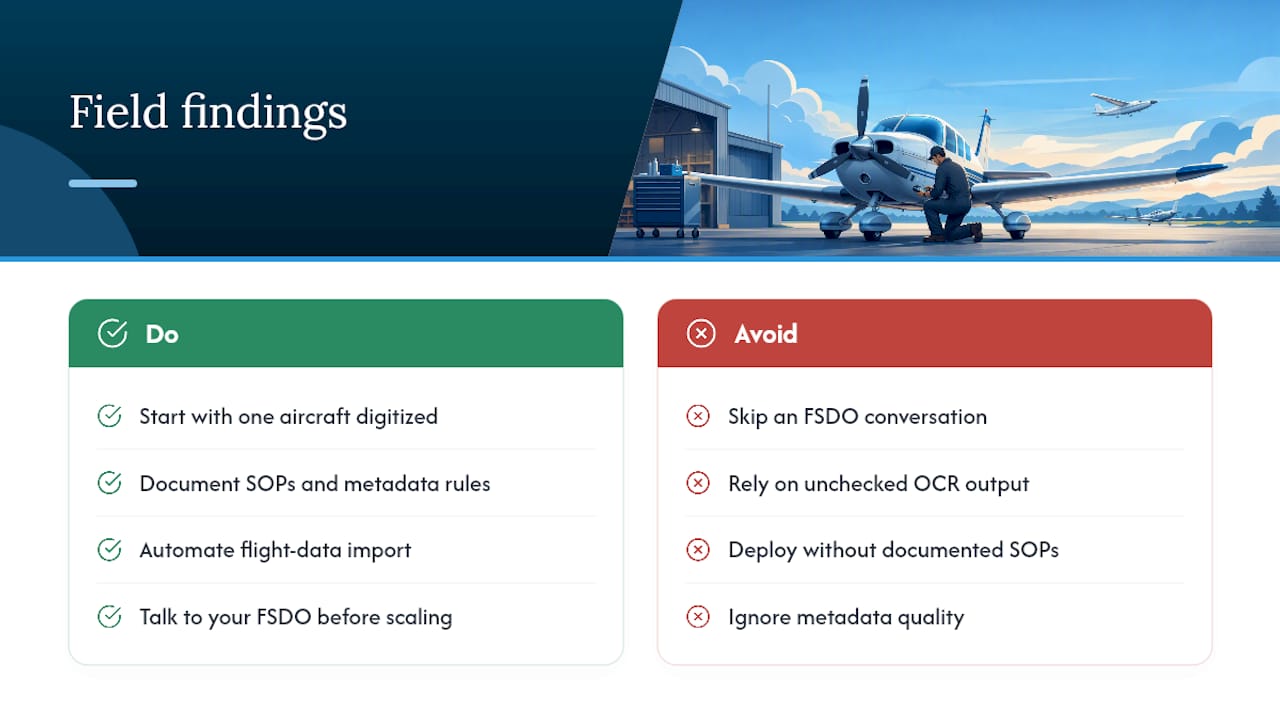
The pitfalls are consistent too. Weak metadata, missing SOPs, and OCR output nobody double-checked cause more compliance headaches than the technology itself. Skipping a quick FSDO conversation before going live is the mistake that costs owners the most time later.
Start small. Digitize one aircraft, document your procedures, and talk to your FSDO before scaling to a full fleet.
— Trent
Getting Your Records FAA-Ready With SquawkFree
There are practical alternatives to juggling paper logbooks and spreadsheets for owners who need records that hold up under FAA scrutiny. Some digital solutions provide electronic logbooks structured around §43.9’s required fields, include automated AD tracking, and features that auto-import flight data instead of requiring manual entry.

Some digitization services pair OCR with human verification, so scanned signatures and certificate numbers get checked by a person before they become part of a permanent record. Export tools that keep audit trails and signatures linked together are important when an aircraft changes hands or an inspector asks for a human-readable bundle.
If you’re weighing whether your current recordkeeping would survive a close look from your FSDO, start with a trial and see how your existing logs map onto a compliant electronic system.
Primary Sources Worth Bookmarking
- §91.417 Maintenance Records: required entry content and retention rules for owners.
- 14 CFR §43.9: signature, certificate number, and certificate type requirements for maintenance entries.
- AC 120-78B: FAA guidance on electronic signatures, recordkeeping, and the OpSpec A025 acceptance process.
- FAA Legal Interpretation on §43.9(a)/§43.11(a): confirmation that entries need not sit in a physical book.
- EasyFlow’s overview of workflow compliance: general framing of audit-trail practices applicable to recordkeeping workflows.
Sources
- § 91.417 Maintenance records. — eCFR
- 14 CFR § 43.9 - Content, form, and disposition of maintenance records — LII / Cornell
- AC 120-78B — Acceptance and use of electronic signatures, electronic recordkeeping, and electronic manuals — FAA
- Request for Legal Interpretation of 14 C.F.R. §§ 43.9(a) and 43.11(a) — FAA
Recommended
No credit card required · read-only after trial