
Close in an Hour: GL Correct Flight School Invoicing

Close in an Hour: GL Correct Flight School Invoicing
Flight school invoicing should convert Hobbs or tach time into line-item invoices automatically, route each charge to the correct revenue account, and sync that data to your accounting system in real time. Done right, this means aircraft rental, instructor time, fuel surcharges, and landing fees never get lumped into a single mystery line. You close the books faster, students get statements they can actually understand, and your CFI doesn’t spend Friday afternoons reconstructing last week’s flights from memory.
TL;DR:
- An automated invoicing system should accurately import flight data from Hobbs or tach readings into itemized invoices, avoiding manual re-entry and errors.
- Proper mapping of each charge to a specific revenue account is essential to generate detailed financial reports that distinguish aircraft rental, instructor fees, and surcharges.
- Handling deferred revenue correctly involves posting prepayments as liabilities and recognizing revenue as hours are flown, with scheduled reports to satisfy auditors.
- Transitioning to new invoicing software requires full parallel runs and testing to prevent duplicate entries or missing records, especially for deferred revenue and open receivables.
- Integration of flight data via real-time sync improves bookkeeping accuracy, reduces month-end cleanup, and supports detailed exportable reports for reconciliation.
Table of Contents
- What Makes Flight School Billing So Messy?
- What Should a Flight School Invoicing System Actually Do?
- Real-Time Sync or Nightly Batch: Which One Protects Your Close?
- How Do You Invoice Deposits and Payment Plans Correctly?
- How Do You Evaluate and Roll Out a New Invoicing System?
- How Flight Intelligence Removes Manual Entry From Invoicing
- Why Investing in Flight-School-Specific Invoicing Pays Off
- Get Flight Data and Invoicing Working From the Same Source
- Sources
- FAQ
What Makes Flight School Billing So Messy?
Most flight school billing problems start the same way: someone is retyping numbers that already exist somewhere else. The Hobbs meter or tach reading gets written on a piece of paper, texted to the front desk, or entered into a spreadsheet, and each handoff is a chance for a typo or a forgotten line item.
That manual gap is only the first problem. A single training flight often generates four or five distinct charges. Aircraft rental, instructor time, fuel surcharge, landing fees, and sometimes a simulator block all need to land in different revenue accounts. But when invoices get built by hand, they tend to collapse into one flat “flight training” line. That makes your income statement useless for answering basic questions, like whether your Cessna 172 or your Cirrus SR20 is actually more profitable per flight hour.
Prepaid packages add another layer. A student who buys a 40-hour block up front isn’t generating revenue the day they pay. They’re generating a liability that your school works off hour by hour, and if your invoicing system doesn’t track that, you either recognize revenue too early or lose track of how many hours are left on the package entirely.
Batch-based accounting exports make things worse before they make them better. Many scheduling platforms handle the calendar side of a flight school well but treat billing as an afterthought, dumping a lump sum into QuickBooks overnight rather than posting itemized detail. That forces your bookkeeper to manually reclassify entries every month just to see where the money actually came from.
Common friction points that show up during month-end cleanup include:
- Hobbs and tach readings entered manually, hours after the flight, with no record of who verified them
- Aircraft, instructor, and fee revenue merged into a single undifferentiated line
- Prepaid packages with no clear schedule for how much revenue has actually been earned
- Nightly batch exports that post one lump sum instead of itemized detail
- Deposits and no-show fees that get collected but never reconciled against the right invoice
Collections add a final wrinkle. Deposits held against future lessons, no-show fees, and partial refunds all need clear rules, or every disputed charge turns into a phone call your front desk staff didn’t have time for.
What Should a Flight School Invoicing System Actually Do?
A flight school invoicing system earns its place in your stack by doing six things well. Miss any one of them, and you’re back to spreadsheets and end-of-month guesswork.
- Auto-generate itemized invoices straight from flight data. The system should pull Hobbs or tach readings and signed instructor time directly into the invoice, without a staff member retyping numbers from a logbook or a text message.
- Map every line item to the right GL account. Aircraft rental revenue, instructor revenue, landing fees, and fuel surcharges each need their own account so your income statement actually tells you which parts of your operation make money.
- Handle deferred revenue correctly. When a student buys a prepaid block, the invoicing system should post that payment as a liability and recognize revenue only as hours are flown or milestones reached, not the day the check clears.
- Fix mistakes with credit memos, not journal hacks. When an invoice is wrong, the correct workflow issues a credit memo against the original and a clean replacement invoice, rather than a manual journal entry that only your bookkeeper understands six months later.
- Track receipts, unapplied payments, and aging AR. You need to see at a glance which students are current, which are 30 or 60 days out, and which payments haven’t been matched to an invoice yet.
- Export reports that support real reconciliation. AR aging, training revenue by aircraft or instructor, and deferred revenue schedules should be one export away, not a project.
Line-item clarity isn’t just an accounting nicety. Research on invoice best practices shows that clear breakdowns and defined payment terms measurably reduce disputes and speed up collections, which matters even more when your customer base is students juggling tuition, rent, and flight fees on the same budget.
The deferred revenue piece deserves special attention because it’s where most flight schools get audited and flinch. The correct approach records the initial customer payment as a liability, then recognizes revenue incrementally as hours are flown or milestones are hit. Your invoicing system should be able to produce a schedule showing exactly how much of a prepaid package has been earned versus how much is still owed in flight hours, because that’s the first document an auditor or a new CFO will ask for.
Correction workflows matter just as much as generation workflows. Every flight school eventually issues a wrong invoice, whether from a fuel surcharge miscalculation or a duplicate landing fee. The clean fix is a credit memo against the original invoice paired with a corrected replacement, which keeps your audit trail intact. A structured invoice management approach treats corrections as first-class transactions, not something to bury in a memo field.
Pro Tip: Ask any vendor you’re evaluating to show you a deferred revenue schedule for a hypothetical 20 hour prepaid package, mid-use. If they can’t produce one in a live demo, assume your bookkeeper will be building that schedule by hand every month.
For a closer look at how Hobbs data flows into GL-mapped invoices in practice, see how automation handles Hobbs-to-GL mapping.
Real-Time Sync or Nightly Batch: Which One Protects Your Close?
Real-time sync posts each invoice to your accounting system the moment it’s generated, with the correct GL codes attached. Nightly batch exports wait until the end of the day, and many only push a single summarized total rather than itemized detail. The difference shows up every month-end: real-time sync means your books are already correct when you sit down to close, while batch exports usually mean an hour or two of manual reclassification before the numbers make sense.
Mapping your chart of accounts correctly on day one avoids most of that cleanup entirely. Aircraft rental, instructor fees, landing fees, and fuel surcharges each need a dedicated revenue account, and your invoicing system needs to know which line item goes where before the first invoice is ever generated. Get this wrong at setup, and every invoice for the next quarter needs a manual fix.
If you’re moving off QuickBooks Desktop or off a spreadsheet-based system, a few steps keep the transition from becoming a mess:
- Export historic invoices and reconcile any open accounts receivable before you cut over
- Migrate deferred revenue balances as a distinct line item, not folded into general revenue
- Run a full parallel month-close, with both the old and new systems live, before retiring the legacy process
- Test a sample of line-item mappings against your actual chart of accounts before going live school-wide
A safe migration typically runs a full month in parallel, reconciling open AR, deferred revenue, and last-period adjustments before the old system is switched off. Skipping that parallel period is the single most common reason flight schools end up with duplicated entries or missing line-item detail three months after a “successful” migration.
Streamlined payment integration pays off beyond bookkeeping convenience, too. Research on midsize business payment processes shows that tighter integration between invoicing and payments improves collections and the customer experience, which for a flight school means fewer awkward conversations about overdue balances.
How Do You Invoice Deposits and Payment Plans Correctly?
Career-pilot programs almost never ask for full tuition up front; many aspiring pilots benefit from specialized training resources like those offered by the Academy at Dronable to support their education journey. ATP’s Airline Career Pilot Program, for example, uses a deposit followed by several milestone payments, with FAA examiner fees and third-party app costs billed separately as they come up. Academies that publish fixed program pricing tend to follow the same pattern: a deposit plus a handful of installments, with students commonly combining self-pay funds, private loans, and VA benefits to cover the total.
That structure means your invoicing system has to track more than a single balance due. Each installment needs its own due date, its own invoice, and a clear record of whether it’s been paid, and your statements need to show students exactly which milestone they’ve reached and what’s still owed.
Deposits bring their own classification question. A refundable deposit is a liability until it’s earned or returned, while a non-refundable deposit can typically be recognized once the enrollment terms make it non-contingent. Get this distinction wrong and you’ll either overstate revenue early or understate a real liability sitting on your books.
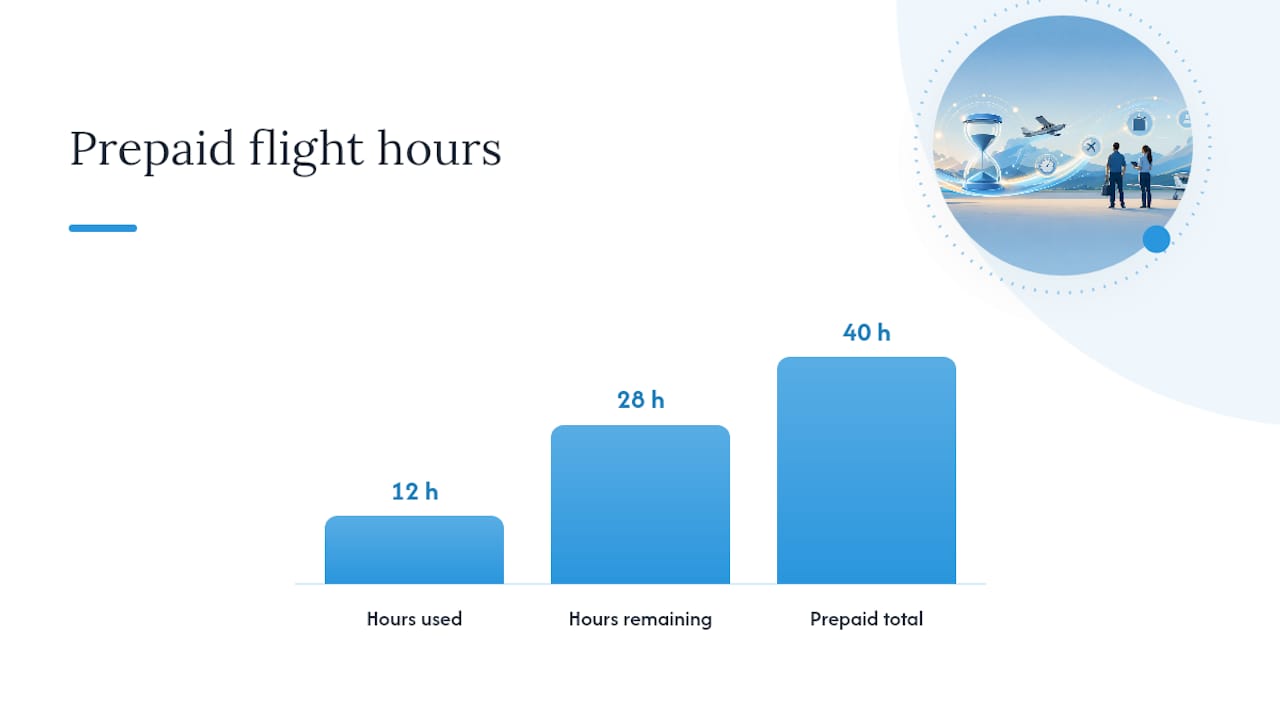
Prepaid hour packages need the same discipline. If a student buys 40 hours and flies 12, the invoice or statement should show 28 hours remaining, not just a dollar balance, because dollar balances are exactly where “how many hours do I have left” disputes start.
A few practices keep student payment plans from becoming a collections headache:
- Issue a separate invoice for each milestone payment, not one long-running tab
- Classify deposits as refundable or non-refundable at the moment of sale, not after a dispute
- Show remaining hours, not just remaining dollars, on prepaid package statements
- Record third-party financing disbursements as a distinct payment source so reconciliation doesn’t require guesswork
Third-party financing adds one more moving part. When a student uses an outside lender to fund training, your invoicing system needs to record that disbursement separately from a personal payment, since the remittance timing and reconciliation process differ. Financing partners commonly advertise fast approval and flexible repayment, but from your side, the operational question is whether your AR ledger can tell the difference between “paid by student” and “paid by lender” without extra manual work. For guidance on structuring billing policies students will actually understand, review this flight school billing policy checklist.
How Do You Evaluate and Roll Out a New Invoicing System?
Choosing a flight school invoicing platform comes down to five real questions, not a features list a salesperson reads off a slide. Ask each vendor to demonstrate, live, rather than describe in the abstract.
- How deep is the automation, really? Does the system pull Hobbs or tach data and instructor sign-offs directly into an invoice, or does someone still need to enter numbers manually?
- Can it map to your actual chart of accounts? Confirm it supports separate GL codes for aircraft, instructor, fees, and fuel surcharges, not a single generic training-revenue bucket.
- Does it handle deferred revenue as a real workflow? It should generate a schedule showing what’s been earned against a prepaid package, not just a running balance.
- How does it fix mistakes? The answer should be credit memos and replacement invoices, never “we’ll adjust it in a journal entry.”
- Can you get your data out? Confirm exportability for AR aging, revenue-by-aircraft, and deferred revenue schedules, plus what happens to your records if you ever switch providers.
Rolling out a new system safely means resisting the urge to flip the switch for the whole fleet at once. Pilot the new invoicing workflow with one aircraft or one route first, train the front-desk and accounting staff on that smaller scope, and migrate a sample of open receivables to confirm the mapping works before touching the rest of your fleet. Run one full parallel month-close alongside your existing process before retiring it.
Watch for red flags during vendor demos: a system that can only produce a summarized nightly export, one that has no real answer for deferred revenue, or one where “correcting an invoice” means calling support. Any of those is a sign the platform was built for scheduling first and billing second.
Pro Tip: During your pilot month, ask your bookkeeper to reconcile the new system’s export against your old process line by line. If the numbers match without manual adjustment, you’ve found a platform worth trusting with the rest of your fleet. For a breakdown of what different platforms charge relative to what they actually automate, see this look at flight school software costs.
How Flight Intelligence Removes Manual Entry From Invoicing
Every invoicing fix above depends on one thing: trustworthy flight data at the source. SquawkFree’s Flight Intelligence feature auto-imports flight data, which means the Hobbs or tach entry feeding your invoice was never retyped by a tired front-desk employee at 6 p.m.
That matters for accounting integrity in a few concrete ways:
- Invoices start from imported flight data instead of a handwritten logbook entry or a text message
- Fleet records stay centralized, which supports the kind of line-item GL mapping your bookkeeper needs for clean reporting
- Exportable records give your accounting staff the AR aging and training-revenue detail needed for reconciliation, without rebuilding it from scratch each month
- Read-only account access remains available for at least two years after cancellation, so historical invoice data isn’t lost during a platform transition
If your school is evaluating a direct path to cleaner invoicing rather than another scheduling add-on, the SquawkFree Flight School plan is built around exactly this problem.
Why Investing in Flight-School-Specific Invoicing Pays Off
Generic billing tools save you an afternoon. Flight-school-specific invoicing saves you every month, because Hobbs-driven line items and deferred revenue tracking are the difference between a close that takes an hour and one that takes a week of detective work. Start small: pilot automation on one aircraft, prioritize GL-correct exports, and run one parallel month-close before you trust the system with your whole fleet.
— Trent
Get Flight Data and Invoicing Working From the Same Source
SquawkFree gives flight schools a way to stop rebuilding invoices from scratch every billing cycle. Flight Intelligence auto-imports flight data from ADS-B, so the Hobbs and tach numbers behind every invoice line are already accurate before your front desk ever opens a spreadsheet, and the platform’s AD compliance tracking and fleet recordkeeping mean your accounting exports carry the same detail your maintenance logs do.

Flight school invoicing plans often offer monthly or annual subscriptions with role-based access for instructors, dispatchers, and accounting staff to see relevant information. If you’re migrating off a legacy system, migration from MyFBO is free, and existing logbook records can be digitized through the Logbook Digitization service starting at $299 one-off per aircraft. Set up a demo through SquawkFree and pilot it against one aircraft in your fleet before your next month-close.
Sources
- Airline Career Pilot Program Cost | ATP Flight School
- Professional Pilot Program Cost 2026: Price & Payment Options | Acron Aviation Academy
- 7 things to include on an invoice to get paid | Forbes
- QuickBooks payments research
FAQ
Can You Deduct Flight School Costs on Taxes?
Flight training costs can sometimes qualify as a deductible business expense or education credit, but eligibility depends heavily on whether the training maintains or improves skills for a current job versus qualifying you for a new career. Consult a tax professional for your specific situation, since the rules differ based on employment status and program type.
Is It True That Most Flight Students Quit Before Finishing?
Dropout rates in flight training are a real concern across the industry, and cost, scheduling, and unclear billing are commonly cited factors. Clear, itemized invoicing and transparent prepaid package tracking won’t fix every reason a student leaves, but confusion over what they’ve paid for and how many hours remain is a preventable one.
How Do Most Students Pay for Flight School?
Most students use a mix of funding sources rather than paying tuition in one lump sum. Career-pilot programs commonly structure payment as a deposit followed by milestone installments, and many students combine self-pay funds, private loans, scholarships, or VA benefits to cover the total cost.
How Do You Get Tuition Reimbursement for Flight School?
Tuition reimbursement for flight training typically comes through an employer education benefit, veterans’ benefits like the GI Bill, or third-party financing arranged directly with the school. Check with your school’s financial aid or billing office about which programs it’s approved to work with, since eligibility and paperwork requirements vary by funding source.
What Should a Flight School Invoice Include?
A complete flight school invoice should list the aircraft, instructor time, landing fees, and fuel surcharges as separate line items, along with clear payment terms and contact information. Well-structured invoices with clear breakdowns reduce disputes and help students understand exactly what they’re paying for.
Recommended
No credit card required · read-only after trial