
Stop Unsafe Flights in 90 Days: Flight School Dispatch for Managers
Stop Unsafe Flights in 90 Days: Flight School Dispatch for Managers
An effective flight school dispatch process links scheduling, preflight checks, maintenance status, and billing into one system, so an unairworthy aircraft can never leave the ramp by accident. The single best way to get there is software that enforces hard blocks automatically, imports flight data without manual entry, and produces an audit trail on demand. There are software options that build toward exactly this model.
TL;DR:
- The dispatch system must enforce automatic hard blocks for overdue inspections, safety-critical squawks, and expired documentation to prevent unairworthy aircraft from flying.
- Configuration of hard versus soft warnings is crucial, with hard blocks for safety issues and soft warnings for near-expiry items, requiring documented overrides for soft warnings.
- Automated flight data import from sources like ADS-B and Hobbs meters reduces errors, accelerates billing, and ensures accurate maintenance and flight logs.
- Continuous maintenance recordkeeping linked to scheduling constraints is essential for passable FAA audits, with exportable audit packs for inspections.
- A phased rollout, with clear roles and contingency plans for disruptions, minimizes operational risks during the transition to software-led dispatch systems.
Table of Contents
- What Does the Flight School Dispatch Process Actually Involve?
- What Software Features Does Reliable Dispatch Require?
- How Do You Configure Hard Blocks Versus Soft Warnings?
- Best Practices for Preflight Checks and Squawk Reporting
- How Should Flight-Data Import and Logbook Linkage Work?
- Keeping Maintenance Records Audit-Ready Year Round
- Automating Billing: Hobbs Time, Lesson Types, and Instructor Pay
- Your First 90 Days: A Rollout Checklist
- Emergency Procedures and Contingency Planning in Dispatch
- What Flight Schools Get Wrong When They Move to Software-Led Dispatch
- Bring Your Dispatch Process Onto One Platform
- Resources for Deeper Implementation Detail
- Sources
- FAQ
What Does the Flight School Dispatch Process Actually Involve?
Dispatch is not one event. It’s a chain of checks that runs from the moment a student requests a booking to the moment the aircraft is billed and logged. Each link in that chain needs to hold, or the whole process breaks down somewhere you won’t notice until an audit does.
Here’s how it should run in a well-run flight school:
- Request intake. A student or renter requests a time slot; the dispatch board shows real-time availability for aircraft and instructors side by side.
- Automated eligibility checks. The system verifies aircraft airworthiness status, instructor and pilot currency, and document expirations before the slot can be confirmed.
- Confirmation. The booking locks only after every check clears. No dispatcher has to remember to look anything up.
- Mobile handoff. The pilot or instructor pulls up the preflight checklist on a phone or tablet at the aircraft.
- Post-flight ingestion. Flight data flows back in automatically, triggering maintenance counters and billing in the same step.
Skip any one of these steps manually, and you’re relying on a dispatcher’s memory during a hectic Saturday morning. Integrated scheduling and maintenance systems close that gap by blocking unairworthy aircraft from ever appearing as bookable.
What Software Features Does Reliable Dispatch Require?
A dispatch system is only as good as the features underneath it. When you’re evaluating a platform, look past the interface and check whether it actually enforces the rules you need enforced.
- A scheduling engine with configurable hard and soft blocks, plus resource groups for aircraft, instructors, and simulators.
- Mobile squawk logging that updates the calendar the moment an issue is reported, not hours later.
- Automated flight-data import with logbook linkage, so Hobbs time and flight legs post without retyping.
- An AD/SB library mapped to individual aircraft and serial numbers, with exportable audit packs that are ready for inspection.
- Role-based access with signed release-to-service workflows, so only qualified personnel can clear an aircraft back to flying status.
- Billing automation that maps Hobbs time to lesson types and general ledger codes.
Pro Tip: Ask any vendor to show you a sample exportable audit pack before you sign anything. If they can’t produce one in the demo, they can’t produce one during an actual FAA ramp check either.
How Do You Configure Hard Blocks Versus Soft Warnings?
Not every problem should stop a flight, but some absolutely must. The distinction between a hard block and a soft warning is where most schools either get dispatch right or get it dangerously wrong.
Hard blocks should trigger automatically for:
- Overdue recurring inspections used in flight schools, such as 100-hour or annual inspections.
- Unresolved safety-critical squawks (anything affecting flight controls, engine, or structural integrity).
- Expired airworthiness certificates or missing required documents.
Soft warnings work better for lower-risk items:
- A pilot’s medical or flight review expiring within a configurable window, like 14 or 30 days out.
- An inspection coming due soon but not yet overdue.
When a dispatcher does need to override a soft warning, the system should require a documented reason and timestamp the decision under that dispatcher’s login. Overrides on hard blocks should be restricted to a designated maintenance authority, never a front-desk scheduler.
Best Practices for Preflight Checks and Squawk Reporting
The preflight check is where real-world problems first surface, and how you handle that moment determines whether small issues stay small.
- Require completion of a mobile preflight checklist before any aircraft is marked as departed, especially for renters and solo students.
- Have pilots categorize squawks by severity the moment they’re reported, not after the flight debrief.
- Let the system auto-generate a maintenance ticket from any submitted squawk, attaching it to that aircraft’s record instantly.
- Make ticket status visible to schedulers immediately, so the next booking reflects reality.
Mobile-accessible defect logs that update the calendar in real time cut out the phone calls and sticky notes that used to be standard at busy flight schools. A simple SOP helps here: pilots report squawks before they leave the ramp, and dispatchers confirm the aircraft’s new status before releasing the next booking.
How Should Flight-Data Import and Logbook Linkage Work?
Manual logbook entry is where errors creep in, and it’s also the slowest part of most schools’ billing cycle. Automating this step solves both problems at once.
Good systems pull from multiple sources:
- ADS-B telemetry feeds.
- Direct Hobbs meter ingestion.
- Connected onboard devices.
The essential fields to capture on every flight are tail number, pilot in command, Hobbs start and stop times, individual flight legs, and the split between PIC and dual instruction hours. Validation matters just as much as capture: duplicate-entry detection, a human-verification window before data locks in, and a secure audit trail for any manual correction.
Schools running disconnected maintenance logs and booking calendars deal with daily reconciliation work that automated import eliminates almost entirely. The payoff shows up fastest in billing turnaround and in inspection counters that update themselves instead of waiting on someone’s end-of-week data entry.
Keeping Maintenance Records Audit-Ready Year Round
An auditor doesn’t care how busy your dispatch desk was last month. They care whether every inspection, AD, and signoff traces cleanly from the aircraft record to a signature. Building that trail has to happen continuously, not the week before a visit.
- Map recurring inspections directly to scheduling constraints, so an aircraft due for its 100-hour physically cannot be booked past that limit.
- Maintain an AD/SB library keyed to manufacturer serial number, so effectivity checks run automatically against your actual fleet rather than a generic list.
- Structure work orders so discrepancies, parts, labor, and the release-to-service signoff all live on one linked record.
- Generate exportable audit packs on demand, with full change history attached.
That linked workflow, from discrepancy capture through signed release, is what separates a school that passes a surprise ramp check calmly from one that spends a week scrambling through paper files. This approach to aircraft recordkeeping follows this same structure.
Automating Billing: Hobbs Time, Lesson Types, and Instructor Pay
Billing errors erode trust faster than almost anything else in flight school operations. Students notice when they’re overcharged for taxi time, and instructors notice when their pay splits don’t match logged hours.
- Map Hobbs or flight time to specific lesson types and general ledger codes automatically, rather than leaving categorization to whoever’s at the front desk.
- Build in a verification window before invoices finalize, catching data errors before a student sees a bill.
- Calculate instructor pay and split payouts directly from the same flight-data feed used for student billing.
- Handle cancelled or maintenance-cancelled flights with a clear reconciliation path so nobody gets billed for a flight that never happened.
Getting this right once means it stays right on every subsequent flight.
Your First 90 Days: A Rollout Checklist
Moving to a fully integrated dispatch process works best in phases, not a single flip-the-switch weekend.
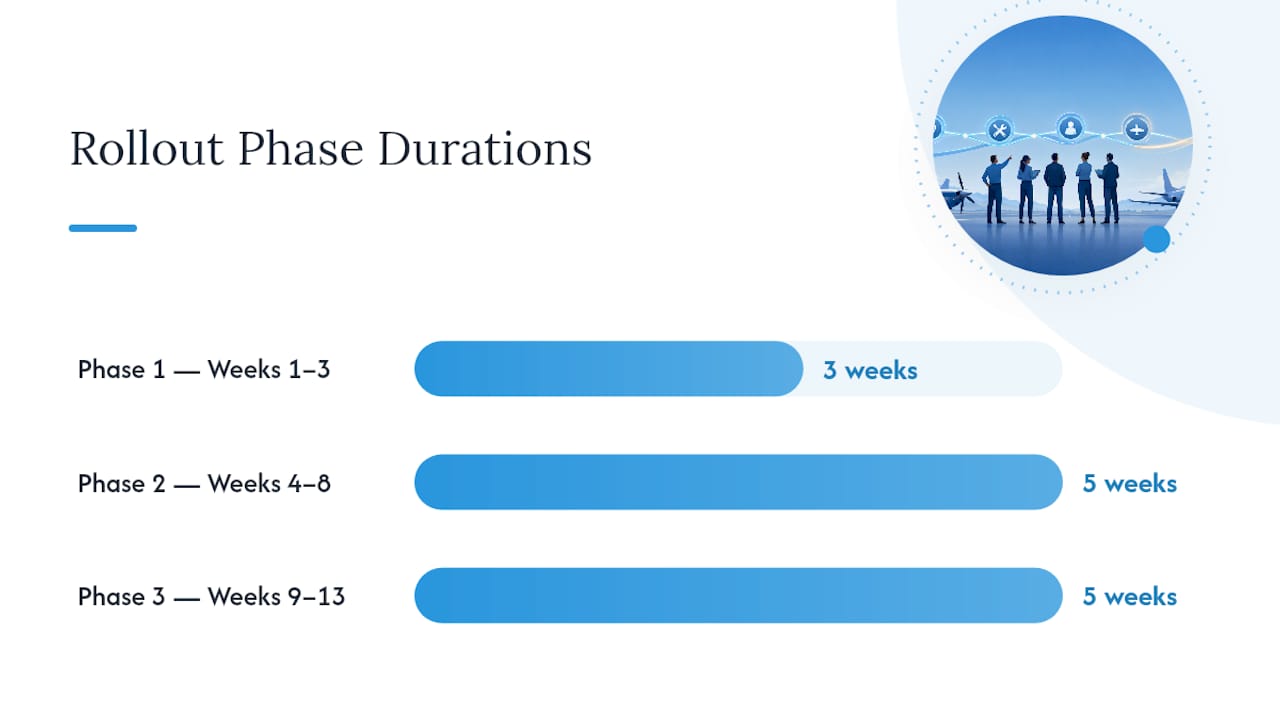
- Phase 1 (weeks 1 to 3): Audit existing data, configure your hard and soft block rules, and import rosters for aircraft, instructors, and students.
- Phase 2 (weeks 4 to 8): Turn on telemetry import, set up squawk reporting workflows, and train dispatchers and instructors on the new system.
- Phase 3 (weeks 9 to 13): Enable billing automation, validate your first audit exports, and run a mock audit before a real one catches you unprepared.
Assign clear owners: a dispatch admin for scheduling rules, a maintenance lead for AD/SB accuracy, a billing operator for invoice reconciliation, and a compliance reviewer to sign off on audit readiness. Setting up instructor availability correctly during Phase 1 prevents a wave of scheduling conflicts later.
Pro Tip: Run your mock audit in Phase 3 using last month’s real data, not a clean test file. Problems in your actual records won’t show up in a sample dataset built to look tidy.
Emergency Procedures and Contingency Planning in Dispatch
A dispatch system built only for good weather and healthy aircraft fails exactly when you need it most. Contingency planning has to be built into the workflow, not bolted on as an afterthought.
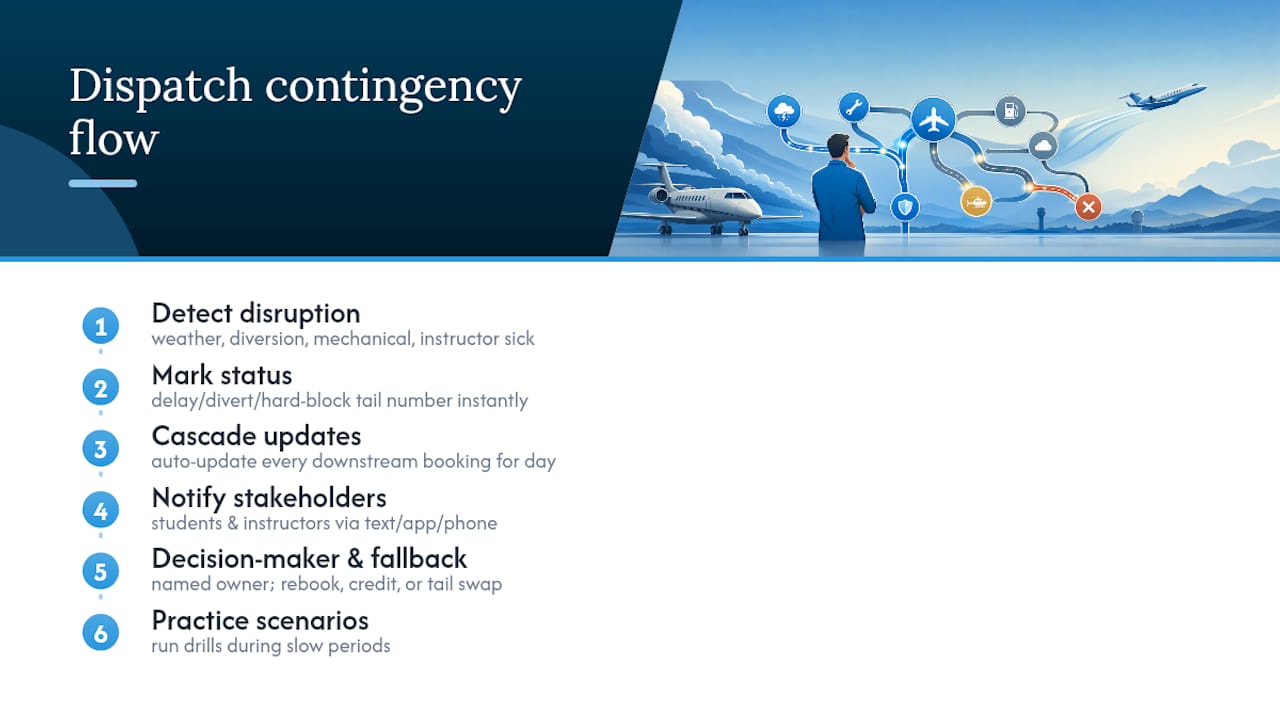
Weather holds and diversions are the most common disruptions. Your dispatch board should let a scheduler mark an aircraft as delayed or diverted in real time, automatically cascading that change to every downstream booking for the day rather than leaving the next three students wondering why their aircraft never showed. The same logic applies to a mechanical squawk discovered midday: once a pilot logs it, every remaining booking for that tail number should shift to hard-block status instantly, not after someone remembers to update a whiteboard.
Communication protocols matter as much as the technical block. Define in advance who notifies affected students and instructors when a flight gets scrubbed, and through what channel, whether that’s an automated text, an app notification, or a phone call for same-day changes. Silence is the worst outcome; a student showing up to a locked hangar door because nobody updated their booking damages trust fast.
Build a simple decision tree for common scenarios: aircraft goes unairworthy mid-day, instructor calls in sick, weather closes the field for the afternoon. Each scenario needs a named decision-maker, typically the dispatch admin or chief flight instructor, and a documented fallback (rebooking priority, makeup lesson credit, swap to a different tail number). Practicing these scenarios during slow periods, rather than discovering the gaps during an actual emergency, is what keeps a disruption from turning into a safety incident.
What Flight Schools Get Wrong When They Move to Software-Led Dispatch
The biggest mistake I see is treating scheduling and maintenance as two separate problems solved by two separate tools. Schools that keep a booking calendar in one app and maintenance logs in a spreadsheet are one busy Saturday away from dispatching an aircraft that shouldn’t fly.
The second mistake is weak override policies. If any dispatcher can click past a hard block without a documented reason, you don’t actually have a hard block. The third is undertraining: rolling out new software without walking every instructor and dispatcher through the squawk workflow guarantees someone reverts to a phone call and a sticky note within a week.
The fix is a staged rollout, documented overrides tied to a login, and a real QA check on your first month of imported flight data before you trust it blindly. For more operational detail on getting this right, some blogs cover scheduling and billing setup step by step.
— Trent
Bring Your Dispatch Process Onto One Platform
If you’ve been piecing together a spreadsheet for maintenance, a separate calendar for scheduling, and a shoebox of paper squawk sheets, Squawkfree exists to end that arrangement. Some platforms map directly onto the workflow this article describes: they auto-import flight data from ADS-B and connected sources without manual entry, offer AD tracking by aircraft and serial number, link maintenance logs to work orders and release-to-service signoffs, and tie billing to Hobbs time and lesson types automatically.

When you request a demo, ask specifically how AD handling works by MSN and serial number, how hard-block configuration gets set up for your fleet, and which telemetry sources the platform supports out of the box. Those three questions will tell you fast whether a system fits your operation. Visit Squawkfree to start a trial and see your own fleet’s dispatch data flow through the platform.
Resources for Deeper Implementation Detail
- Best flight school scheduling software for feature checklists.
- Aircraft maintenance logs and FAA compliance for audit export structure.
- Digital aircraft records for recordkeeping standards.
Sources
- Flight School Software: Scheduling Blocks Unairworthy Aircraft - The DailyMoss
- General Aviation Maintenance Software – Part-CAO & CAMO | SAM by ASA
- Best General Aviation Maintenance Software (2026)
FAQ
What Is the Difference Between a Hard Block and a Soft Warning?
A hard block prevents a booking outright, typically for overdue inspections or unresolved safety-critical squawks, while a soft warning flags a soon-to-expire item like a medical certificate but still allows the booking.
Who Should Be Able to Override a Dispatch Block?
Soft warnings can generally be overridden by a dispatcher with a documented reason, but hard blocks tied to airworthiness should only be clearable by a designated maintenance authority with signature authority.
How Does Automated Flight-Data Import Improve Dispatch Accuracy?
It eliminates manual Hobbs entry errors and duplicate records by pulling data directly from ADS-B or connected devices, with a human-verification window before figures lock in for billing and maintenance counters.
Can Squawkfree Handle AD and SB Tracking by Aircraft Serial Number?
Yes, Squawkfree maps AD tracking to individual aircraft and serial numbers so effectivity checks and due dates stay current without manual cross-referencing.
What Should a Flight School’s Contingency Plan for Dispatch Include?
It needs a clear decision-maker for disruptions like weather holds or mechanical squawks, a defined communication channel for notifying affected students and instructors, and a documented fallback for rebooking or makeup credit.
Recommended
No credit card required · read-only after trial