
4–6 Month Migration to Automatic Flight Logging for GA Operators
4–6 Month Migration to Automatic Flight Logging for GA Operators
Automatic flight logging pulls flight telemetry directly from ADS-B, QAR, or Hobbs/tach sources into your maintenance and scheduling systems, without anyone retyping a single number. Done right, it turns raw flight data into maintenance triggers, work orders, and audit-ready records automatically. For GA owners and flight schools, the practical payoff is fewer transcription errors, faster maintenance turnarounds, and a records system that survives an FAA audit. An automatic flight logging feature built around exactly this workflow is available from some maintenance tracking platforms.
TL;DR:
- Automatic flight logging enhances maintenance accuracy by automatically timestamping, mapping, and flagging exceedances directly from ADS-B, QAR, and Hobbs/tach data sources.
- Transitioning from paper logs to digital systems requires a phased approach, including parallel runs of 30 days or more to ensure data integrity and regulatory compliance.
- Platforms that combine data capture, maintenance tracking, and scheduling, with two-way sync capabilities, provide the most seamless automation and operational efficiency.
- Proper access controls, encryption, and data retention policies are essential to protect flight data and ensure ownership rights in the event of provider changes or outages.
- Automated telemetry can improve flight training by offering objective, measurable performance data that standardizes instructor assessments and supports competency-based progression.
Table of Contents
- Where Automatic Flight Logging Data Comes From and Where It Goes
- How Does This Change Maintenance Planning and Flight-School Operations?
- What Does an Audit-Ready Logging System Actually Require?
- How to Roll Out Automatic Flight Logging Without Losing Records
- How SquawkFree Handles Automatic Flight Logging
- Who Actually Has Access to Your Flight Data?
- Does Automated Logging Improve Flight Training, Not Just Maintenance?
- How Do the Leading Automatic Flight Logging Options Compare?
- How Do You Back Up Flight Logs So a Server Outage Doesn’t Cost You Records?
- What Actually Matters When You Automate Your Flight Logs
- Get Started With Automatic Flight Logging on SquawkFree
- Sources
Where Automatic Flight Logging Data Comes From and Where It Goes
Automatic flight logging depends on three basic capture points. ADS-B receivers pick up position, altitude, and speed data broadcast from the aircraft’s transponder. QAR (Quick Access Recorder) or ACARS feeds, common on turbine aircraft and increasingly available in retrofit kits for piston singles and twins, capture more granular flight parameters. Hobbs and tach inputs, along with portable telemetry devices mounted in the panel, fill the gap for aircraft without avionics-level data output.
None of that data matters until it moves somewhere useful. That’s the job of cloud bridges, REST APIs, and pre-built connectors that link the aircraft’s data stream to your CMMS or MRO platform and your scheduling software. A well-built connector doesn’t just dump numbers into a database. It timestamps every entry, maps fields (fuel burn, hobbs time, defect codes) to the right maintenance categories, and flags exceedances (a hard landing, an overspeed, an engine parameter outside limits) as discrete events rather than burying them in a data table.
The processing layer is where the real value shows up:
- Timestamping creates a defensible, chronological record for every flight.
- Data mapping routes hobbs hours, fuel data, and defect codes into the correct maintenance fields automatically.
- Exceedance detection flags out-of-limit events the moment they occur, rather than after someone reviews a logbook weeks later.
- Event creation converts flagged exceedances into maintenance tasks without a human re-entering the same information twice.
When Flight Data Monitoring is connected to MRO planning, exceedances stop being notes in a logbook and become work orders in the maintenance queue. That closed loop, from sensor to shop floor, is the difference between automatic flight logging as a record-keeping convenience and automatic flight logging as an actual maintenance tool.
How Does This Change Maintenance Planning and Flight-School Operations?
Paper logs and manual entry create two recurring headaches: lost or misfiled records, and hours spent retyping numbers that a sensor already captured once. Automatic flight logging removes both. Digital tech logs distribute defect reports to maintenance and operations teams in near real time, instead of waiting for someone to walk a paper squawk sheet across the ramp.
The maintenance-planning shift matters more than most owners expect. Interval-based maintenance (change the oil at 50 hours, inspect at 100, no exceptions) gives way to condition-based decisions once exceedance data flows automatically. A hard landing or an over-temp event triggers an inspection immediately, rather than sitting unnoticed until the next scheduled check.
By the numbers: Flight-school platforms that integrate flight-data capture with scheduling and training progression report audit-ready compliance and centralized dashboards that cut coordination overhead across multi-base operations, where paper trails between locations used to be the biggest bottleneck.
For flight schools specifically, automated logging does something paper never could: it creates objective, telemetry-backed evidence of student performance instead of relying on an instructor’s memory or handwriting. That shift matters for three groups:
- Chief instructors get consistent competency data across every CFI on staff, not just the meticulous ones.
- Compliance officers get audit trails that don’t depend on finding the right paper file.
- Aircraft owners get maintenance records that hold up under scrutiny because a sensor logged them, not a person recalling a flight from memory.
What Does an Audit-Ready Logging System Actually Require?
Not every system marketed as “automatic flight logging” meets the bar regulators and insurers expect. Before you trust a platform with your maintenance history, confirm it delivers a specific set of integrity features, not just data import.
An electronic tech log inside a CMMS can legitimately replace paper only when it provides:
- Immutable, time-stamped entries that cannot be silently edited after the fact.
- Tamper-evident records, so any correction leaves a visible trail rather than overwriting history.
- Per-user e-signatures tied to individual mechanics, pilots, or instructors, not a shared login.
- Retention and export capabilities that satisfy the recordkeeping windows your operation is subject to.
- Two-way sync with fleet/MRO systems, so a defect logged in the aircraft updates the maintenance queue automatically and a completed work order reflects back into the flight record.
- Field mapping for fuel, hobbs time, and defect codes, so the data lands in the right place without manual reclassification.
- Offline capture support, because line stations and grass strips don’t always have a signal.
That last point isn’t a minor convenience. Encrypted local storage and conflict-free sync are what let a mechanic log a defect at a remote strip and have it reconcile correctly once the device reconnects, instead of creating duplicate or conflicting entries.
Before you retire paper entirely, walk through three regulatory validation steps. First, map every data field your current paper process captures against what the new system produces, so nothing falls through the gap. Second, notify the relevant authority before you stop keeping paper records, rather than after. Third, run a shadow period where both systems operate side by side.
Pro Tip: Don’t treat the e-signature feature as a checkbox. Confirm each mechanic and CFI has an individual signing credential, since a shared login undermines the tamper-evidence the whole system is supposed to provide.
How to Roll Out Automatic Flight Logging Without Losing Records
A rushed cutover is how operators end up with gaps in their maintenance history right when they need it most. The safer path follows a phased migration that typically runs four to six months from first pilot aircraft to full retirement of paper logs.
- Select one pilot aircraft. Choose a plane with typical usage patterns, not your most complex or least-flown tail number.
- Test connectivity and mapping. Confirm the ADS-B or telemetry feed reaches your CMMS and that fuel, hobbs, and defect fields land correctly.
- Verify offline sync. Simulate a lost connection and confirm data reconciles without duplication once the device reconnects.
- Configure e-signatures. Assign individual signing credentials to every mechanic and instructor who will touch the system.
- Run a 30-day parallel operation. Keep paper and digital records side by side, and reconcile them daily.
- Notify your authority. Do this before, not after, you stop maintaining paper records.
- Cut over fully once your parallel-run metrics clear the thresholds below.
| Metric tracked during parallel run | Acceptance threshold |
|---|---|
| Discrepancy rate between paper and digital records | Under 2% of entries |
| Average sign-off time per flight | Comparable to or faster than paper process |
| Sync failure rate (offline to cloud) | Under 1% of sessions |
| Data field mapping errors | Zero unresolved by end of parallel run |
If discrepancies stay above that threshold past 30 days, extend the parallel run rather than force a cutover date. A logbook digitization process for your historical paper records should run in tandem with this rollout, so new automated entries connect to a complete history rather than starting from a blank slate.
How SquawkFree Handles Automatic Flight Logging
Some platforms offer features that auto-import flight data from ADS-B sources directly into maintenance and scheduling records, without a mechanic or dispatcher retyping hobbs times or flight legs by hand. The analytics layer built on top of that import gives owners and flight-school managers a clearer picture of aircraft utilization alongside the maintenance triggers themselves.
Certain software fits a specific customer profile well: individual owners and co-owners who want maintenance and AD tracking without hiring a compliance manager, and flight schools running multiple aircraft across one or more bases that need scheduling, dispatch, and billing tied to the same data feeding maintenance decisions.
Some systems offer subscription platforms with per-aircraft add-ons for automatic flight data import, allowing owners to add features to specific aircraft without restructuring their entire fleet’s setup at once.
Practical resources worth reviewing before you migrate:
- FAA airworthiness directive tracking tied directly to your fleet’s actual flight data.
- Flight school scheduling software built to work alongside automated maintenance triggers.
- Aircraft scheduling for multi-base operations, useful once flight-data capture and scheduling need to share the same system.
Who Actually Has Access to Your Flight Data?
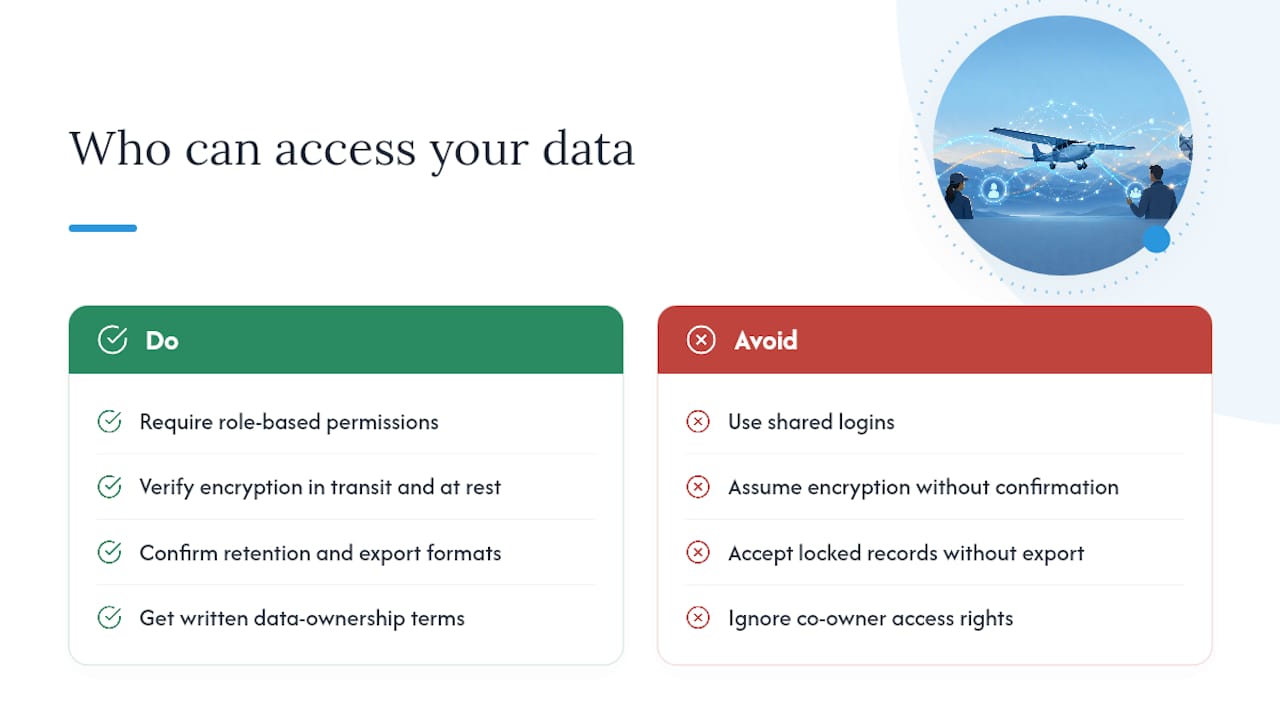
Automatic flight logging means a continuous stream of aircraft usage data is leaving the cockpit and landing somewhere in the cloud. Before you connect a system, know exactly who can see it and what happens to it if you ever switch providers.
Start with access control. Every platform handling your flight data should support role-based permissions, so a dispatcher sees scheduling information while a mechanic sees maintenance-relevant fields, without either party having blanket access to everything. Shared logins defeat this purpose entirely and undermine the tamper-evidence a good system is supposed to provide.
Encryption matters at two points: while data sits in storage, and while it moves from your aircraft’s telemetry source to the cloud. A provider should be able to state plainly whether data is encrypted in transit and at rest, not just imply it.
Retention and portability deserve equal attention. Ask what happens to your flight history if you cancel a subscription. A platform that locks your maintenance records behind a paywall, with no export option, creates a worse compliance risk than the paper logs it replaced. Confirm export formats (CSV, PDF, or direct CMMS transfer) before you commit years of flight data to any single system.
Finally, consider who owns the data itself. Aircraft co-owners in particular should clarify, in writing, whether all owners retain equal access to the shared aircraft’s flight history, since that question rarely comes up until a partnership dissolves and someone needs their records back.
Does Automated Logging Improve Flight Training, Not Just Maintenance?
Automatic flight logging isn’t only a maintenance tool. Once telemetry flows automatically, it becomes a foundation for tracking pilot performance and training progression with a consistency that handwritten instructor notes never achieve.
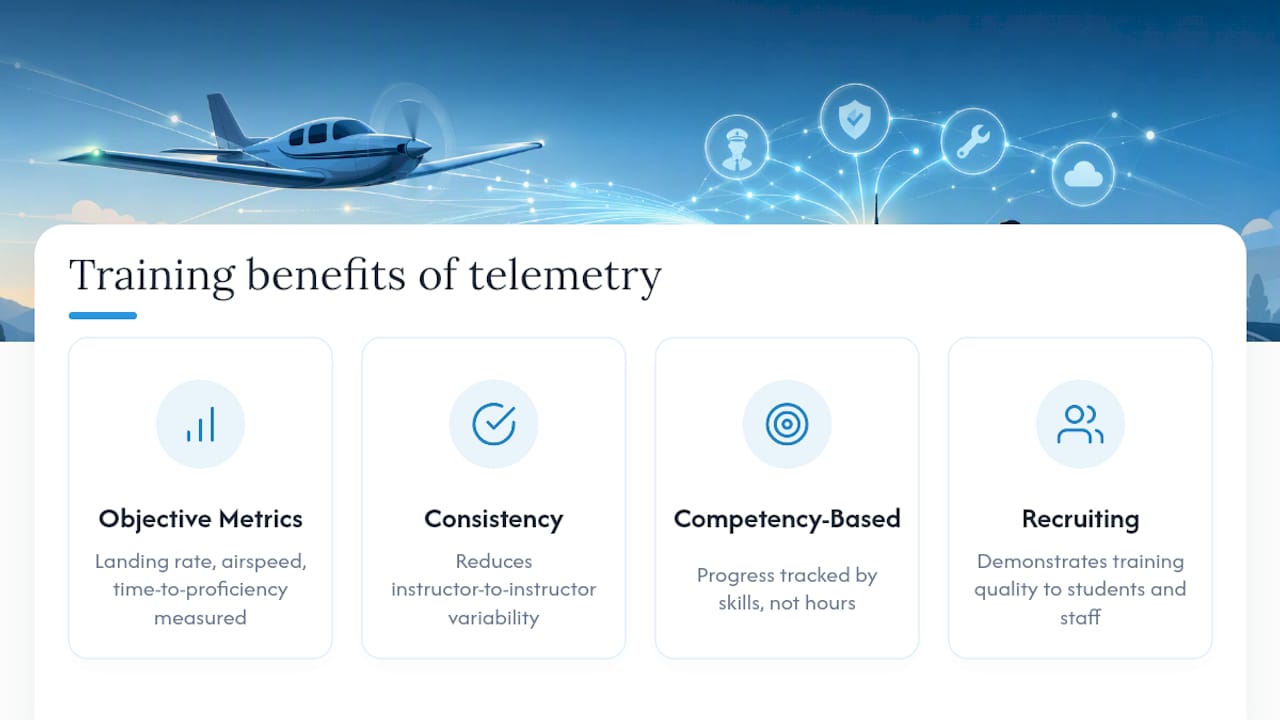
Traditional flight training records rely heavily on instructor judgment: a CFI’s subjective sense of whether a student’s landings are improving, recorded in whatever detail that instructor happens to write down. Objective telemetry changes that equation. Landing rate of descent, airspeed control on approach, and time-to-proficiency on specific maneuvers all become measurable data points instead of impressions.
That shift supports competency-based training approaches, where progression is tracked against specific, measurable skills rather than hours accumulated. Sensors don’t have good days or bad days, and they don’t remember a strong landing more vividly than three mediocre ones.
For flight schools running multiple instructors across a fleet, this consistency solves a real problem: standardizing what “proficient” means when five different CFIs are each teaching the same maneuver. Objective telemetry reduces the instructor-to-instructor variability that makes stage checks inconsistent.
There’s a workforce angle worth noting too. As flight schools compete for instructor talent, and as pilot compensation trends continue shaping who stays in instructing versus who moves to the airlines, objective progression data helps schools demonstrate training quality to prospective students and staff alike, independent of any single instructor’s tenure.
How Do the Leading Automatic Flight Logging Options Compare?
Automatic flight logging solutions generally fall into three categories, and understanding which category a system belongs to matters more than any single feature comparison.
Hardware-first telemetry devices capture flight data at the source, whether through ADS-B receivers, portable panel-mounted units, or QAR/ACARS integration on turbine aircraft. These devices solve the capture problem but usually need a separate software layer to turn raw data into maintenance triggers and scheduling updates.
Standalone digital logbook platforms focus on record-keeping and compliance but vary widely in whether they actually integrate with maintenance planning or simply digitize the paper process. A system that stores flight legs digitally but doesn’t sync with your CMMS still leaves someone manually creating work orders.
Integrated maintenance and fleet platforms combine data capture, maintenance tracking, scheduling, and compliance in one system, which matters most for flight schools and multi-aircraft owners who need those functions talking to each other rather than living in separate tools.
The comparison that actually matters isn’t feature count. It’s whether a given platform closes the loop between capturing flight data and acting on it, generating a work order, flagging an AD, updating a training record, without a human bridging that gap manually. A system with an impressive dashboard but no two-way sync to your maintenance system is still asking someone to do the connecting work by hand.
How Do You Back Up Flight Logs So a Server Outage Doesn’t Cost You Records?
A cloud platform going down for an afternoon is an inconvenience. Losing years of flight and maintenance history because that platform had no backup plan is a genuinely different problem, and it’s one every GA owner should ask about before trusting a system with their records.
Three practices separate a resilient logging setup from a fragile one:
- Redundant cloud storage across multiple data centers, so a single server failure doesn’t threaten the underlying records.
- Regular automated exports to a format you control (CSV or PDF archives), stored independently of the primary platform.
- Version history, so a bad sync or accidental edit can be rolled back rather than overwriting good data permanently.
Ask any provider directly how often data is backed up and whether you, the owner, can trigger an export yourself without waiting on customer support. A platform that can’t answer that clearly hasn’t thought through disaster recovery as carefully as it should have.
The offline capture and sync features already covered under audit-ready system requirements do double duty here. A system built to reconcile data after a lost connection at a remote strip is, by design, also built to handle a longer outage without losing the underlying flight records. Backup and offline resilience aren’t separate features. They’re the same engineering problem solved twice.
What Actually Matters When You Automate Your Flight Logs
Most guidance on automatic flight logging focuses on the sensors and the software, and treats the migration itself as an afterthought. That’s backward. The technology to capture flight data automatically has existed for years. What separates operators who successfully retire paper logs from those who end up running two systems forever is the discipline of the transition, not the sophistication of the tools.
The conventional advice, “pick a platform and switch,” skips the part that actually determines success: the parallel run. Skipping that 30-day reconciliation window is where most rollouts go wrong, because discrepancies that seem trivial in week one compound into real compliance gaps by month three.
If you take one thing from this guide, prioritize the shadow run over the shiny dashboard. A platform with modest analytics but disciplined migration support will outperform a flashy tool with no reconciliation process, every time an auditor asks you to prove your records are accurate going back two years.
— Trent
Get Started With Automatic Flight Logging on SquawkFree
If you’re weighing hardware-only telemetry against a full maintenance platform, the real question is which one actually turns flight data into finished work, not just stored records. Some platforms auto-import flight data from ADS-B sources directly into maintenance and scheduling records, so hobbs time, fuel data, and defect codes land where they need to without manual re-entry.

That matters most for the exact readers this guide is written for: owners managing AD compliance solo, co-owners splitting maintenance responsibility across a shared aircraft, and flight-school managers coordinating multiple instructors and tails at once. Rather than stitching together a telemetry device, a separate logbook app, and a scheduling tool, SquawkFree keeps maintenance tracking, AD searches, and flight data import in one subscription, with per-aircraft add-ons for Flight Intelligence when you’re ready to automate.
Start by reviewing how SquawkFree tracks maintenance and airworthiness directives for your fleet, and see what a 60-day trial looks like for your specific aircraft.
Sources
Recommended
No credit card required · read-only after trial